| Last Modified: 11-27-2007 | 1.6 J | |
| Service Category: Audio/Visual/Telematics | Section: Audio/Video | |
| Model Year: 2008 | Model: LX570 | Doc ID: RM0000012FK02GX |
| Title: AUDIO / VIDEO: AUDIO AND VISUAL SYSTEM: INSPECTION PROCEDURE (2008 LX570) | ||
|
Illumination for Panel Switch does not Come on with Tail Switch ON |
INSPECTION PROCEDURE
PROCEDURE
|
1. |
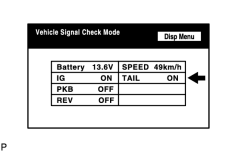
CHECK VEHICLE SIGNAL (DISPLAY CHECK MODE) |
|
(a) Enter the "Display Check" mode and select "Vehicle Signal Check Mode"
|

(b) Check that the display changes between ON and OFF according to the light control switch operation.
OK:
|
Light Control Switch |
Display |
|---|---|
|
Tail or head |
ON |
|
Off |
OFF |
HINT:
This display is updated once per second. As a result, it is normal for the display to lag behind the actual change in the switch.
Result
|
Result |
Proceed to |
|---|---|
|
OK (w/ Navigation System) |
A |
|
OK (w/o Navigation System) |
B |
|
NG |
C |
|


|

|