| Last Modified: 11-27-2007 | 1.6 J | |
| Service Category: Audio/Visual/Telematics | Section: Audio/Video | |
| Model Year: 2008 | Model: LX570 | Doc ID: RM0000014SV03XX |
| Title: AUDIO / VIDEO: AUDIO AND VISUAL SYSTEM: INSPECTION PROCEDURE (2008 LX570) | ||
|
The Other Caller cannot Hear Your Voice, or Your Voice is too Quiet or Distorted |
INSPECTION PROCEDURE
PROCEDURE
|
1. |
CHECK CELLULAR PHONE |
(a) Check if the other side can hear your voice properly.
OK:
Your voice can be heard correctly.
|

|
2. |
CHECK SETTINGS |
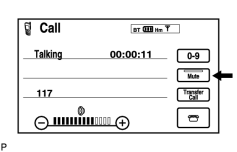
|
(a) Check if the mute switch is on. OK: Mute switch is not on. |
|
|
3. |
CHECK SETTINGS |
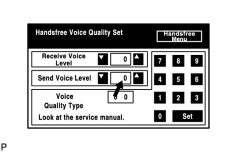
|
(a) Enter the "Handsfree Voice Quality Set" mode
|

(b) Check if the Send Voice Level is set to "0".
HINT:
The Send Voice Level can be set to 11 different levels, -5 to +5, with a 3 dB difference.
(c) Check if the Send Voice Level is set to the minimum or maximum level.
HINT:
When the Send Voice Level is set to the minimum or maximum level, the sound may be distorted.
OK:
The Send Voice Level is set to "0".
|
|
4. |
CHECK MICROPHONE (NAVIGATION CHECK MODE) |
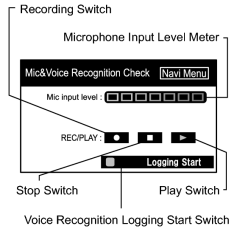
|
(a) Enter the "Mic & Voice Recognition Check" mode
|
(b) When a voice is input into the microphone, check that the microphone input level meter changes according to the input voice.
(c) Push the recording switch and perform voice recording.
HINT:
The recording limit is 5 seconds.
(d) Check that the recording indicator remains on while recording and that the recorded voice is played normally without noise or distortion.
OK:
All check results are normal.
Result
|
Result |
Proceed to |
|---|---|
|
OK (w/ Navigation System) |
A |
|
OK (w/o Navigation System) |
B |
|
NG |
C |
|

|

|