| Last Modified: 11-27-2007 | 1.6 G | |
| Service Category: Brake | Section: Brake System | |
| Model Year: 2008 | Model: LX570 | Doc ID: RM00000171W00JX |
| Title: BRAKE SYSTEM (OTHER): HYDRAULIC BRAKE BOOSTER: ON-VEHICLE INSPECTION (2008 LX570) | ||
ON-VEHICLE INSPECTION
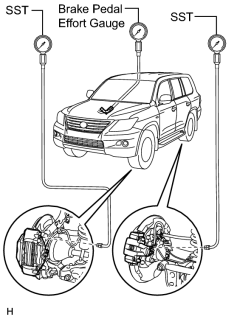
1. INSPECT BRAKE MASTER CYLINDER FLUID PRESSURE CHANGE
|
(a) Inspect the battery voltage. Standard Voltage: 11 to 14 V |
(b) Turn the engine switch off and depress the brake pedal more than 20 times.
HINT:
When pressure in the power supply system is released, the reaction force becomes light and the stroke becomes longer.
(c) Install the LSPV gauge (SST) and brake pedal effort gauge, and bleed air from the LSPV gauge (SST).
SST: 09709-29018
(d) When the booster does not operate:
Depress the brake pedal and check the fluid pressure.
Standard Fluid Pressure with Pedal Depressing Force of 245 N (25 kgf, 55 lbf):
|
Item |
Specified Condition |
|---|---|
|
Front brake pressure |
2350 kPa (24.0 kgf/cm2, 341 psi) or higher |
|
Rear brake pressure |
0 kPa (0 kgf/cm2, 0 psi) |
Standard Fluid Pressure with Pedal Depressing Force of 343 N (35 kgf, 77 lbf):
|
Item |
Specified Condition |
|---|---|
|
Front brake pressure |
3550 kPa (36.2 kgf/cm2, 515 psi) or higher |
|
Rear brake pressure |
0 kPa (0 kgf/cm2, 0 psi) |
(e) When the booster operates:
(1) Turn the engine switch on (IG) and wait until the pump motor has stopped.
(2) Depress the brake pedal and check the fluid pressure.
Standard Fluid Pressure with Pedal Depressing Force of 49 N (5 kgf, 11 lbf):
|
Item |
Specified Condition |
|---|---|
|
Front brake pressure |
1620 to 2820 kPa (16.6 to 28.7 kgf/cm2, 235 to 408 psi) |
|
Rear brake pressure |
1680 to 2880 kPa (17.2 to 29.4 kgf/cm2, 244 to 417 psi) |
Standard Fluid Pressure with Pedal Depressing Force of 98 N (10 kgf, 22 lbf):
|
Item |
Specified Condition |
|---|---|
|
Front brake pressure |
3840 to 5040 kPa (39.2 to 51.3 kgf/cm2, 557 to 730 psi) |
|
Rear brake pressure |
4000 to 5200 kPa (40.8 to 53.0 kgf/cm2, 580 to 754 psi) |
Standard Fluid Pressure with Pedal Depressing Force of 147 N (15 kgf, 33 lbf):
|
Item |
Specified Condition |
|---|---|
|
Front brake pressure |
6200 to 7400 kPa (63.3 to 75.4 kgf/cm2, 899 to 1073 psi) |
|
Rear brake pressure |
6470 to 7670 kPa (66.0 to 78.2 kgf/cm2, 939 to 1112 psi) |
Standard Fluid Pressure with Pedal Depressing Force of 196 N (20 kgf, 44 lbf):
|
Item |
Specified Condition |
|---|---|
|
Front brake pressure |
8500 to 9700 kPa (86.7 to 98.9 kgf/cm2, 1233 to 1406 psi) |
|
Rear brake pressure |
8890 to 10090 kPa (90.7 to 102.8 kgf/cm2, 1289 to 1463 psi) |
2. INSPECT BRAKE MASTER CYLINDER OPERATION
(a) Inspect the battery voltage.
Standard Voltage:
11 to 14 V
(b) Turn the engine switch off and depress the brake pedal more than 20 times.
HINT:
When pressure in the power supply system is released, the reaction force decreases and the stroke becomes longer.
(c) Check that the brake pedal reaction force decreases.
If the pedal reaction force does not decrease, check and replace the brake line and brake master cylinder.
(d) Turn the engine switch on (IG) and check the pump motor operation noise.
If the pump motor does not operate, check and replace the wire harness and brake booster assembly
 .
.
(e) Connect the Techstream to the DLC3.
(f) Turn the engine switch on (IG).
(g) Turn the Techstream on.
(h) Enter the following menus: Chassis / ABS/VSC/TRAC / Active Test.
(i) Jack up and support the vehicle.
(j) Release the parking brake lever.
(k) Move the shift lever to N and check that the rear wheels can be rotated by hand.
(l) Inspect the front VSC solenoid (SMCF) operation.
(1) Select the "VSC/TRAC Solenoid (SRCF)" on the Techstream.
(2) Turn the "VSC/TRAC Solenoid (SRCF)" on with the Techstream, depress the brake pedal with stable force and check that the pedal cannot be depressed.
If the pedal can be depressed, replace the brake master cylinder.
NOTICE:
When operating the solenoid continuously, set the interval to more than 20 seconds.
HINT:
To protect the solenoids, the Techstream turns off automatically 2 seconds after every solenoid has been turned on.
(3) Release the brake pedal.
(4) When the solenoid is off, depress the brake pedal again and check that the brake pedal can be depressed.
If the pedal cannot be depressed, replace the brake master cylinder.
(m) Inspect the front VSC solenoid (SREA) operation.
(1) Select the "VSC/TRAC Solenoid (SRCF) and VSC/TRAC Solenoid (SRCR)" on the Techstream.
(2) Turn the "VSC/TRAC Solenoid (SRCF) and VSC/TRAC Solenoid (SRCR)" on simultaneously with the Techstream, then depress the brake pedal with stable force.
(3) When the solenoids are on, check that the front wheels cannot be rotated by hand.
If the front wheels can be rotated, replace the brake master cylinder.
NOTICE:
When operating the solenoid continuously, set the interval to more than 20 seconds.
HINT:
- To protect the solenoids, the Techstream turns off automatically 2 seconds after every solenoid has been turned on.
- When rotating the wheels quickly, the fail-safe function is activated and judgment cannot be made properly. Rotate the wheels as slowly as possible.
(4) When the solenoids are off, turn the "VSC/TRAC Solenoid (SRCF)" on again, and then depress the brake pedal. Then check the front wheels by rotating them by hand.
If the front wheels cannot be rotated, replace the brake master cylinder.
(5) When the "VSC/TRAC Solenoid (SRCF)" is off, depress the brake pedal again and check that the brake pedal can be depressed.
If the pedal cannot be depressed, replace the brake master cylinder.
(n) Inspect the front ABS solenoid (SFRH) operation.
(1) Select the "ABS Solenoid (SFRH)" on the Techstream.
(2) Turn the "ABS Solenoid (SFRH)" on with the Techstream, then depress the brake pedal with stable force.
(3) When the solenoid is on, check the right front wheel by rotating it by hand.
If the right front wheel cannot be rotated, replace the brake master cylinder.
NOTICE:
When operating the solenoid continuously, set the interval to more than 20 seconds.
HINT:
- To protect the solenoids, the Techstream turns off automatically 2 seconds after every solenoid has been turned on.
- When rotating the wheel quickly, the fail-safe function is activated and judgment cannot be made properly. Rotate the wheel as slowly as possible.
(4) When the solenoid is off, depress the brake pedal again and check that the right front wheel cannot be rotated by hand.
If the right front wheel can be rotated, replace the brake master cylinder.
HINT:
When rotating the wheel quickly, the fail-safe function is activated and judgment cannot be made properly. Rotate the wheel as slowly as possible.
(o) Inspect the front ABS solenoid (SFLH) operation.
(1) Select the "ABS Solenoid (SFLH)" on the Techstream.
(2) Turn the "ABS Solenoid (SFLH)" on with the Techstream, then depress the brake pedal with stable force.
(3) When the solenoid is on, check the left front wheel by rotating it by hand.
If the left front wheel cannot be rotated, replace the brake master cylinder.
NOTICE:
When operating the solenoid continuously, set the interval to more than 20 seconds.
HINT:
- To protect the solenoids, the Techstream turns off automatically 2 seconds after every solenoid has been turned on.
- When rotating the wheel quickly, the fail-safe function is activated and judgment cannot be made properly. Rotate the wheel as slowly as possible.
(4) When the solenoid is off, depress the brake pedal again and check that the left front wheel cannot be rotated by hand.
If the left front wheel can be rotated, replace the brake master cylinder.
(p) Inspect the front ABS solenoid (SFRR) operation.
(1) Select the "ABS Solenoid (SFRR) and ABS Solenoid (SFRH)" on the Techstream.
(2) Depress the brake pedal with stable force, then turn the "ABS Solenoid (SFRR) and ABS Solenoid (SFRH)" on simultaneously with the Techstream.
(3) When the solenoids are on, check the right front wheel by rotating it by hand.
If the right front wheel cannot be rotated, replace the brake master cylinder.
NOTICE:
When operating the solenoid continuously, set the interval to more than 20 seconds.
HINT:
- To protect the solenoids, the Techstream turns off automatically 2 seconds after every solenoid has been turned on.
- When rotating the wheel quickly, the fail-safe function is activated and judgment cannot be made properly. Rotate the wheel as slowly as possible.
(4) When the solenoids are off, depress the brake pedal again and check that the right front wheel cannot be rotated by hand.
If the right front wheel can be rotated, replace the brake master cylinder.
(q) Inspect the front ABS solenoid (SFLR) operation.
(1) Select the "ABS Solenoid (SFLR) and ABS Solenoid (SFLH)" on the Techstream.
(2) Depress the brake pedal with stable force, then turn the "ABS Solenoid (SFLR) and ABS Solenoid (SFLH)" on simultaneously with the Techstream.
(3) When the solenoids are on, check the left front wheel by rotating it by hand.
If the left front wheel cannot be rotated, replace the brake master cylinder.
NOTICE:
When operating the solenoid continuously, set the interval to more than 20 seconds.
HINT:
- To protect the solenoids, the Techstream turns off automatically 2 seconds after every solenoid has been turned on.
- When rotating the wheel quickly, the fail-safe function is activated and judgment cannot be made properly. Rotate the wheel as slowly as possible.
(4) When the solenoids are off, depress the brake pedal again and check that the left front wheel cannot be rotated by hand.
If the left front wheel can be rotated, replace the brake master cylinder.
(r) Inspect the rear VSC solenoid (SREC) operation.
(1) Select the "VSC/TRAC Solenoid (SRMF)" on the Techstream.
(2) Depress the brake pedal with stable force, then turn the "VSC/TRAC Solenoid (SRMF)" on with the Techstream.
(3) Release the brake pedal when the solenoid is on, and check that the rear wheels cannot be rotated by hand.
If the rear wheels can be rotated, replace the brake master cylinder.
NOTICE:
When operating the solenoid continuously, set the interval to more than 20 seconds.
HINT:
- To protect the solenoids, the Techstream turns off automatically 2 seconds after every solenoid has been turned on.
- When rotating the wheels quickly, the fail-safe function is activated and judgment cannot be made properly. Rotate the wheels as slowly as possible.
(4) When the solenoid is off, check the rear wheels by rotating them by hand.
If the rear wheels cannot be rotated, replace the brake master cylinder.
(s) Inspect the rear VSC solenoid (STR) operation.
(1) Select the "VSC/TRAC Solenoid (SRMF) and VSC/TRAC Solenoid (SRMR)" on the Techstream.
(2) Turn the "VSC/TRAC Solenoid (SRMF) and VSC/TRAC Solenoid (SRMR)" on simultaneously with the Techstream.
(3) When the solenoids are on, check that the rear wheels cannot be rotated by hand.
If the rear wheels can be rotated, replace the brake master cylinder.
NOTICE:
When operating the solenoid continuously, set the interval to more than 20 seconds.
HINT:
- To protect the solenoids, the Techstream turns off automatically 2 seconds after every solenoid has been turned on.
- When rotating the wheels quickly, the fail-safe function is activated and judgment cannot be made properly. Rotate the wheels as slowly as possible.
(4) When the solenoids are off, turn the "VSC/TRAC Solenoid (SRMF)" on again, and check the rear wheels by rotating them by hand.
If the rear wheels cannot be rotated, replace the brake master cylinder.
(5) When the "VSC/TRAC Solenoid (SRMF)" is off, depress the brake pedal again and check that the rear wheels cannot be rotated by hand.
If the rear wheels can be rotated, replace the brake master cylinder.
(t) Inspect the rear ABS solenoid (SRRH) operation.
(1) Select the "ABS Solenoid (SRRH)" on the Techstream.
(2) Turn the "ABS Solenoid (SRRH)" on with the Techstream, then depress the brake pedal with stable force.
(3) When the solenoid is on, check the right rear wheel by rotating it by hand.
If the right rear wheel cannot be rotated, replace the brake master cylinder.
NOTICE:
When operating the solenoid continuously, set the interval to more than 20 seconds.
HINT:
- To protect the solenoids, the Techstream turns off automatically 2 seconds after every solenoid has been turned on.
- When rotating the wheel quickly, the fail-safe function is activated and judgment cannot be made properly. Rotate the wheel as slowly as possible.
(4) When the solenoid is off, depress the brake pedal again and check that the right rear wheel cannot be rotated by hand.
If the right rear wheel can be rotated, replace the brake master cylinder.
HINT:
When rotating the wheel quickly, the fail-safe function is activated and judgment cannot be made properly. Rotate the wheel as slowly as possible.
(u) Inspect the rear ABS solenoid (SRLH) operation.
(1) Select the "ABS Solenoid (SRLH)" on the Techstream.
(2) Turn the "ABS Solenoid (SRLH)" on with the Techstream, then depress the brake pedal with stable force.
(3) When the solenoid is on, check the left rear wheel by rotating it by hand.
If the left rear wheel cannot be rotated, replace the brake master cylinder.
NOTICE:
When operating the solenoid continuously, set the interval to more than 20 seconds.
HINT:
- To protect the solenoids, the Techstream turns off automatically 2 seconds after every solenoid has been turned on.
- When rotating the wheel quickly, the fail-safe function is activated and judgment cannot be made properly. Rotate the wheel as slowly as possible.
(4) When the solenoid is off, depress the brake pedal again and check that the left rear wheel cannot be rotated by hand.
If the left rear wheel can be rotated, replace the brake master cylinder.
(v) Inspect the rear ABS solenoid (SRRR) operation.
(1) Select the "ABS Solenoid (SRRR) and ABS Solenoid (SRRH)" on the Techstream.
(2) Depress the brake pedal with stable force, then turn the "ABS Solenoid (SRRR) and ABS Solenoid (SRRH)" on simultaneously with the Techstream.
(3) When the solenoids are on, check the right rear wheel by rotating it by hand.
If the right rear wheel cannot be rotated, replace the brake master cylinder.
NOTICE:
When operating the solenoid continuously, set the interval to more than 20 seconds.
HINT:
- To protect the solenoids, the Techstream turns off automatically 2 seconds after every solenoid has been turned on.
- When rotating the wheel quickly, the fail-safe function is activated and judgment cannot be made properly. Rotate the wheel as slowly as possible.
(4) When the solenoids are off, depress the brake pedal again and check that the right rear wheel cannot be rotated by hand.
If the right rear wheel can be rotated, replace the brake master cylinder.
(w) Inspect the rear ABS solenoid (SRLR) operation.
(1) Select the "ABS Solenoid (SRLR) and ABS Solenoid (SRLH)" on the Techstream.
(2) Depress the brake pedal with stable force, then turn the "ABS Solenoid (SRLR) and ABS Solenoid (SRLH)" on simultaneously with the Techstream.
(3) When the solenoids are on, check the left rear wheel by rotating it by hand.
If the left rear wheel cannot be rotated, replace the brake master cylinder.
NOTICE:
When operating the solenoid continuously, set the interval to more than 20 seconds.
HINT:
- To protect the solenoids, the Techstream turns off automatically 2 seconds after every solenoid has been turned on.
- When rotating the wheel quickly, the fail-safe function is activated and judgment cannot be made properly. Rotate the wheel as slowly as possible.
(4) When the solenoids are off, depress the brake pedal again and check that the left rear wheel cannot be rotated by hand.
If the left rear wheel can be rotated, replace the brake master cylinder.
(x) Lower the vehicle.
(y) Disconnect the Techstream.
3. CHECK FLUID LEVEL IN RESERVOIR

|

|