| Last Modified: 11-27-2007 | 1.6 A | |
| Service Category: Brake | Section: Brake Control/Dynamic Control System | |
| Model Year: 2008 | Model: LX570 | Doc ID: RM000001B2E00CX |
| Title: BRAKE CONTROL / DYNAMIC CONTROL SYSTEMS: REAR SPEED SENSOR: INSTALLATION (2008 LX570) | ||
INSTALLATION
1. INSTALL REAR SPEED SENSOR LH
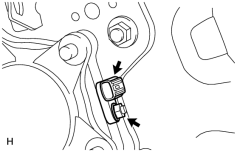
|
(a) Install the speed sensor with the nut. Torque: 8.3 N·m (85 kgf·cm, 73 in·lbf) NOTICE:
|
2. INSTALL REAR SPEED SENSOR RH
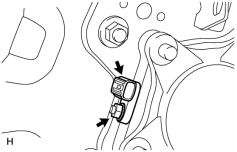
|
(a) Install the speed sensor with the nut. Torque: 8.3 N·m (85 kgf·cm, 73 in·lbf) NOTICE:
|
3. INSTALL SKID CONTROL SENSOR WIRE
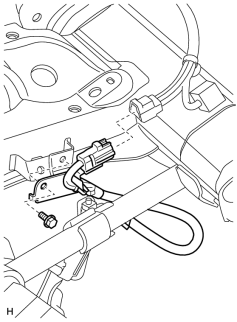
|
(a) Install the sensor clamp with the bolt. Torque: 13 N·m (127 kgf·cm, 9 ft·lbf) NOTICE:
Make sure the clamp rotation stopper touches the installation position. |
(b) Connect the connector.
NOTICE:
- Securely insert the connector.
- When connecting the connector, do not twist the wire harness.
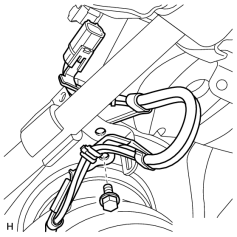
|
(c) Install the sensor clamp with the bolt. Torque: 13 N·m (127 kgf·cm, 9 ft·lbf) NOTICE:
Make sure the clamp rotation stopper touches the installation position. |
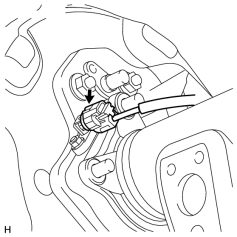
|
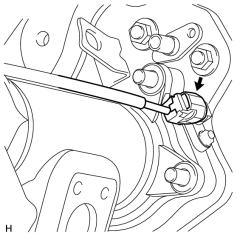
(d) Connect the speed sensor RH connector. NOTICE:
|
(e) Attach the 3 clamps.
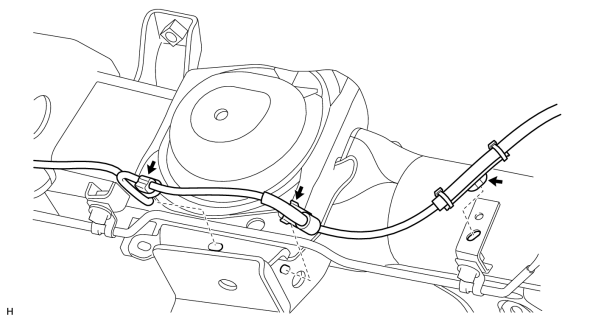
NOTICE:
- When attaching the clamps, do not twist the wire harness.
- When attaching the clamps, securely insert them as shown in the illustration.
(f) Attach the 5 clamps.
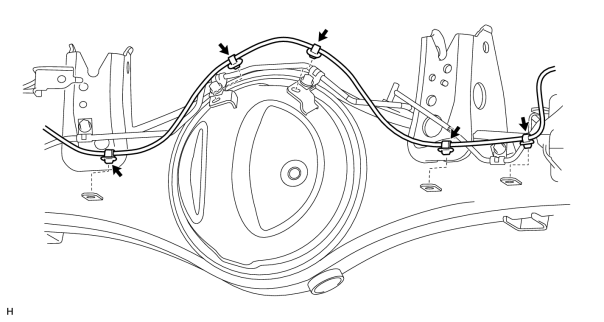
NOTICE:
- When attaching the clamps, do not twist the wire harness.
- When attaching the clamps, securely insert them as shown in the illustration.
(g) Attach the 2 clamps and install the sensor clamp with the bolt.
Torque: 13 N·m (127 kgf·cm, 9 ft·lbf)
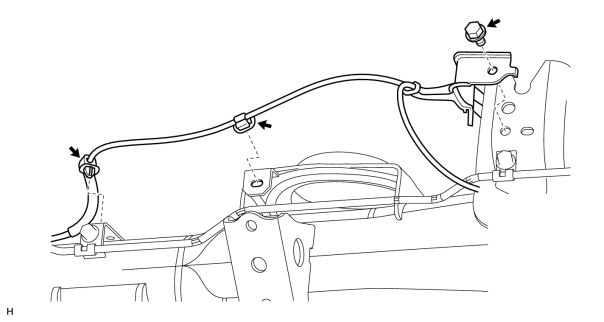
|
(h) Connect the speed sensor LH connector. NOTICE:
|
4. INSTALL REAR WHEEL
Torque: 131 N·m (1336 kgf·cm, 97 ft·lbf)
5. CONNECT CABLE TO NEGATIVE BATTERY TERMINAL
NOTICE:
When disconnecting the cable, some systems need to be initialized after the cable is reconnected
 .
.
6. CHECK SPEED SENSOR SIGNAL
(a) Check the speed sensor signal
.

|

|