| Last Modified: 11-27-2007 | 1.6 J | |
| Service Category: Brake | Section: Brake Control/Dynamic Control System | |
| Model Year: 2008 | Model: LX570 | Doc ID: RM000001FQP01DX |
| Title: BRAKE CONTROL / DYNAMIC CONTROL SYSTEMS: VEHICLE STABILITY CONTROL SYSTEM: DESCRIPTION (2008 LX570) | ||
|
VSC OFF Indicator Light does not Come ON |
DESCRIPTION
When the center differential is locked or the VSC OFF switch is operated, VSC control turns off and the VSC OFF indicator illuminates.
WIRING DIAGRAM
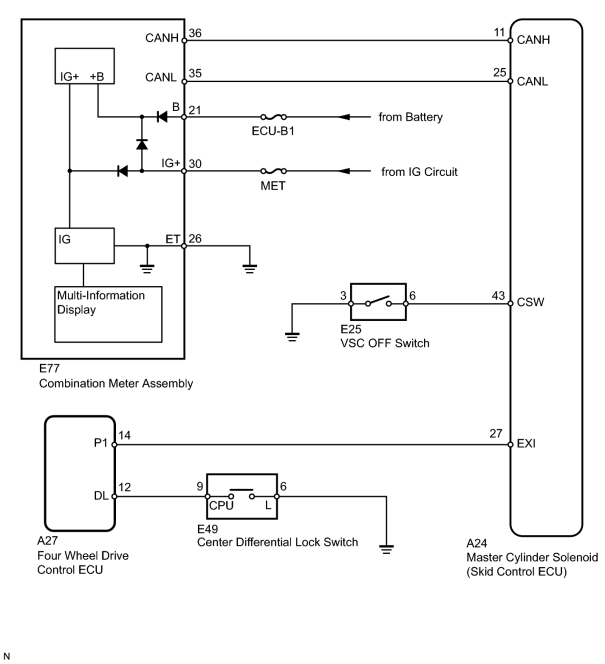
INSPECTION PROCEDURE
NOTICE:
When replacing the master cylinder solenoid, perform zero point calibration
 .
.
PROCEDURE
|
1. |
CHECK CAN COMMUNICATION LINE |
(a) Turn the engine switch off.
(b) Connect the Techstream to the DLC3.
(c) Turn the engine switch on (IG) and the Techstream on.
(d) Select "CAN Bus Check" from the System Selection Menu screen, and follow the prompts on the screen to inspect the CAN Bus.
OK:
"CAN Bus Check" indicates no malfunctions in CAN communication.
|

|
2. |
CHECK DTC (for CAN Communication System) |
(a) Turn the engine switch off.
(b) Connect the Techstream to the DLC3.
(c) Turn the engine switch on (IG) and the Techstream on.
(d) Check for DTCs
.
Result
|
Result |
Proceed to |
|---|---|
|
CAN system DTC is not output. |
A |
|
CAN system DTC is output. |
B |
|
|
3. |
CHECK OPERATION OF VSC OFF INDICATOR (ACTIVE TEST) |
(a) Turn the engine switch off.
(b) Connect the Techstream to the DLC3.
(c) Turn the engine switch on (IG) and the Techstream on.
(d) Enter the following menus: Body Electrical / Combination Meter / Active Test.
(e) Check the condition of the VSC OFF indicator by operating the Techstream.
Combination Meter
|
Tester Display |
Test Part |
Control Range |
Diagnostic Note |
|---|---|---|---|
|
Indicat. Lamp VSC OFF |
VSC OFF Indicator |
Indicator ON/OFF |
- |
OK:
The indicator turns on when operating the Techstream.
|

|

|