| Last Modified: 11-27-2007 | 1.6 A | |
| Service Category: Audio/Visual/Telematics | Section: Audio/Video | |
| Model Year: 2008 | Model: LX570 | Doc ID: RM000002BC6009X |
| Title: AUDIO / VIDEO: TELEVISION DISPLAY: INSTALLATION (2008 LX570) | ||
INSTALLATION
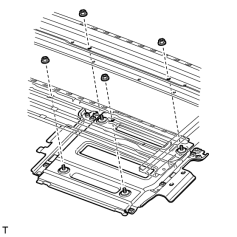
1. INSTALL TELEVISION DISPLAY BRACKET
|
(a) Install the bracket with the 4 nuts. |
2. INSTALL SLIDING ROOF HOUSING SUB-ASSEMBLY
(a) Install the sliding roof housing
 .
.
3. INSTALL TELEVISION DISPLAY ASSEMBLY
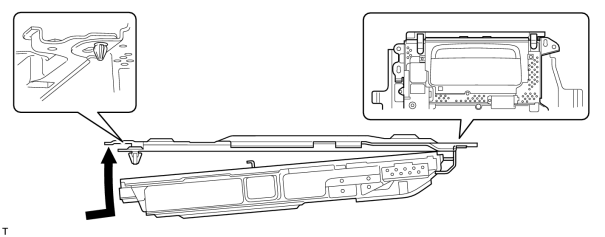
(a) Attach the display to the claws on the front side of the bracket by moving it in the direction of the arrow in the illustration, and then attach the clips to temporarily install the display.
|
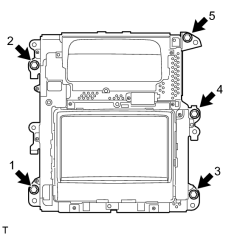
(b) Install the television display with the 5 bolts. HINT:
Install the bolts in the order shown in the illustration. |
(c) Connect the connectors.
4. INSTALL ROOF CONSOLE BOX ASSEMBLY
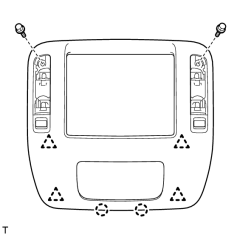
(a) Connect the connector.
|
(b) Attach the 4 clips and 2 claws to install the roof console box. |
(c) Install the 2 bolts.
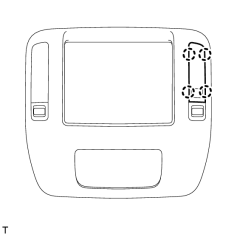
5. INSTALL NO. 2 ROOF LINING TRIM COVER
|
(a) Attach the 4 claws to install the cover. |
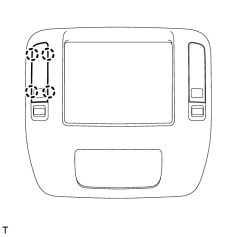
6. INSTALL NO. 1 ROOF LINING TRIM COVER
|
(a) Attach the 4 claws to install the cover. |
7. CONNECT CABLE TO NEGATIVE BATTERY TERMINAL
NOTICE:
When disconnecting the cable, some systems need to be initialized after the cable is reconnected
.
8. INSTALL ENGINE ROOM SIDE COVER LH

|

|