| Last Modified: 11-27-2007 | 1.6 J | |
| Service Category: Audio/Visual/Telematics | Section: Audio/Video | |
| Model Year: 2008 | Model: LX570 | Doc ID: RM000002LS7004X |
| Title: AUDIO / VIDEO: REAR SEAT ENTERTAINMENT SYSTEM: INSPECTION PROCEDURE (2008 LX570) | ||
|
A Remote Control System does not Operate |
INSPECTION PROCEDURE
HINT:
If the vehicle has a navigation system, "multi-display" refers to the "display and navigation module display".
PROCEDURE
|
1. |
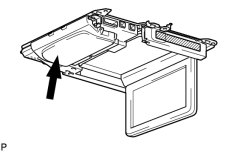
CLEAN INFRARED RAY RECEIVING PORTION |
|
(a) Clean the infrared ray receiving portion on the television display. |
(b) Check whether the same malfunction occurs.
OK:
The function returns to normal.
|

|
2. |
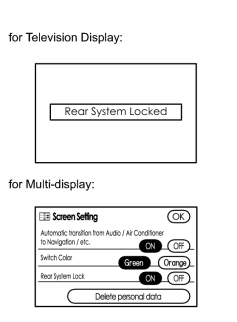
CHECK SYSTEM |
|
(a) Check that the remote control operation of the rear system is not locked by the radio receiver or the multi-display. (1) Check if "Rear System Locked" appears on the television display. OK: The message does not appear. HINT:
If the rear system is locked and the remote controller is used in the rear seat area, an operation not possible message (for example, "Rear System Locked") is displayed. If the message is displayed, enter the multi-display screen setting, and change "Rear System Lock" to OFF. |
|
|
3. |
CHECK REMOTE CONTROLLER (for BATTERY) |
(a) Check that the dry-cell battery of the remote controller is not depleted.
OK:
Battery is not depleted.
|
|
4. |
CHECK TELEVISION DISPLAY ASSEMBLY |
(a) Check if the television display is open.
OK:
Open.
HINT:
When the television display is closed, some switches on the remote controller cannot be used.
|
|
5. |
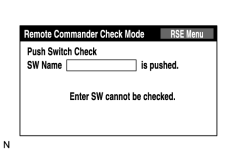
CHECK REMOTE COMMANDER (DISPLAY CHECK MODE) |
|
(a) Enter the "Display Check" mode (Remote Commander Check Mode)
|

(b) Operate the abnormal switch and check if the switch name and status are correctly displayed.
OK:
The switch name and status are correctly displayed as operated.
|

|

|