| Last Modified: 11-27-2007 | 1.6 A | |
| Service Category: Audio/Visual/Telematics | Section: Audio/Video | |
| Model Year: 2008 | Model: LX570 | Doc ID: RM000002MK800DX |
| Title: AUDIO / VIDEO: REAR DOOR SPEAKER: INSTALLATION (2008 LX570) | ||
INSTALLATION
HINT:
- Use the same procedures for the LH side and RH side.
- The procedures listed below are for the LH side.
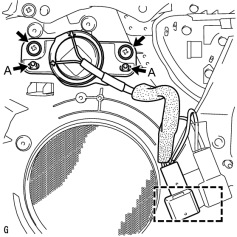
1. INSTALL REAR NO. 3 SPEAKER ASSEMBLY (for 19 Speakers)
|
(a) Align the speaker to the door position pins labeled A. |
(b) Install the speaker with the 2 screws.
NOTICE:
Do not touch the cone part of the speaker.
(c) Attach the clamp and connect the connector.
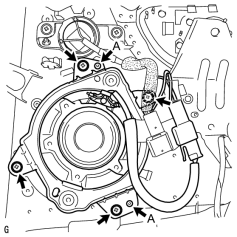
2. INSTALL REAR NO. 2 SPEAKER ASSEMBLY (for 19 Speakers)
|
(a) Align the speaker to the door position pins labeled A. |
(b) Install the speaker with the 4 screws.
NOTICE:
Do not touch the cone part of the speaker.
(c) Connect the connector.
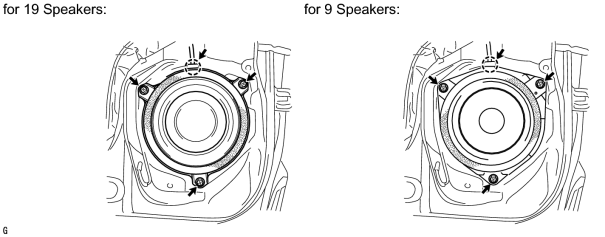
3. INSTALL REAR SPEAKER SET
(a) Temporarily install the speaker by attaching the claw of the speaker to the door panel.
(b) Install the speaker with the 3 screws.
NOTICE:
Do not touch the cone part of the speaker.
(c) Connect the connector.
4. INSTALL REAR DOOR TRIM BOARD SUB-ASSEMBLY

5. INSTALL REAR UPPER DOOR ARMREST BASE PANEL LH
6. INSTALL REAR DOOR INSIDE HANDLE BEZEL PLUG LH
7. CONNECT CABLE TO NEGATIVE BATTERY TERMINAL
NOTICE:
When disconnecting the cable, some systems need to be initialized after the cable is reconnected
.
8. INSTALL ENGINE ROOM SIDE COVER LH

|

|