| Last Modified: 11-27-2007 | 1.6 L | |
| Service Category: Audio/Visual/Telematics | Section: Audio/Video | |
| Model Year: 2008 | Model: LX570 | Doc ID: RM000002QKJ005X |
| Title: AUDIO / VIDEO: HARD DISK DRIVE: PRECAUTION (2008 LX570) | ||
PRECAUTION
1. PRECAUTION FOR DISPLAY AND NAVIGATION ASSEMBLY
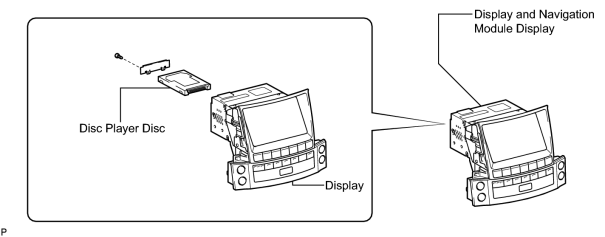
(a) The disc player disc has a built-in hard disk drive (HDD) for storing maps and other data used by the navigation system. When handling the disc player disc, follow the precautions below.
|
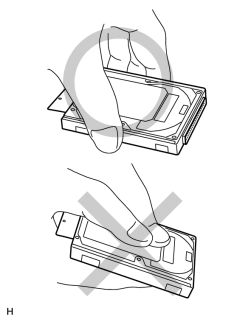
(1) Do not touch cover of the HDD NOTICE:
When removing or installing the disc player disc, hold it as shown in the illustration. |
(2) Avoid vibrations and impacts
NOTICE:
- Do not drop or strike the disc player disc. Do not use a disc player disc that has been dropped or struck.
- Prepare a new disc player disc before removing the disc player disc.
(3) Avoid condensation
NOTICE:
- Introducing the disc player disc to sudden temperature changes may cause condensation to form inside it, and may lead to malfunctions in the HDD.
- The removed display and navigation module display must be stored in an environment where the temperature, humidity, etc. is the same as the vehicle interior, and the disc player disc must not be removed.
- If transporting the disc player disc from its storage area to a location where the temperature, humidity, etc. is different, allow it some time to adapt to the surrounding environment.
(4) Avoid static electricity
NOTICE:
- Touching the connector terminals may transmit static electricity to the inner circuits and may lead to malfunctions in the HDD.
- When installing or removing the disc player disc, observe all precautions to prevent damage to the system by electrostatic discharge (ESD).
(5) Keep away from magnetic items
NOTICE:
Keep speakers, motors, magnetized tools, etc. away from the disc player disc.
(b) When replacing the disc player disc, follow the precaution below.
(1) After removing and installing the disc player disc, use the HDD information screen to perform the SMART inspection and confirm that there are no malfunctions in the HDD
 .
.
2. PRECAUTIONS DURING REPLACEMENT
NOTICE:
When replacing electronic parts, if there is a possibility that your body may contact a circuit board, etc., use the recommended tools and observe all precautions to prevent damage to the system by electrostatic discharge (ESD).
(a) Procedures where static electricity countermeasures are necessary
(1) Disc player disc replacement.
(2) Internal wiring connection/disconnection, inspection, and replacement.
(b) Precautions during procedures
(1) Before performing any procedures, touch an unpainted metal part or ground bolt of the vehicle to eliminate any static electricity.
(2) To prevent damage to electrical equipment, disconnect the battery's power supply before installing and removing electrical equipment.
(3) Never touch the electronic parts of a circuit board, or the pins of an integrated circuit.
(4) When performing procedures, do not allow clothing to come near or contact parts.

|

|