| Last Modified: 11-27-2007 | 1.6 J | |
| Service Category: Audio/Visual/Telematics | Section: Audio/Video | |
| Model Year: 2008 | Model: LX570 | Doc ID: RM000002TSY004X |
| Title: AUDIO / VIDEO: REAR SEAT ENTERTAINMENT SYSTEM: INSPECTION PROCEDURE (2008 LX570) | ||
|
Television Display Screen is White |
INSPECTION PROCEDURE
PROCEDURE
|
1. |
CHECK MODE IN WHICH WHITE SCREEN OCCURRED |
(a) Check the mode in which the white screen occurred.
Result
|
Result |
Proceed to |
|---|---|
|
Occurs in all modes |
A |
|
Only during DVD and DVD-P (rear seat only) image |
B |
|

|
2. |
CHECK DISPLAY (RSE IMAGE QUALITY ADJUSTMENT SCREEN) |
|
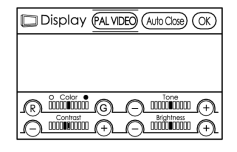
(a) Press the remote controller DISPLAY switch, and adjust the settings for contrast, tint and color. OK: Returned to normal through image quality adjustment. |
|
|
3. |
CHECK DISC |
|
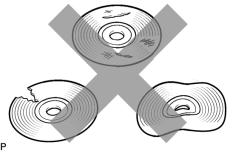
(a) Check that the disc is not deformed or cracked. OK: No deformation or cracks on the disc. |
|
|
4. |
DISC CLEANING |
|
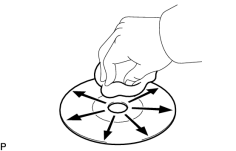
(a) Disc cleaning (1) If dirt is on the disc surface, wipe it clean with a soft cloth from the inside to the outside in a radial direction. NOTICE:
Do not use a conventional record cleaner or antistatic preservative. |
|
|
5. |
CHECK DISPLAY SIGNAL CIRCUIT |
(a) Inspect the display signal circuits below.
(1) Inspect the display signal circuit between the radio receiver and television display
 .
.
(2) Inspect the display signal circuit between the video terminal and television display
.
(b) If the display signal circuit is operating normally, proceed to the next step.
|

|

|