| Last Modified: 11-27-2007 | 1.6 J | |
| Service Category: Audio/Visual/Telematics | Section: Audio/Video | |
| Model Year: 2008 | Model: LX570 | Doc ID: RM000002TXZ008X |
| Title: AUDIO / VIDEO: REAR SEAT ENTERTAINMENT SYSTEM: DESCRIPTION (2008 LX570) | ||
|
Display Signal Circuit between Video Terminal and Television Display |
DESCRIPTION
This is the display signal circuit from the video terminal to the television display.
WIRING DIAGRAM
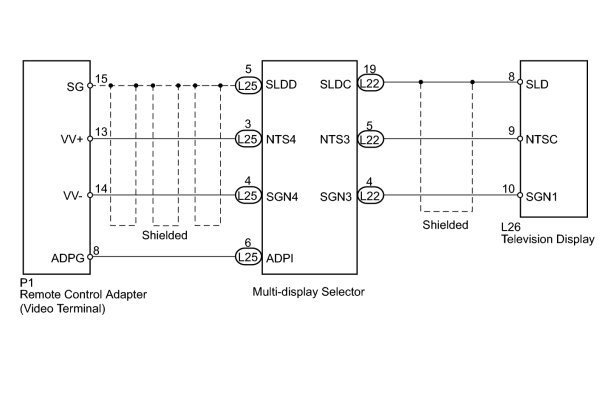
INSPECTION PROCEDURE
PROCEDURE
|
1. |
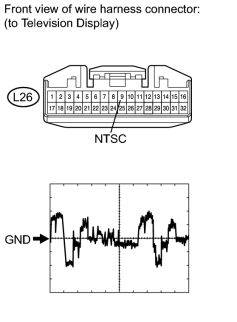
CHECK TELEVISION DISPLAY ASSEMBLY |
|
(a) Disconnect the L26 display connector. |
(b) Using an oscilloscope, check the signal waveform between each terminal and the body ground according to the conditions shown in the chart below.
Measurement Condition
|
Item |
Content |
|---|---|
|
Terminal No. (Symbol) |
L26-9 (NTSC) - Body ground |
|
Tool Setting |
200 mV/DIV., 10 μsec./DIV. |
|
Condition |
DVD displayed on television display |
OK:
Waveform is as shown in the illustration.
|

|
2. |
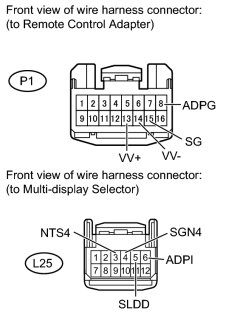
CHECK HARNESS AND CONNECTOR (REMOTE CONTROL ADAPTER - MULTI-DISPLAY SELECTOR) |
|
(a) Disconnect the P1 adapter connector. |
(b) Disconnect the L25 selector connector.
(c) Measure the resistance according to the value(s) in the table below.
Standard Resistance:
|
Tester Connection |
Condition |
Specified Condition |
|---|---|---|
|
P1-13 (VV+) - L25-3 (NTS4) |
Always |
Below 1 Ω |
|
P1-14 (VV-) - L25-4 (SGN4) |
||
|
P1-8 (ADPG) - L25-6 (ADPI) |
||
|
P1-15 (SG) - L25-5 (SLDD) |
||
|
L25-3 (NTS4) - Body ground |
Always |
10 kΩ or higher |
|
L25-4 (SGN4) - Body ground |
||
|
L25-6 (ADPI) - Body ground |
||
|
L25-5 (SLDD) - Body ground |
|
|
3. |
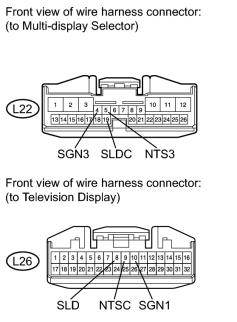
CHECK HARNESS AND CONNECTOR (MULTI-DISPLAY SELECTOR - TELEVISION DISPLAY ASSEMBLY) |
|
(a) Disconnect the L22 selector connector. |
(b) Disconnect the L26 display connector.
(c) Measure the resistance according to the value(s) in the table below.
Standard Resistance:
|
Tester Connection |
Condition |
Specified Condition |
|---|---|---|
|
L22-5 (NTS3) - L26-9 (NTSC) |
Always |
Below 1 Ω |
|
L22-4 (SGN3) - L26-10 (SGN1) |
||
|
L22-19 (SLDC) - L26-8 (SLD) |
||
|
L22-5 (NTS3) - Body ground |
Always |
10 kΩ or higher |
|
L22-4 (SGN3) - Body ground |
|
|
4. |
REPLACE REMOTE CONTROL ADAPTER WITH NORMAL ONE AND CHECK |
(a) Replace the remote control adapter
 with a normal one and check if the same problem occurs again.
OK:
Same problem does not occur.
|

|

|