| Last Modified: 11-27-2007 | 1.6 J | |
| Service Category: Audio/Visual/Telematics | Section: Audio/Video | |
| Model Year: 2008 | Model: LX570 | Doc ID: RM000002TT2004X |
| Title: AUDIO / VIDEO: REAR SEAT ENTERTAINMENT SYSTEM: INSPECTION PROCEDURE (2008 LX570) | ||
|
Navigation Display Appears on Multi-display, But does not Appear or is not Stabilized on Television Display |
INSPECTION PROCEDURE
HINT:
- When the navigation image is displayed on the television display, if the image of the multi-display changes to the camera image or intuitive parking assist image, the television display will change to the image displayed before changing to the navigation image.
- If the vehicle has a navigation system, "multi-display" refers to the "display and navigation module display".
PROCEDURE
|
1. |
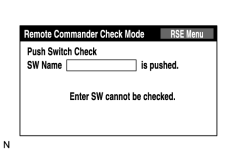
CHECK REMOTE COMMANDER (DISPLAY CHECK MODE) |
|
(a) Enter the "Display Check" mode (Remote Commander Check Mode)
|

(b) Operate the abnormal switch and check if the switch name and status are correctly displayed.
OK:
The switch name and status are correctly displayed as operated.
|

|
2. |
CHECK REMOTE CONTROLLER (for BATTERY) |
(a) Check that the dry-cell battery of the remote controller is not depleted.
OK:
Battery is not depleted.
|

|

|