| Last Modified: 11-27-2007 | 1.6 J | |
| Service Category: Audio/Visual/Telematics | Section: Navigation/Multi Info Display | |
| Model Year: 2008 | Model: LX570 | Doc ID: RM000002U2Z003X |
| Title: NAVIGATION / MULTI INFO DISPLAY: NAVIGATION SYSTEM: INSPECTION PROCEDURE (2008 LX570) | ||
|
Traffic Information is not Displayed |
INSPECTION PROCEDURE
NOTICE:
Traffic information requires payment. An "XM Nav Traffic Premium Package" contract must be made between a satellite radio company and the user. If the contract expires, traffic information will not be able to be listened to or viewed.
Traffic information does not apply to all roads, only main roads. For information on the latest coverage areas, contact the satellite radio company.
PROCEDURE
|
1. |
CHECK DISPLAY |
(a) Check the traffic information screen.
Result
|
Result |
Proceed to |
|---|---|
|
Traffic information is not displayed |
A |
|
Traffic information is displayed but is not updated |
B |
|

|
2. |
CHECK SETTINGS OF SATELLITE RADIO TUNER |
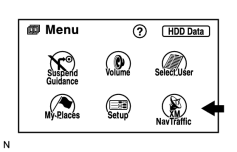
(a) Press the MENU button.
|
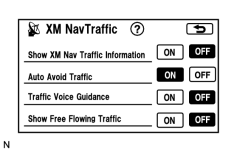
(b) Press XM NavTraffic. |
|
(c) Check if "Show XM Nav Traffic Information" is ON. OK: "Show XM NavTraffic Information" is ON. |
|
|
3. |
CHECK CONTRACT CONDITIONS |
(a) Check if the "XM Nav Traffic Premium Package" contract has been extended, or if the contract period has ended.
OK:
Contract is valid.
|
|
4. |
PERFORM ACTIVATION REFRESH |
(a) Perform activation refresh.
HINT:
Refer to the satellite radio tuner company web site. (http://www.xmradio.com/refresh/)
OK:
Malfunction disappears.
|
|
5. |
CHECK SURROUNDINGS |
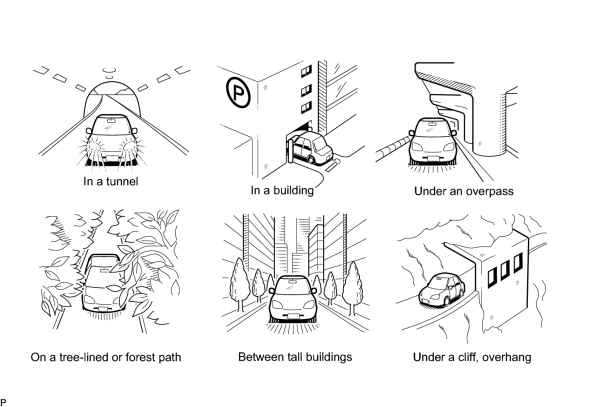
(a) Check if the vehicle is in an environment where reception is difficult due to something blocking the area above the vehicle.
HINT:
If the area above the vehicle is blocked, such as when in a building or tunnel, reception may not be possible.
OK:
Area above vehicle is not blocked.
|
|
6. |
CHECK COVERAGE AREA |
(a) Check that your current position is within the traffic information coverage area.
OK:
Within coverage area.
|
|
7. |
CHECK AVC-LAN PLUS |
(a) Perform the AVC-LAN plus check
 .
.
Result
|
Result |
Proceed to |
|---|---|
|
"XM" is displayed |
A |
|
"XM" is not displayed |
B |
|
|
8. |
CHECK DTC |
(a) Check for display and navigation module display DTCs.
Result
|
Result |
Proceed to |
|---|---|
|
"OK" is output |
A |
|
Code other than "OK" is output |
B |
|
|
9. |
CHECK SATELLITE RADIO |
(a) Check if CH001 (free broadcast) can be received.
OK:
CH001 can be received.
|
|
10. |
CHECK SURROUNDINGS |
(a) Check if the vehicle is in an environment where reception is difficult due to something blocking the area above the vehicle.
HINT:
If the area above the vehicle is blocked, such as when in a building or tunnel, reception may not be possible.
OK:
Area above vehicle is not blocked.
|
|
11. |
CHECK DTC |
(a) Check for display and navigation module display DTCs.
Result
|
Result |
Proceed to |
|---|---|
|
DTC is not output |
A |
|
DTC is output |
B |
|
|
12. |
CHECK CONTRACT CONDITIONS |
(a) Check if the "XM Nav Traffic Premium Package" contract has been extended, or if the contract period has ended.
OK:
Contract is valid.
|
|
13. |
PERFORM ACTIVATION REFRESH |
(a) Perform activation refresh.
HINT:
Refer to the satellite radio tuner company web site. (http://www.xmradio.com/refresh/)
OK:
Malfunction disappears.
|
|
14. |
CHECK DISPLAY AGAIN |
(a) Wait for 2.5 minutes, and check again if the actual traffic conditions match the display.
OK:
Actual traffic conditions match display.
|
|
15. |
CHECK COVERAGE AREA |
(a) Check if the area on the display that does not match actual traffic conditions is within the XM Nav Traffic coverage area.
OK:
Within coverage area.
|
|
16. |
CHECK DISPLAY AGAIN |
(a) After 30 minutes have passed, check if all traffic information disappears.
HINT:
After traffic information updates have stopped, the navigation system continues displaying traffic information for a maximum of 30 minutes.
OK:
All traffic information disappears.
|

|

|