| Last Modified: 11-27-2007 | 1.6 A | |
| Service Category: Audio/Visual/Telematics | Section: Navigation/Multi Info Display | |
| Model Year: 2008 | Model: LX570 | Doc ID: RM000003B6F002X |
| Title: NAVIGATION / MULTI INFO DISPLAY: DISPLAY AND NAVIGATION ASSEMBLY (w/ Navigation System): INSTALLATION (2008 LX570) | ||
INSTALLATION
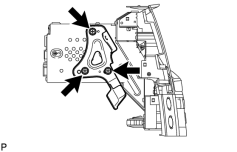
1. INSTALL NO. 2 RADIO RECEIVER BRACKET
|
(a) Install the bracket with the 3 bolts. Torque: 3.0 N·m (30 kgf·cm, 26 in·lbf) |
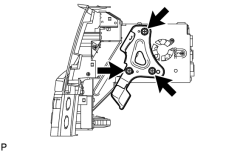
2. INSTALL NO. 1 RADIO RECEIVER BRACKET
|
(a) Install the bracket with the 3 bolts. Torque: 3.0 N·m (30 kgf·cm, 26 in·lbf) |
3. INSTALL DISPLAY AND NAVIGATION MODULE DISPLAY
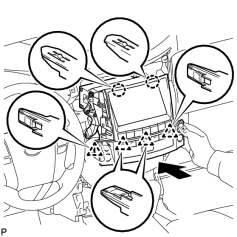
(a) Connect the connectors.
|
(b) Insert the display and attach the 2 claws and 4 clips on its backside. NOTICE:
When inserting the display, do not press the knobs on it. |
|
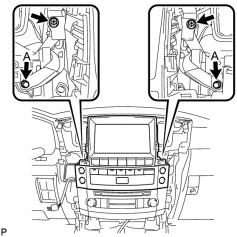
(c) Install the display with the 2 screws and 2 bolts. Torque: 12 N·m (122 kgf·cm, 8 ft·lbf) |
4. INSTALL NO. 4 INSTRUMENT PANEL REGISTER ASSEMBLY

5. INSTALL NO. 3 INSTRUMENT PANEL REGISTER ASSEMBLY
6. CONNECT CABLE TO NEGATIVE BATTERY TERMINAL
NOTICE:
When disconnecting the cable, some systems need to be initialized after the cable is reconnected
.
7. INSTALL ENGINE ROOM SIDE COVER LH

|

|