Voice is not Recognized
Circuit diagnosis
INSPECTION PROCEDURE
| 1. CHECK MAP DISC |

Check that the map disc is not deformed or cracked.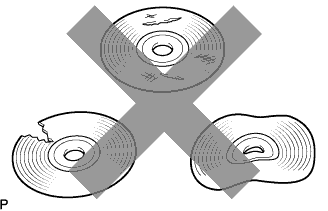

- OK:
- No deformations or cracks on map disc.
|
|
||||

| OK | |
 |
| 2. CHECK MAP DISC |
Check for dirt on the map disc surface.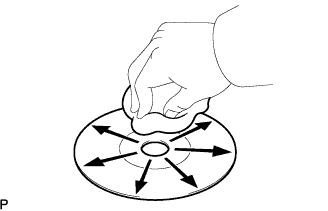
- OK:
- No dirt is on the map disc surface.
- NOTICE:
- Do not use a conventional record cleaner or anti-static preservative.
- HINT:
- If the disc is dirty, clean the disc by wiping the disc's surface radially with a soft cloth.
|
|
||||
| OK | |
|
| 3. CHECK MICROPHONE (NAVIGATION CHECK MODE) |
Enter the "Microphone Check" mode (Click here).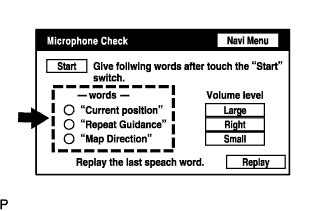
Follow the directions on the screen. Check that the word recognition indicator lights up in green for each item.
- OK:
- All check items are recognized.
|
|
||||
| OK | ||
 |
||
| ||