DISASSEMBLY
Removal / installation
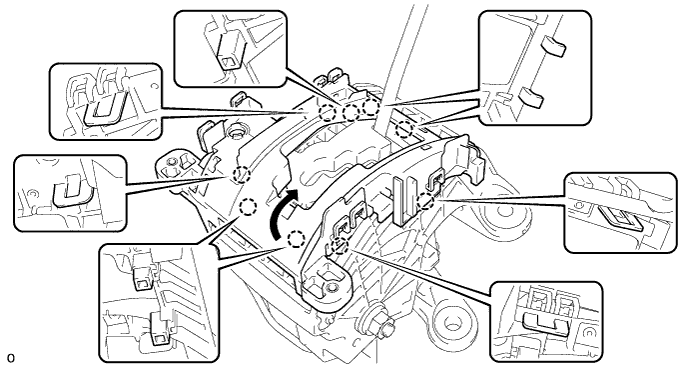
| 1. REMOVE POSITION INDICATOR HOUSING |

Using a screwdriver, remove the position indicator housing from the shift lever assembly.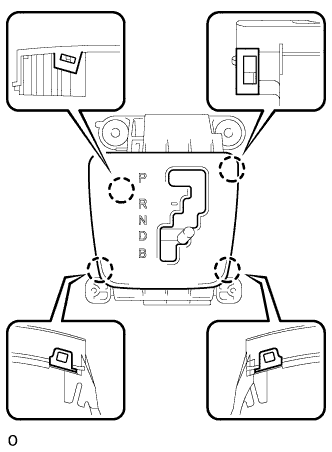

- NOTICE:
- Do not damage the position indicator housing.
| 2. REMOVE SHIFT LOCK RELEASE BUTTON |
Remove the shift lock release button, spring and cover from the position indicator housing.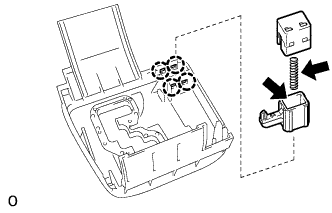
- NOTICE:
- Do not damage the position indicator housing.
| 3. REMOVE POSITION INDICATOR LIGHT GUIDE |
Using a screwdriver, remove the position indicator light guide from the shift lever assembly.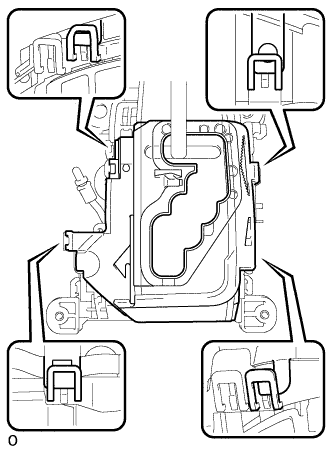
| 4. REMOVE POSITION INDICATOR SLIDE COVER |
Remove the position indicator slide cover from the position indicator housing lower.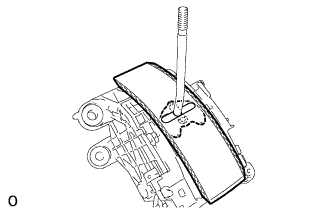
| 5. REMOVE POSITION INDICATOR SLIDE COVER NO.2 |
Remove the position indicator slide cover No.2 from the position indicator slide cover.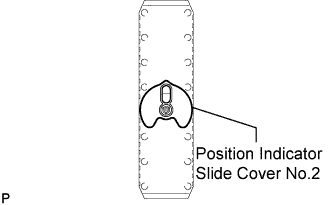
| 6. REMOVE INDICATOR LIGHT WIRE SUB-ASSEMBLY |
Remove the indicator light wire sub-assembly from the shift lever assembly.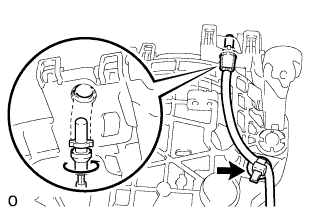
| 7. REMOVE SHIFT LEVER WIRE GUIDE |
Remove the shift lever wire guide No.1 from the indicator light wire.
| 8. REMOVE POSITION INDICATOR HOUSING LOWER |
Remove the position indicator housing lower from the shift lock control unit.