DIAGNOSIS DISPLAY DETAILED DESCRIPTION
Troubleshooting
- HINT:
- This section contains a detailed description of displays within diagnostic mode.
- Illustrations may differ from the actual vehicle depending on the device settings and options. Therefore, some detailed areas may not be shown exactly the same as on the actual vehicle.
- This section contains a detailed description of displays within diagnostic mode.
| SYSTEM CHECK |
System Check Mode Screen
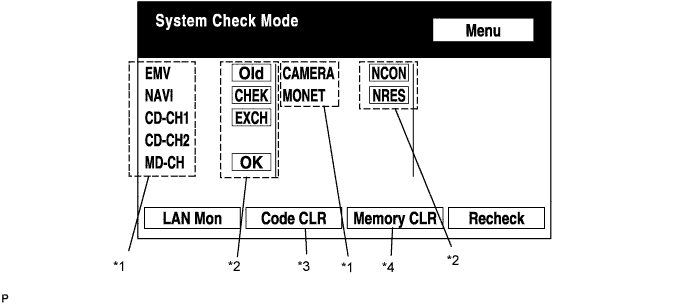

Device Names and Hardware Address/*1
- HINT:
- Registered device names are displayed.
- If a device name is unknown to the system, its physical address is shown instead.
- Registered device names are displayed.
Address No.
Name
Address No.
Name
110
EMV
120
AVX
128
1DIN TV
140
AVN
144
G-BOOK
178
NAVI
17C
MONET
190
AUDIO H/U
1AC
CAMERA-C
1B0
Rr-TV
1C0
Rr-CONT
1C2
TV-TUNER2
1C4
PANEL
1C6
G/W
1C8
FM-M-LCD
1D8
CONT-SW
1EC
Body
1F0
RADIO TUNER
1F1
XM
1F2
SIRIUS
230
TV-TUNER
240
CD-CH2
250
DVD-CH
280
CAMERA
360
CD-CH1
3A0
MD-CH
17D
TEL
440
DSP-AMP
530
ETC
5C8
MAYDAY
1A0
DVD-P
1D6
CLOCK
1F4
RSA
1F6
RSE
480
AMP
-
-
Check Result/*2
- HINT:
- Result codes for all devices are displayed.
Result
Meaning
Action
OK
The device did not respond with a DTC (excluding communication DTCs from the AVC-LAN).
-
EXCH
The device responds with a "replace"-type DTC.
Look up the DTC in "Unit Check Mode" and replace the device.
CHEK
The device responds with a "check"-type DTC.
Look up the DTC in "Unit Check Mode".
NCON
The device was previously present, but does not respond in diagnostic mode.
- Check power supply wire harness of the device.
- Check the AVC-LAN of the device.
Old
The device responds with an "old"-type DTC.
Look up the DTC in "Unit Check Mode".
NRES
The device responds in diagnostic mode, but gives no DTC information.
- Check power supply wire harness of the device.
- Check the AVC-LAN of the device.
- Check power supply wire harness of the device.
Code Clear/*3
Present DTCs are cleared.Memory Clear/*4
Present and past DTCs and registered connected device names are cleared.
Diagnosis MENU Screen
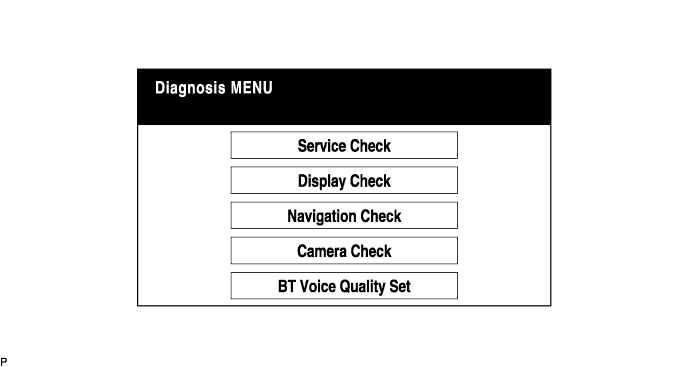
- HINT:
- Each item is grayed out or not displayed based on the device settings.
Unit Check Mode Screen
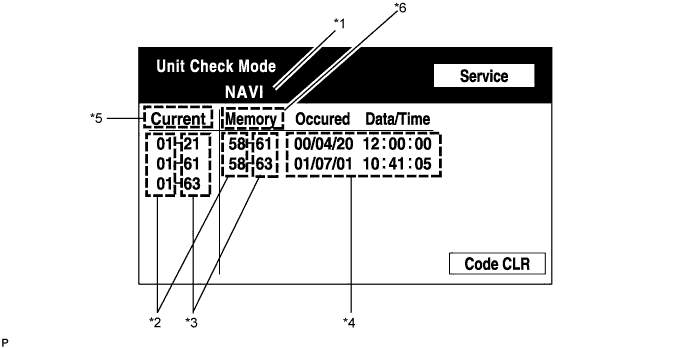
Screen Description Display
Contents
Device name/*1
Target device
Segment/*2
Target device logical address
DTC/*3
DTC (Diagnostic Trouble Code)
Timestamp/*4
The time and date of past DTCs are displayed. (The year is displayed in 2-digit format.)
Present Code/*5
The DTC output at the service check is displayed.
Past Code/*6
Diagnostic memory results and recorded DTCs are displayed.
LAN Monitor (Original) Screen
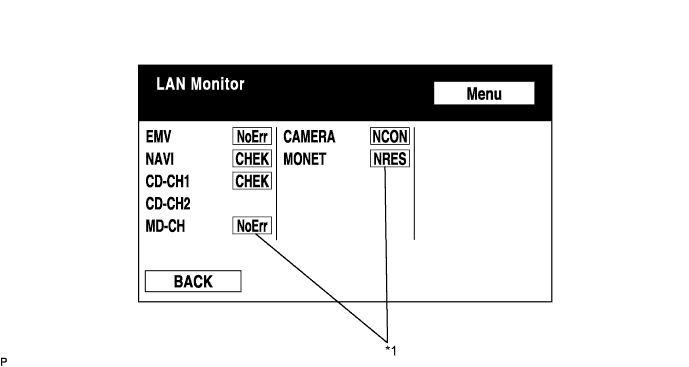
Check Result/*1
- HINT:
- Check results of all the devices are displayed.
Result
Meaning
Action
No Err (OK)
There are no communication DTCs.
-
CHEK
The device responds with a "check"-type DTC.
Look up the DTC in "Unit Check Mode".
NCON
The device was previously present, but does not respond in diagnostic mode.
- Check power supply wire harness of the device.
- Check the AVC-LAN of the device.
Old
The device responded with an "old"-type DTC.
Look up the DTC in "Unit Check Mode".
NRES
Device responds in diagnostic mode, but gives no DTC information.
- Check power supply wire harness of the device.
- Check the AVC-LAN of the device.
- Check power supply wire harness of the device.
LAN Monitor (Individual) Screen
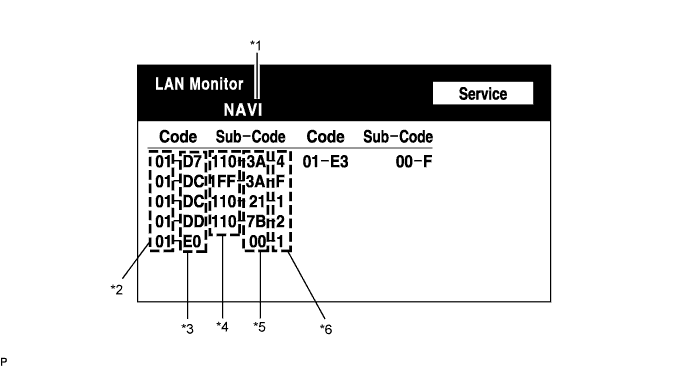
Screen Description Display
Contents
Device name/*1
Target device
Segment/*2
Target logical address
DTC/*3
DTC (Diagnostic Trouble Code)
Sub-code (device address)/*4
Physical address stored with DTC (If there is no address, nothing is displayed.)
Connection check No./*5
Connection check number stored with DTC
DTC occurrence/*6
Number of times the same DTC has been recorded
| DISPLAY CHECK |
Vehicle Signal Check Mode Screen
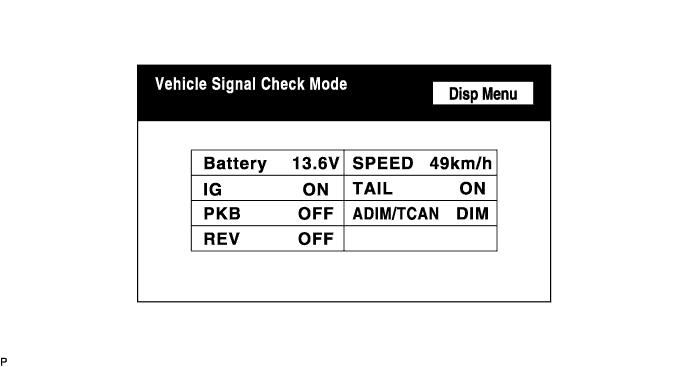
Screen Description Name
Contents
Battery
Battery voltage is displayed.
PKB
Parking brake ON/OFF state is displayed.
REV
Reverse signal ON/OFF state is displayed.
IG
IG switch ON/OFF state is displayed.
ADIM/TCAN
Brightness state DIM (with)/BRIGHT (without) is displayed.
SPEED
Vehicle speed is displayed in km/h.
TAIL
TAIL signal (Headlight dimmer switch) ON/OFF state is displayed.
- HINT:
- Only items sending a vehicle signal will be displayed.
- This screen is updated once per second when input signals to the vehicle are changed.
- Only items sending a vehicle signal will be displayed.
| NAVIGATION CHECK |
Navigation Check Screen
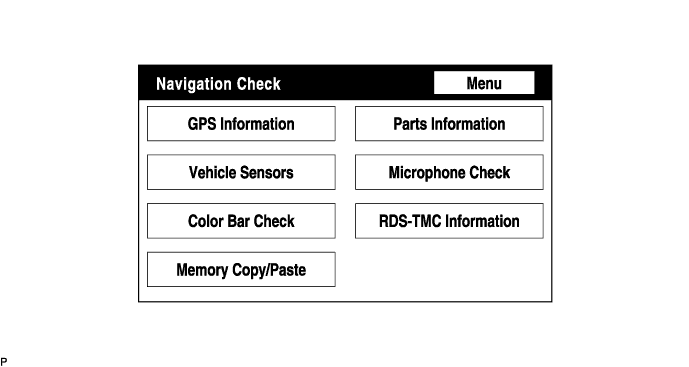
- HINT:
- Each item is grayed out or not displayed based on the device settings.
GPS Information Screen
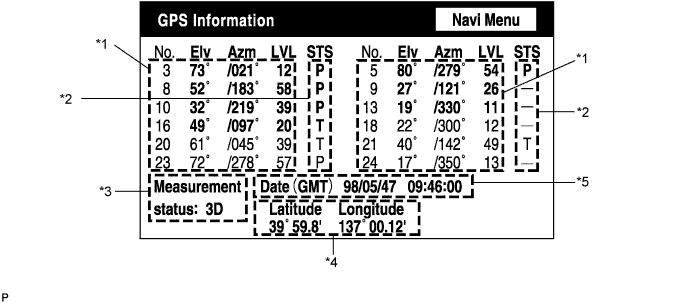
Satellite information/*1
Information from a maximum of 12 satellites is displayed on the screen. This information includes the target GPS satellite number, elevation angle, direction and signal level.Receiving condition/*2
(DENSO model) Display
Contents
T
The system is receiving a GPS signal, but is not using it for location.
P
The system is using the GPS signal for location.
-
The system cannot receive a GPS signal.
(AISIN AW model) Display
Contents
01H
The system cannot receive a GPS signal.
02H
The system is tracing a satellite.
03H
The system is receiving a GPS signal, but is not using it for location.
04H
The system is using the GPS signal for location.
Measurement information/*3 Display
Contents
2D
2-dimensional location method is being used.
3D
3-dimensional location method is being used.
NG
Location data cannot be used.
Error
Reception error has occurred.
-
Any other state.
Position information/*4 Display
Contents
Position
Latitude and longitude information on the current position is displayed.
Date information/*5 Display
Contents
Date
The date/time information obtained from GPS signal is displayed in Greenwich mean time (GMT). The last 4 digits are displayed.
Vehicle Sensors Screen
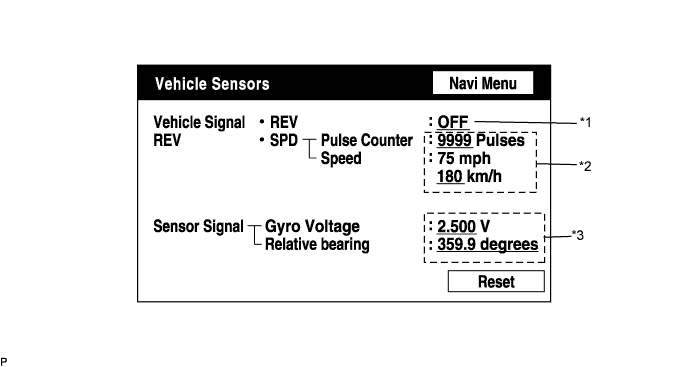
Vehicle signal Display
Contents
REV/*1
REV signal ON/OFF state is displayed.
SPD/*2
SPD signal condition is displayed.
Sensor signal Display
Contents
Gyro sensor/*3
Gyro sensor output condition is displayed (when the vehicle runs straight or is stationary, the voltage is approximately 2.5 V).
- HINT:
- Signals are updated once per second only when vehicle sensor signals are changed.
Parts Information Screen
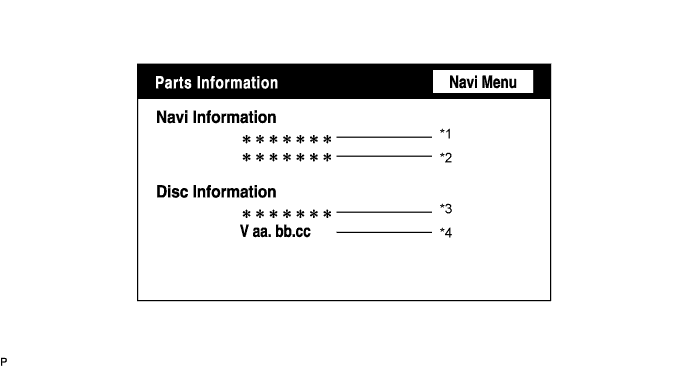
Screen Description Display
Contents
Navigation Manufacturer/*1
Navigation ECU manufacturer is displayed.
Navigation Version No./*2
Navigation ECU version is displayed.
Disc Manufacturer/*3
Map disc manufacturer is displayed.
Disc Version No./*4
Map disc version is displayed.
Memory Copy/Paste Screen
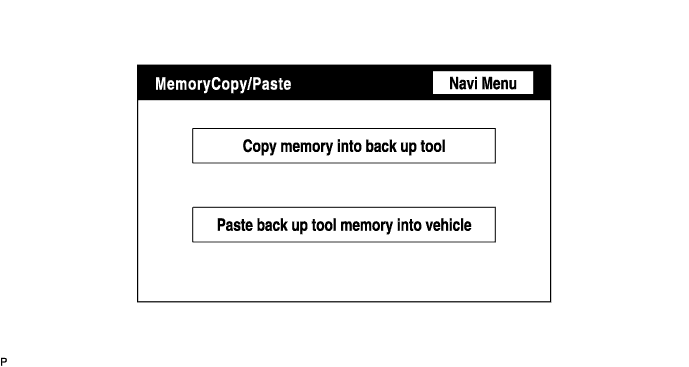
- HINT:
- This function cannot be used.
RDS-TMC Information Screen (Only Europe)
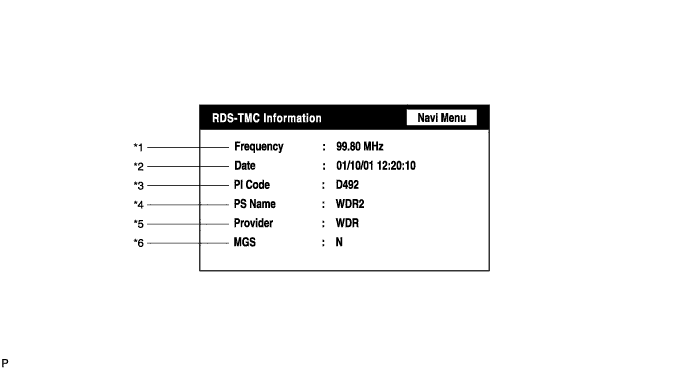
Frequency/*1 Display
Contents
Frequency
The latest received frequency, at which an RDS-TMC signal is detected, is displayed.
Date of update/*2 Display
Contents
Date
The latest date and time of TMC signal detection are displayed. (Greenwich mean time)
PI code/*3 Display
Contents
PI code
Broadcast station identification code (to identify the content of the program) is displayed.
PS name/*4 Display
Contents
PS name
Broadcast station name is displayed.
Provider name/*5 Display
Contents
Provider
The name of the TMC provider (TMC information source) is displayed (max. 8 characters).
MGS/*6 Display
Contents
MGS
The latest radio reception area is displayed.
The letter "N", "R", and/or "U" is displayed depending on the reception area.
- HINT:
- If radio wave has never been received, "-" is displayed for all the items.
- As for the MGS, "N" shows a domestic level, "R" shows a local level, and "U" shows a city level. If 2 or 3 levels are applicable, the letters are displayed in a line.
- RDS-TMC information is not updated in DTC mode.
- If radio wave has never been received, "-" is displayed for all the items.