INSTALLATION
Removal / installation
| 1. INSTALL REAR SPEED SENSOR |

Install the rear speed sensor with the bolt.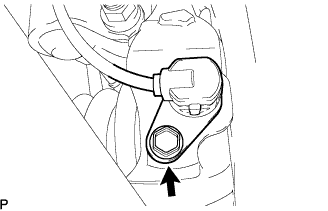

- Torque:
- 8.0 N*m{ 82 kgf*cm , 71 in.*lbf }
- NOTICE:
- Prevent foreign matter from attaching to the sensor tip.
Install the sensor harness clamps with the 2 bolts to the body and the shock absorber bracket.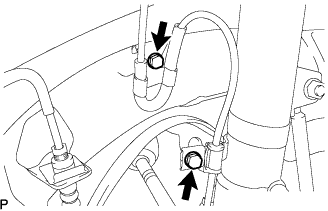
- Torque:
- 5.0 N*m{ 51 kgf*cm , 44 in.*lbf }
- NOTICE:
- Do not twist the sensor wire when installing the sensor.
Push in the sensor wire harness with the grommet.
- NOTICE:
- When installing the grommet, do not pull the sensor wire. Only pull the grommet.
Connect the rear speed sensor connector.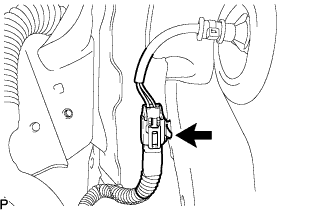
| 2. INSTALL REAR WHEEL |
- Torque:
- 103 N*m{ 1,050 kgf*cm , 76 ft.*lbf }
| 3. INSTALL REAR SEAT SIDE COVER |
Engage the 4 clips and install the rear seat side cover.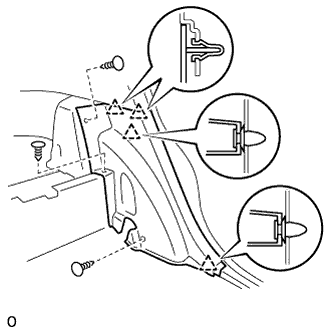
Install the 3 clips.
| 4. INSTALL DECK SIDE TRIM COVER |
Engage the 5 claws and install the deck side trim cover.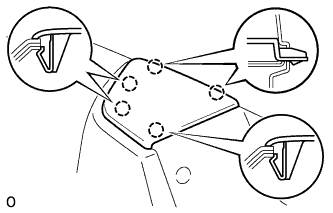
| 5. INSTALL REAR DOOR OPENING TRIM WEATHER STRIP |
| 6. INSTALL REAR DOOR SCUFF PLATE |
Connect the connector. (w/ illumination scuff plate)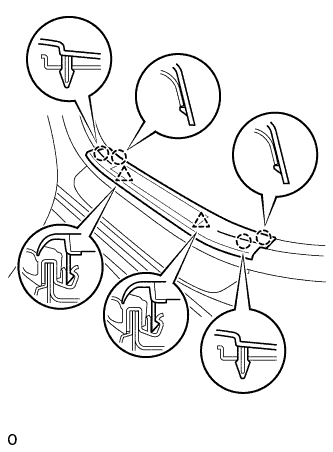
Engage the 4 claws and 2 clips, and install the rear door scuff plate.
| 7. CHECK SPEED SENSOR SIGNAL |