REMOVAL
Removal / installation
| 1. PRECAUTION |

| 2. DISCONNECT CABLE FROM NEGATIVE BATTERY TERMINAL |
| 3. REMOVE FRONT DOOR SCUFF PLATE LH (for LHD) |
| 4. REMOVE FRONT DOOR SCUFF PLATE RH (for RHD) |
- HINT:
- Use the same procedures for the RH side and the LH side.
| 5. REMOVE COWL SIDE TRIM SUB-ASSEMBLY LH (for LHD) |
Remove the 2 clips and the cowl side trim sub-assembly LH.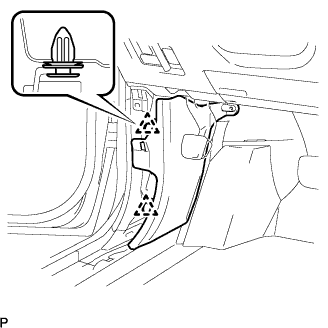

| 6. REMOVE COWL SIDE TRIM SUB-ASSEMBLY RH (for RHD) |
- HINT:
- Use the same procedures for the RH side and the LH side.
| 7. REMOVE INSTRUMENT PANEL FINISH PANEL SUB-ASSEMBLY LOWER |
Using a screwdriver, open the instrument panel finish panel sub-assembly lower cover.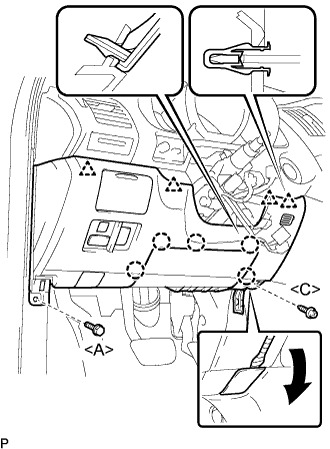
- HINT:
- Tape the screwdriver tip before use.
Remove the bolt <A> and the screw <C>.
Disconnect the hood lock control cable assembly.
Disengage the 5 claws and the 4 clips.
Disconnect the connectors and then remove the instrument panel finish panel sub-assembly lower.
| 8. REMOVE DRIVER SIDE KNEE AIRBAG ASSEMBLY |
Disconnect the connector from the driver side knee airbag assembly.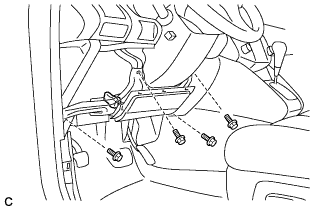
- NOTICE:
- When handling the airbag connector, take care not to damage the airbag wire harness.
Remove the 4 bolts and the driver side knee airbag assembly.
| 9. REMOVE AIR CONDITIONER AMPLIFIER ASSEMBLY (for RHD) |
Disconnect the connectors.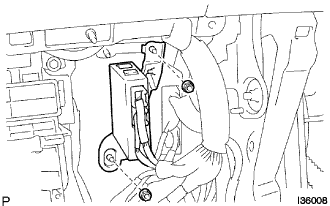
Remove the 2 nuts and air conditioner amplifier assembly.
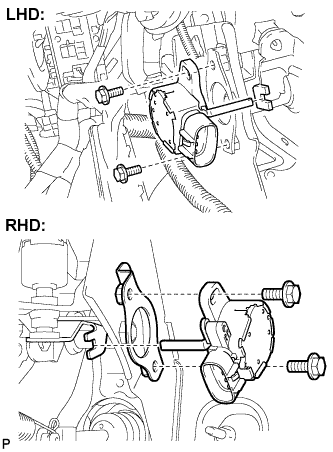
| 10. REMOVE BRAKE PEDAL STROKE SENSOR ASSEMBLY |
Disconnect the brake pedal stroke sensor assembly connector.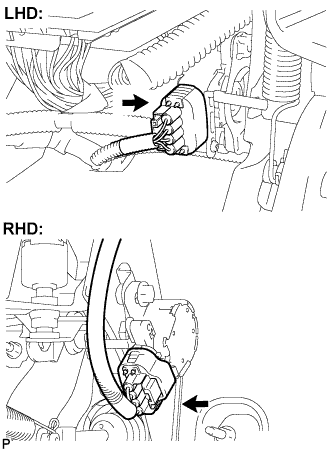
Remove the 2 bolts and the brake pedal stroke sensor assembly.