01-DC
Diagnostic trouble codes
DESCRIPTION
| DTC No. |
DTC Detection Condition |
Trouble Areas |
| 01-DC *1 |
Transmission to component shown by sub-code failed (Detecting this DTC does not always mean actual failure) |
If the same sub-code is recorded in other components, check harness for power supply and communication system of all components shown by code |
- HINT:
- *1: This code may be stored if the engine is started, idled for 60 seconds and then started again.
- NOTICE:
- Be sure to clear and recheck DTCs and perform inspection according to the result to avoid the condition shown in "HINT" above.
- The multi-display is the master unit.
- Be sure to clear and recheck DTCs after the inspection is completed to confirm that no DTCs are output.
- Be sure to clear and recheck DTCs and perform inspection according to the result to avoid the condition shown in "HINT" above.
INSPECTION PROCEDURE
- NOTICE:
- Be sure to read DESCRIPTION before performing the following procedures.
| 1. CHECK FOR DTC OF OTHER COMPONENTS |

Check if the component shown by the sub-code is displayed in the check result of the other components.
Check if "01-DC" is output for the other components.
If "01-DC" is output for any other components, check if the same physical address is displayed.
- HINT:
- For the list of the components shown by sub-codes, refer to the table in step 2.
- Result:
Result
Proceed to
"01-DC" is output and the same physical address is displayed
A
"01-DC" is not output or the same physical address is not displayed
B
|
|
||||

| A | |
 |
| 2. IDENTIFY THE COMPONENT WHICH HAS STORED THIS CODE |
Enter the diagnostic mode.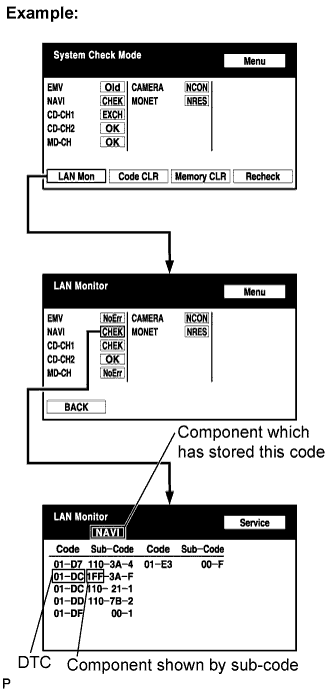

Press the "LAN Mon" switch to change to "LAN Monitor" mode.
Identify the component which has stored this code.
Component Table Display
Component
AUDIO H/U (190)
Radio Receiver
DSP-AMP (440)
Stereo Component Amplifier
G/W (1C6)
Gateway ECU
NAVI (178)
Navigation ECU
CAMERA (280)
Television Camera ECU
EMV (110)
Multi-display
- HINT:
- "NAVI" is the component which has stored this code in the example shown in the illustration.
| NEXT | |
|
| 3. CHECK COMPONENT WHICH HAS STORED THIS CODE |
Select the component which has stored this code.
Component Table Component
Proceed to
Network gateway ECU (G/W)
Gateway ECU communication error (Click here)
Radio receiver (AUDIO H/U)
Radio receiver communication error (Click here)
Stereo component amplifier (DSP-AMP)
Stereo component amplifier communication error (Click here)
Navigation ECU (NAVI)
Navigation ECU communication error (Click here)
Television camera ECU (CAMERA)
Television camera ECU communication error (Click here)
Multi-display (EMV)
Multi-display communication error (Click here)
| NEXT | ||
 |
||
| ||
| 4. CLEAR DTC |
Clear the DTC (Click here).
- HINT:
- If "01-DC" is output for only one component, this may not indicate a malfunction.
| NEXT | |
|
| 5. RECHECK DTC |
Recheck DTCs and check if the same trouble occurs again.
- OK:
- Malfunction disappears.
|
|
||||
| OK | ||
|
||
| ||