Previous Next

MONTEROS

1983–93 Models
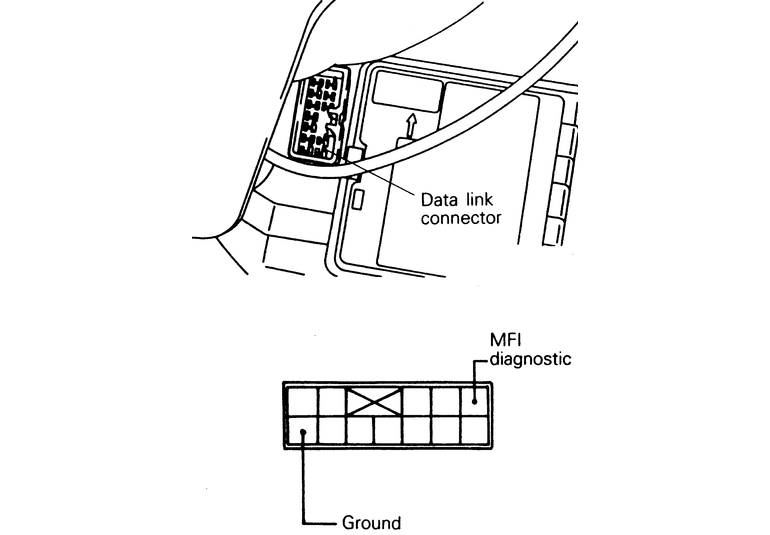
  1. Connect the analog voltmeter to the diagnostic output terminal 1 and the ground terminal 12 of the data link link connector (white). The data link connector is located under the far left-hand side dashboard console, underneath of the fuse board.
  2. Turn the ignition switch to ON.
  3. Check the swing of the voltmeter pointer and read the diagnostic output.
  4. Repair the problem location, referring to the diagnostic chart.

    Fig. 1: The location of the data link connector and the specific terminals needed for testing — models up to 1993

1994–95 Models
SOHC ENGINES
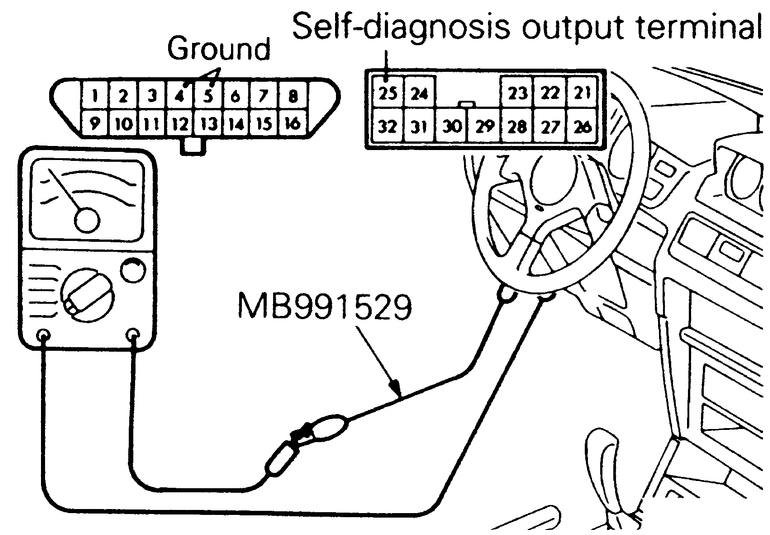
  1. Use the special tool (diagnostic trouble code check harness) to connect an analog-type voltmeter to the diagnostic output terminal 25 and to the ground terminals 4 or 5 of the data link connector.
  2. Turn the ignition switch ON.
  3. Read the diagnostic trouble code pattern from the voltmeter and record it.
  4. Referring to the diagnostic chart, repair the faulty part.

    Fig. 2: Connect the data link terminal 4 or 5 with the self-diagnosis output terminal 25 — SOHC 1994 and later models

DOHC ENGINES

NOTE: This procedure uses the check engine/malfunction indicator lamp to read the trouble codes; a voltmeter is not needed.
  1. Use the special tool (diagnostic trouble code check harness) to connect the diagnostic test mode control terminal (terminal 1) of the data link connector to the ground.
  2. Turn the ignition switch ON.
  3. Read the diagnostic trouble code pattern from the flashing of the check engine/malfunction indicator lamp.
  4. Referring to the diagnostic chart, repair the faulty part.

Previous Next