NOTE: The radio fuses are mounted on the right rear corner
of the radio. The radio need not be removed to change a fuse; just remove the
glove box and reach through the opening.
- Disconnect the negative (-) battery cable from the battery.
- Remove the instrument cluster bezel (trim piece).
- Remove the radio bracket attaching screws from the instrument panel and
remove the radio bracket.
- Pull the radio outward slightly and disconnect the speaker wires, the power
wire and the antenna cable.
- Remove the radio.
- When reinstalling, note that the mounting support attaches to the radio
differently for AM radios or AM/FM radios.
- Hold the radio in position and connect the wiring and antenna leads.
- Before setting the radio into the dash, make certain that the mounting stay
fits into the slot in the reinforcement.
- Install the radio and secure it in place with the mounting screws.
- Mount the instrument bezel with its retaining screws.
- Connect the negative (-) battery cable to the battery.
- Disconnect the negative (-) battery cable from the battery.
- Remove the heater control lever knobs.
- Remove the screws holding the center trim panel. Use a plastic or padded
stick or flat tool to remove the panel without marring it.
- Remove the radio bracket mounting screws.
- Pull the radio unit out of the dash (with the brackets attached) a short
distance.
- Disconnect the wiring and antenna lead at the rear of the radio.
- Remove the radio from the truck and remove the brackets from the radio.
- When reinstalling, mount the brackets to the radio and install them as a
unit.
- Before fitting the radio completely into the dash, connect the wiring and
antenna cable.
- Tighten the bracket mounting screws.
- Install the face plate and the heater control lever knob.
- Connect the negative (-) battery cable to the battery.
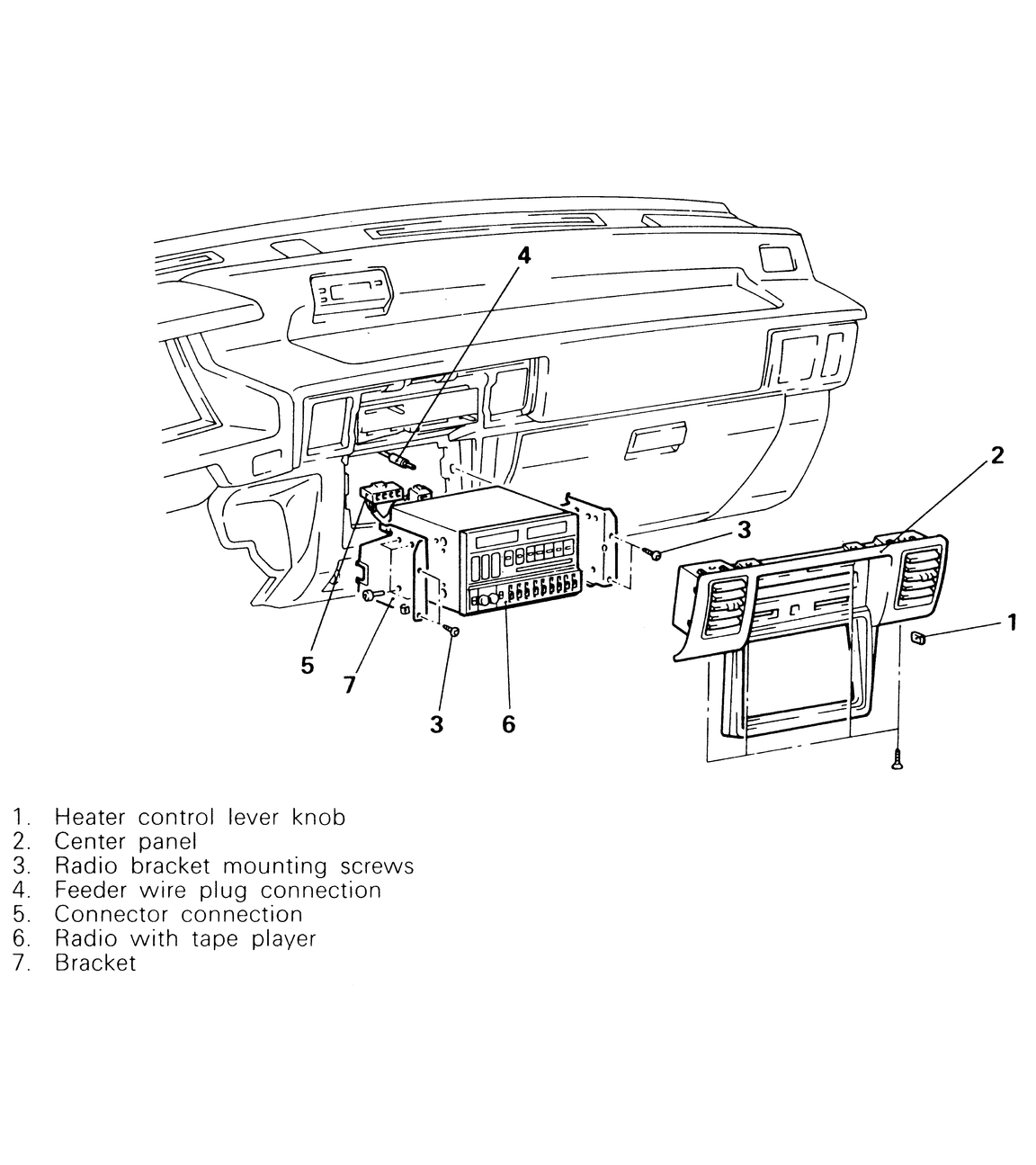
| Fig. 1: Installation and removal components for the
radio/tape player — 1987–95 Pick-ups
|
- Disconnect the negative (-) battery cable from the battery.
- Remove the radio faceplate. Use a flat plastic tool or protected metal tool
so as not to mar the plastic
- Remove the plug on the each side of the center console. Reach through the
holes and remove the radio mounting screws.
- Disconnect the antenna lead wire, the speaker connector and the power wire
from the back of the radio.
- Remove the radio.
- To install, insert the radio into its hole.
- Connect the antenna lead wire, the speaker wires and the power wire to the
back of the radio.
- Insert and tighten the radio mounting screws through the side holes of the
center console.
- Push the radio faceplate back into position.
- Connect the negative (-) battery cable to the battery.
- Disconnect the negative (-) battery cable from the battery.
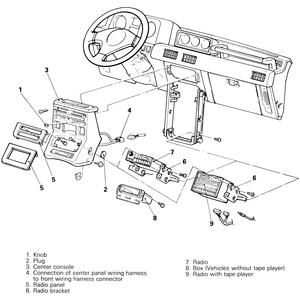
- Remove the knobs from the heater controls.
- Remove the plugs from the side of the console.
- Remove the center console from the dash. As it comes clear, disconnect the
wiring harness.
- Remove the radio faceplates.
- Disconnect the radio brackets from the console.
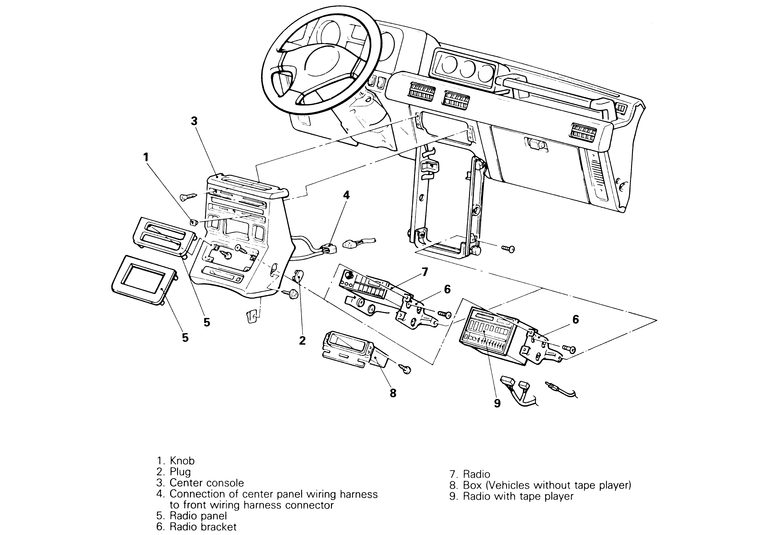
| Fig. 2: Radio/tape player removal and installation
components and locations — 1987–91 Monteros
|
- Remove the radio with the brackets attached. Once clear of the console,
the brackets may be removed.
- When reinstalling, attach the brackets to the radio and the radio to the
console.
- As the console is moved into place, connect the wiring harness.
- Secure the center console, install the hole plugs and install the heater
control knobs.
- Connect the negative (-) battery cable to the battery.
- Disconnect the negative (-) battery cable from the battery.
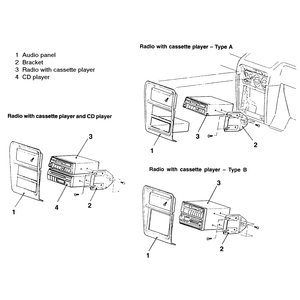
- Remove the screws holding the center panel in place and pull it off of the
dashboard.
- Unscrew the radio/tape player mounting screws from the side brackets.
- Pull the radio assembly out of its hole just far enough to disconnect and
label any wiring attached to it. It may be necessary to remove the glove box
assembly to get at the back of the radio before it is pulled all the way out.
- To remove the glove box, pop the glove box stoppers out and swing the
glove box down and out of the way.
- Extract the radio from the dashboard.
- To install the radio/tape player unit, attach the wiring to the back of
the radio and slide it into its hole (the wiring may need to be attached through
the glove box hole after it has been slid in).
- Install the glove box and stoppers to the dashboard.
- Secure the radio in place with the retaining screws and place the center
panel in place over the radio.
- Insert and tighten the center panel screws.
- Connect the negative (-) battery cable to the battery.
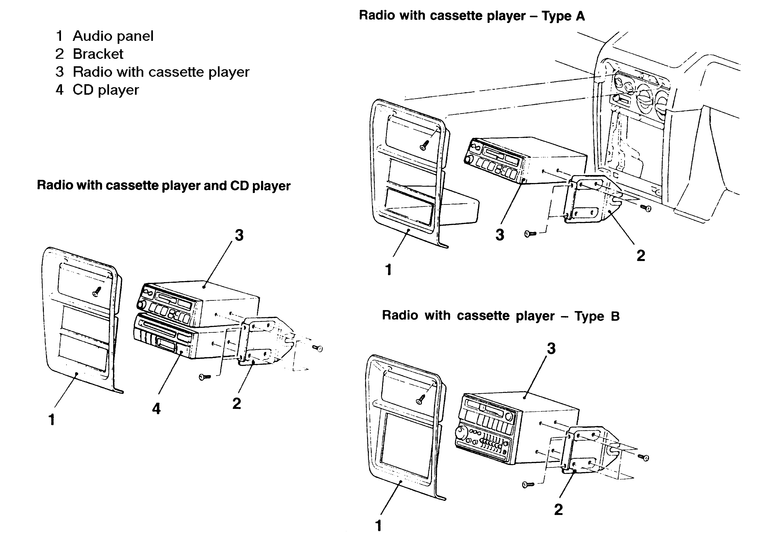
| Fig. 3: Radio and tape player/CD player removal and
installation components — 1992–95 Monteros
|