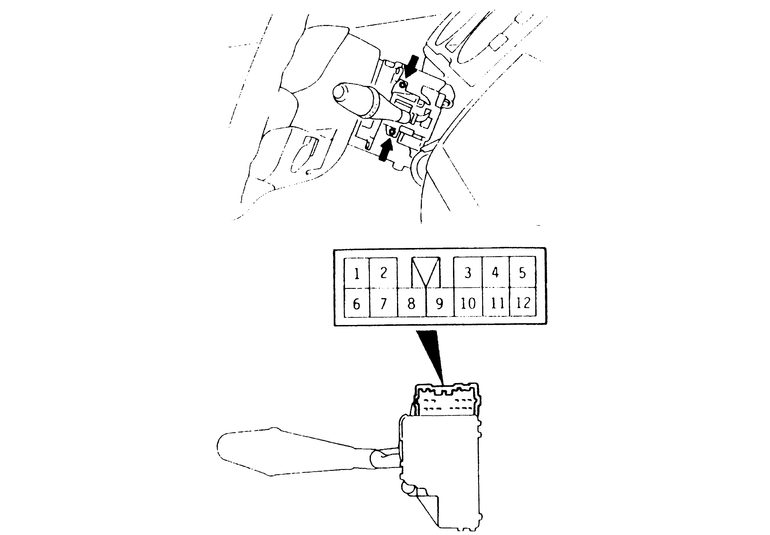
On 1983–89 Pick-ups and Monteros, the windshield wiper switch is integral
with the headlight switch. See the procedure for headlight switch removal and
installation. On 1990–95 Pick-ups and 1990–93 Monteros, the windshield
wiper switch is a part of the column-mounted combination switch. See the procedure
for combination switch removal and installation, later in this section. On 1994
and later Monteros, the windshield wiper and washer switch is separate from
the column switch.
The rear wiper and washer switches found on Monteros are also covered in this
section. Pre-1994 rear wiper and washer switches are the toggle-button variety
and are located on the instrument panel. The 1994 and later Monteros have their
windshield wiper and rear wiper/washer switches combined on the steering column.
- Insert a plastic trim tool under the edge of the switch and pry the switch
to remove it from the instrument panel.
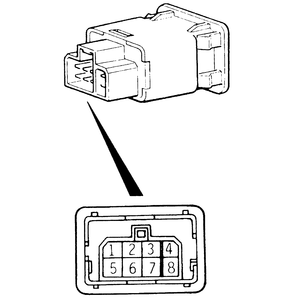
- Using an ohmmeter with side-mount terminals, check for continuity in the
switch as follows:
- Terminals 7 and 2 should be continuous when the wiper switch is in the
ON position.
- Terminals 5 and 2 should be continuous when the wiper switch is in the
OFF position.
- Terminals 5 and 2, and terminals 3 and 8 should be continuous when the
wiper switch is in the INT position.
- Terminals 7 and 6 should be continuous when the washer switch is in
the ON position.
| Fig. 1: Rear window wiper switch terminal configuration — 1983–93
Monteros
|
- If the switch failed any of the tests, replace it with a new unit.
- Disconnect the negative (-) battery cable from the battery.
- Disconnect the electrical wiring from the back of the switch and remove
the switch.
- To install the switch, attach any electrical wiring removed earlier.
- Push the switch back into its hole on the instrument panel until it clicks
in place.
- Attach the negative (-) battery cable back to the battery.
- Remove the column lower cover.
- Remove the column upper cover.
- Loosen the two screws holding the wiper and washer switch to the column,
then remove the switch from the column.
- Operate the switch and check the continuity between the terminals for the
windshield wiper and washer switch.
- Terminals 7 and 8 should have continuity when the switch is in the OFF
position.
- Terminals 8 and 10 should have continuity when the switch is in the
1 (LO) position.
- Terminals 9 and 10 should have continuity when the switch is in the
2 (HI) position.
- Terminals 6 and 10 should have continuity when the washer switch is
in the ON position.
| Fig. 2: Rear and front wiper and washer switch
terminal configuration — 1994–95 Monteros
|
- Operate the switch and check for continuity between the terminals for the
rear window wiper and washer switch.
- Terminals 2 and 7 should have continuity when the wiper switch is in
the ON position.
- Terminals 4 and 7 should have continuity when the wiper switch is in
the OFF position.
- Terminals 1 and 6, and terminals 4 and 7 should have continuity when
the wiper switch is in the INT position.
- Terminals 2 and 3 should have continuity when the washer switch is in
the ON position.
- Terminals 5 and 8 should have continuity when the illumination light
is on.
- If the switch failed any of these tests, replace the old switch with a new
unit.
- Disconnect the negative (-) battery switch from the battery.
- Unplug the harness connector to the switch and discard the old switch.
- Attach the wiper and washer switch to the column with the two retaining
screws.
- Plug any harness connectors back together.
- Install the upper and lower column covers.
- Connect the negative (-) battery cable to the battery.