Previous Next

REMOVAL & INSTALLATION

Front Speed Sensors
  1. Disconnect the negative battery cable from the battery.
  2. Raise the front of the vehicle and support with jackstands.
  3. Remove the wheel to gain better access to the front speed sensors.
  4. Unplug the speed sensor wiring harness connector.
  5. Remove the several retaining brackets holding the speed sensor wire in place. Make certain to note the locations of the various brackets and bolts.
  6. Remove the speed sensor from the backside of the steering knuckle by loosening and removing the two retaining bolts.

    WARNING
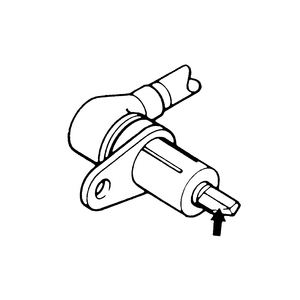
    Be careful when handling the pole piece at the tip of the speed sensor and the toothed edge of the rotor not to damage them by striking against other parts.

  7. Remove the harness bracket once the speed sensor and cable has been removed from the vehicle.

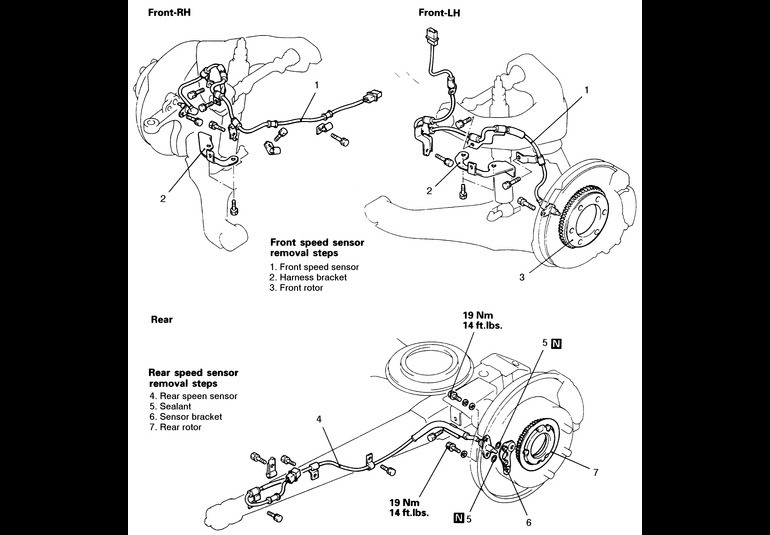
    Fig. 1: Wheel speed sensor removal and installation components — 1992–95 Monteros

    Fig. 2: Be careful when handling the speed sensor not to damage it by accidentally striking it against other parts

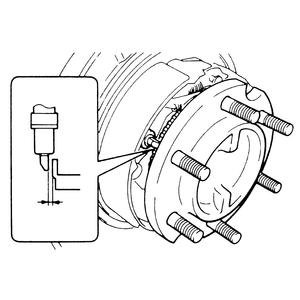
    Fig. 3: When installing the rear wheel speed sensor, make sure that the clearance is 0.012–0.036 in. (0.3–0.9mm)

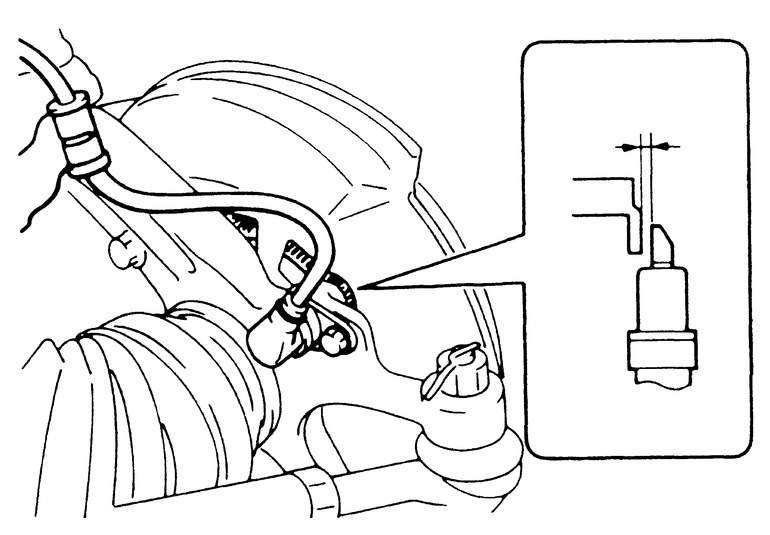
    Fig. 4: After installing the front wheel speed sensor, make certain that the clearance between the sensor and rotor is 0.008–0.040 in. (0.2–1.0mm)

  8. In order to remove the front speed sensor rotor, the front hubs and brake rotors will need to be removed from the steering knuckle — refer to Section 7 for that procedure.
  9. Once the front brake rotor has been removed from the hub assembly, the speed sensor rotor can be removed from the backside of the brake rotor (it is held in place by the rotor bolts).

    To install:

  10. After the speed sensors and toothed rotors have been checked, install the speed sensor to the brake rotor assemblies. Install the brake rotors to the hubs, then install the hub assemblies to the steering knuckles — refer to Section 7.
  11. Install the front harness bracket with the mounting bolts.
  12. When installing the speed sensor tip, install a feeler gauge into the space between the speed sensor's pole piece and the rotor's toothed surface. Check that the clearance at all points is at the standard value of 0.008–0.039 in. (0.2–1.0mm).

    NOTE: If the clearance between the speed sensor's pole piece and the rotor's toothed surface is not within the standard value range, it is probable that the rotor is incorrectly installed. Recheck the rotor's installation.

  13. Route the speed sensor cable along its original placement. Fasten it in place with the various cable brackets. Plug the harness connectors back together.
  14. Install the wheel(s), if removed.
  15. Lower the vehicle to the ground.
  16. Connect the negative cable to the battery.
  17. Have the system rechecked if a new speed sensor was installed and the problem continues.
Rear Speed Sensors
  1. Disconnect the negative battery cable from the battery.
  2. Raise the rear of the vehicle and support with jackstands. Block the front wheels with wheel chocks.
  3. Remove the wheel(s) to gain better access to the rear speed sensors.
  4. Unplug the speed sensor wiring harness connector, which is located toward the front of the rear control arm.
  5. Remove the several retaining brackets holding the speed sensor cable in place on the rear axle assembly. Make certain to note the locations of the various brackets and bolts.
  6. Remove the speed sensor from the backside of the rear disc brake backing plate by loosening and removing the two retaining bolts. Make sure to remove the O-rings from the speed sensor; new ones will be needed upon installation.

    WARNING
    Be careful when handling the pole piece at the tip of the speed sensor and the toothed edge of the rotor not to damage them by striking against other parts.

  7. In order to remove the rear speed sensor rotor and sensor bracket, the rear brake discs and axle shafts will need to be removed from the rear axle housing — refer to Section 7 for that procedure.
  8. Once the rear brake disc and axle shaft have been removed from the rear axle housing assembly, the speed sensor rotor and sensor bracket can be removed.

    To install:

  9. After the speed sensors and toothed rotors have been checked, install the speed sensor to the brake disc assemblies. Install the brake disc and axle shaft to the axle housing — refer to Section 7.
  10. Install the rear harness bracket with the mounting bolts.
  11. When installing the speed sensor tip, install a feeler gauge into the space between the speed sensor's pole piece and the rotor's toothed surface. Check that the clearance at all points is at the standard value of 0.012–0.035 in. (0.3–0.9mm).

    NOTE: If the clearance between the speed sensor's pole piece and the disc's toothed surface is not within the standard value range, it is probable that the disc is incorrectly installed. Recheck the disc's installation.
  12. Route the speed sensor cable along its original placement. Fasten it in place with the various cable brackets. Plug the harness connectors back together.
  13. Install the wheel(s), if removed.
  14. Lower the vehicle to the ground.
  15. Connect the negative cable to the battery.
  16. Have the system rechecked if a new speed sensor was installed and the problem continues.

Previous Next