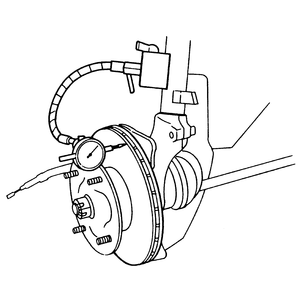
| Fig. 1: Checking disc run-out
|
Check the disc brake rotor for scoring, cracks or other damage. If rotor run-out
is checked, this should be measured while the rotor is installed. Use a dial
gauge to check rotor run-out.
- Raise and support the rear of the vehicle safely using jackstands.
- Remove the rear wheels.
- Visually inspect the rotor for cracks, excessive scoring or other damage.
A light scoring of the surface is normal and should not be considered detrimental
to brake operation.
NOTE: Before attempting to check rotor run-out on all vehicles,
the bearings must be in good condition and exhibit no excessive play.
- Check the disc for excessive run-out using a dial indicator:
- Position and secure a dial indicator so that the button contacts the
disc about 0.20 in. (5mm) from the outer edge. Set the dial indicator
to zero.
- Rotate the disc one complete revolution. The lateral run-out reading
should not exceed 0.039 in. (0.10mm). If the reading is excessive, recondition
or replace the disc.
- Check the disc minimum thickness and the disc parallelism (thickness variation):
- Use a micrometer to check the disc thickness at 4 locations around the
disc. Make sure the measuring point is at the same distance from the edge
at all locations.
- The thickness should be greater than the minimum specification (which
is normally cast onto the disc) and should not vary more than 0.0005 in.
(0.013mm). If the variations are excessive, recondition or replace the
disc. A disc which is smaller than the discard dimension MUST be replaced
for safety.
Refinishing of brake rotors can be handled at machine shops equipped
for brake work.

