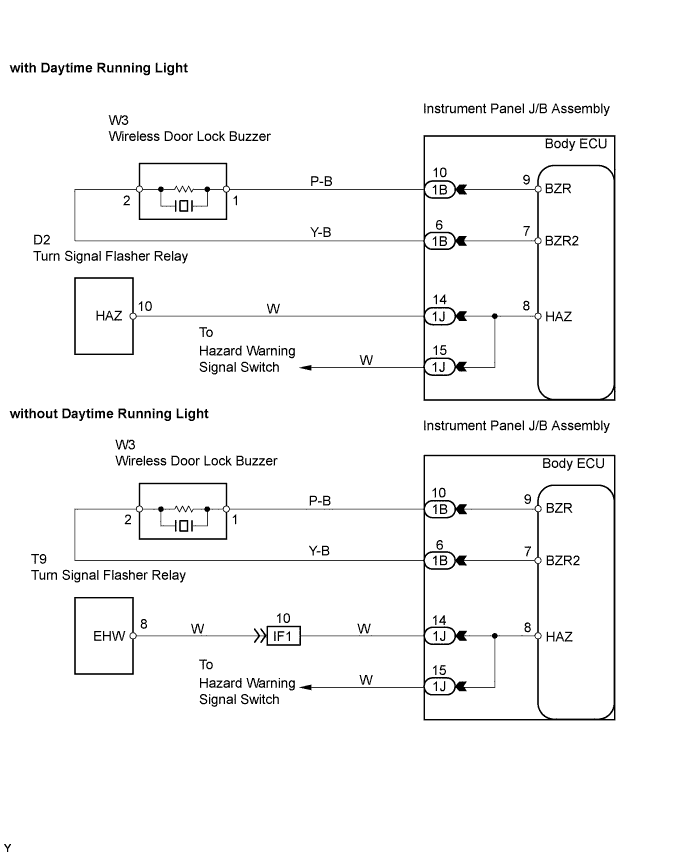
WIRELESS DOOR LOCK CONTROL SYSTEM > No Answer-Back (Hazard Warning Light and Wireless Door Lock Buzzer) |
| 1.CHECK WIRELESS DOOR LOCK CONTROL FUNCTIONS |
Check that the wireless door lock functions operate when the transmitter is used (Click here).
| Condition | Proceed To |
| Wireless door lock functions operate normally but hazard warning light answer-back does not occur | A |
| Wireless door lock functions operate normally but wireless door lock buzzer answer-back does not occur | B |
| Wireless door lock functions do not operate | Go to "Only Wireless Control Function is Inoperative" (Click here) |
|
| ||||
| A | |
 |
| 2.PERFORM ACTIVE TEST BY INTELLIGENT TESTER (HAZARD WARNING LIGHT) |
Connect the intelligent tester to the DLC3.
Turn the ignition switch to the ON position and turn the intelligent tester main switch on.
Select the ACTIVE TEST mode on the intelligent tester.
| Item (Display) | Vehicle Condition / Test Details | Diagnostic Note |
| HAZARD | Turns the turn signal flasher relay ON / OFF | Observe headlight and rear combination light for correct operation |
Check that "ON" and "OFF" of the hazard warning lights on the headlight and rear combination light turn on and off when the intelligent tester is used.
|
| ||||
| OK | ||
 | ||
| ||
| 3.CHECK HAZARD WARNING LIGHTS |
Check that the hazard warning lights flash continuously when the hazard warning light switch is pressed.
|
| ||||
| OK | ||
| ||
| ||
| 4.PERFORM ACTIVE TEST BY INTELLIGENT TESTER (WIRELESS DOOR LOCK BUZZER) |
Connect the intelligent tester to the DLC3.
Turn the ignition switch to the ON position and turn the intelligent tester main switch on.
Select the ACTIVE TEST mode on the intelligent tester.
| Item (Display) | Vehicle Condition / Test Details | Diagnostic Note |
| BUZZ CONT SOUND | Turns wireless door lock buzzer ON / OFF | Buzzer can be heard |
| BUZZ RESP SOUND | Turns wireless door lock buzzer ON / OFF | Buzzer can be heard |
Check that the buzzer sounds/stops when turning the wireless door lock buzzer on/off by using the intelligent tester.
| Condition | Proceed To |
| Buzzer sounds/stops | A |
| Buzzer does not sound or sounds constantly | B |
|
| ||||
| A | ||
| ||
| ||
| 5.INSPECT WIRELESS DOOR LOCK BUZZER |
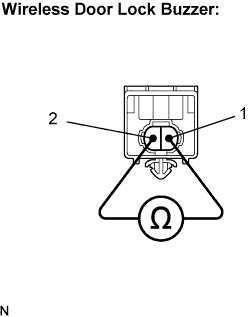 |
Disconnect the wireless door lock buzzer connector.
Measure the resistance according to the value(s) in the table below.
| Tester Connection | Condition | Specified Condition |
| 1 - 2 | Always | Approx. 1 kΩ |
|
| ||||
| OK | |
|
| 6.CHECK HARNESS AND CONNECTOR (WIRELESS DOOR LOCK BUZZER - INSTRUMENT PANEL J/B) |
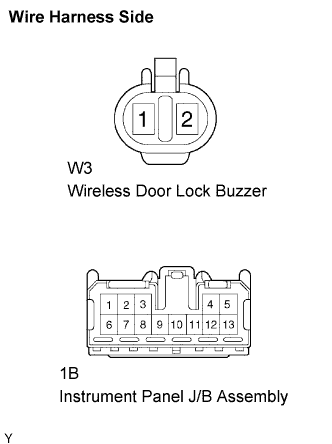 |
Disconnect the buzzer connector (W3) and J/B (1B) connector.
Measure the resistance according to the value(s) in the table below.
| Tester Connection | Condition | Specified Condition |
| W3-1 - 1B-10 (BZR) | Always | Below 1 Ω |
| W3-2 - 1B - 6 (BZR2) | Always | Below 1 Ω |
|
| ||||
| OK | ||
| ||
| ||
| 1.CHECK WIRELESS DOOR LOCK CONTROL FUNCTIONS |
Check that the wireless door lock functions operate when the transmitter is used (Click here).
| Condition | Proceed To |
| Wireless door lock functions operate normally but hazard warning light answer-back does not occur | A |
| Wireless door lock functions operate normally but wireless door lock buzzer answer-back does not occur | B |
| Wireless door lock functions do not operate | Go to "Only Wireless Control Function is Inoperative" (Click here) |
|
| ||||
| A | |
|
| 2.CHECK HAZARD WARNING LIGHTS |
Check that the hazard warning lights flash continuously when the hazard warning light switch is pressed.
|
| ||||
| OK | ||
| ||
| ||
| 3.INSPECT WIRELESS DOOR LOCK BUZZER |
|
Disconnect the wireless door lock buzzer connector.
Measure the resistance according to the value(s) in the table below.
| Tester Connection | Condition | Specified Condition |
| 1 - 2 | Always | Approx. 1 kΩ |
|
| ||||
| OK | |
|
| 4.CHECK HARNESS AND CONNECTOR (WIRELESS BUZZER - INSTRUMENT PANEL J/B) |
|
Disconnect the buzzer (W3) connector and J/B (1B) connector.
Measure the resistance according to the value(s) in the table below.
| Tester Connection | Condition | Specified Condition |
| W3-1 - 1B-10 (BZR) | Always | Below 1 Ω |
| W3-2 - 1B - 6 (BZR2) | Always | Below 1 Ω |
|
| ||||
| OK | ||
| ||
| ||

