METER / GAUGE / DISPLAY METER / GAUGE SYSTEM GENERAL/CONTROL/DETAILS DETAILS
FUNCTION
Buzzer Function
The table below shows the warning and reminder functions of the buzzer in the combination meter assembly.
| 1 | Sliding Roof Open Warning*1 | 2 | Downshift Reject Warning |
| 3 | 4WD Warning*2 | 4 | Parking Brake Engaged Warning |
| 5 | Key Reminder | 6 | Door Open Driving Warning |
| 7 | Seat Belt Warning | 8 | Brake System Warning |
| 9 | Multi-information Display Warning | - | - |
*1: Models with sliding roof system
*2: for 4WD models
Multi-information Display
The display switches in the following order each time the ODO/TRIP switch is pressed:
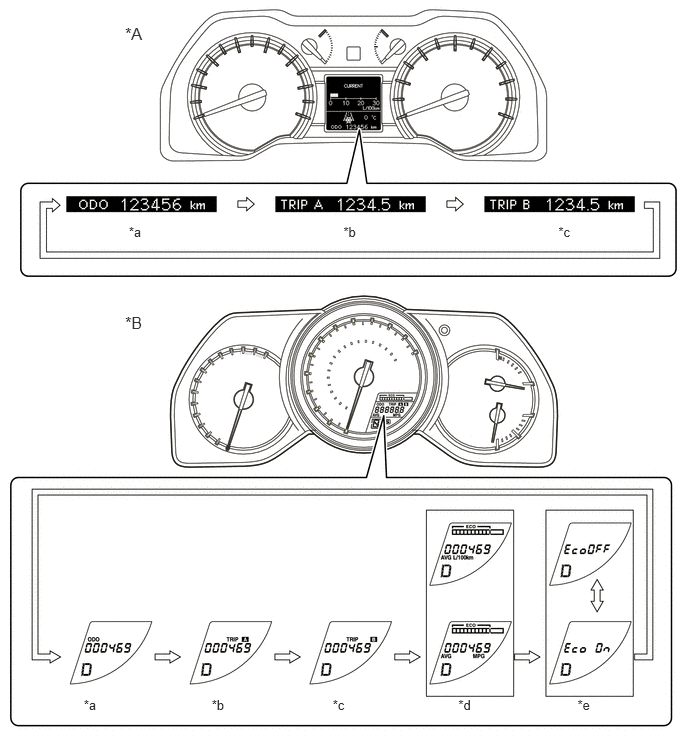
- HINT:
-
The illustration is a representative example.
| *A | for Optitron Meter | *B | for Standard Meter |
| *a | ODO | *b | TRIP A
(If the ODO/TRIP switch is pressed for 0.8 seconds or more, the TRIP A display is reset.) |
| *c | TRIP B
(If the ODO/TRIP switch is pressed for 0.8 seconds or more, the TRIP B display is reset.) |
*d | Eco Driving Indicator Zone Display and Average Fuel Consumption
(If the ODO/TRIP switch is pressed for 0.8 seconds or more, the average fuel consumption display is reset. The average fuel consumption display in the accessory meter is also reset.) |
| *e | Eco Driving Indicator Light User Customize Screen
(If the ODO/TRIP switch is pressed for 0.8 seconds or more, Eco Driving Indicator Light is enabled/disabled.) |
- | - |
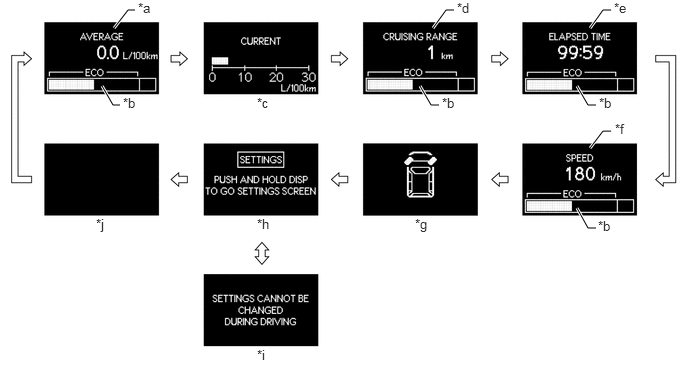
The display* switches in the following order each time the DISP switch is pressed:
- HINT:
-
*: for Optitron Meter
- HINT:
-
The illustration is a representative example.
| *a | Average Fuel Consumption | Displays the value that has been calculated by the meter ECU, which is based on the driven distance and the fuel consumption volume (fuel injection amount signal from ECM via CAN). |
| *b | Eco Driving Indicator Zone Display | Eco driving ratio based on acceleration is shown with a bar graph. |
| *c | Current Fuel Consumption | Displays the value that has been calculated by the meter ECU, which is based on the driven distance and the fuel consumption volume (fuel injection amount signal from ECM via CAN), provided that the ignition switch is ON. |
| *d | Cruising Range | Displays the value that has been calculated by the meter ECU, which is based on the fuel consumption data that the meter ECU continuously monitors and stores in its memory, and the residual fuel volume data, provided that the ignition switch is ON. |
| *e | Elapsed Time | Calculates and displays the elapsed time since the engine start signal was input into the combination meter assembly. |
| *f | Vehicle Speed | Displays the value that has been calculated by the combination meter assembly based on the vehicle speed signal. |
| *g | Steering Angle | Calculates and displays the steering angle, which is based on signals from the steering angle sensor. The steering angle is displayed in 7 stages (1 for neutral and 3 each for left and right) in accordance with the operation of the steering wheel. |
| *h | Setting | In the custom setting display, 3 items (Language, Units, Eco Driving Indicator Light ) can be set. |
| *i | Setting is disabled | Appears in the setting display when the vehicle speed exceeds 8 km/h. |
| *j | Blank | - |
Eco Driving Indicator Light and Eco Driving Indicator Zone Display
The Eco Driving Indicator starts to operate when the following conditions are met:
Ignition switch is ON.
Engine is running.
Shift lever is in D.
Vehicle is running.
The Eco Driving Indicator stops to operation when the following conditions are met:
Ignition switch is off.
Shift lever is in any position other than D.
Engine is not running.
| Vehicle Condition | Eco Driving Indicator Zone Display | Eco Driving Indicator Light |
|---|---|---|
| Stopped | 
|
Turns off |
| Eco Driving | 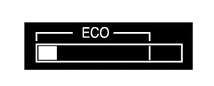
|
Turns on |
| Non-eco Driving | 
|
Turns off |
Warning Display (for Optitron Meter)
The warning and the advisory displays interrupt the image shown in the multi-information display if the display conditions are met.
| Priority | Display | Master Warning Light | Multi Buzzer |
|---|---|---|---|
| 1 | Door Open (While Driving) | Blinks | Sounds |
| Door Open | - | - | |
| TOYOTA Parking Assist-sensor System | - | - | |
| 2 | RELEASE PARKING BRAKE | Blinks | Sounds |
| 3 | HIGH AUTOMATIC TRANSMISSION FLUID TEMP. STOP VEHICLE IN A SAFE PLACE | Illuminates | Sounds |
| CHECK TRANSMISSION SYSTEM | Illuminates | Sounds | |
| 4 | MOONROOF OPEN | Blinks | Sounds |
| 5 | CHECK SONAR SYSTEM | Illuminates | Sounds |
| CLEAN SONAR | Illuminates | Sounds |
- HINT:
-
The items displayed differ by vehicle specification.
Custom Setting Function for Multi-information Display (for Optitron Meter)
Setting that can be customized are displayed in the following order each time the DISP switch is pressed. 3 items can be customized.

| Item | Customized Setting | Default Setting |
|---|---|---|
| LANGUAGE | ·
ENGLISH ·
FRENCH ·
SPANISH |
ENGLISH |
| UNITS | ·
miles ·
km (L/100km) |
·
miles: Models for U.S.A. ·
km (L/100km): Models for Canada |
| ECO LAMP | ·
ON ·
OFF |
ON |
- HINT:
-
When multiple warning conditions occur at the same time, the highest priority warning message is displayed first.