AUDIO / VIDEO AUDIO AND VISUAL SYSTEM DTC CHECK / CLEAR
CHECK DTC (CHECK USING GTS)
Connect the GTS to the DLC3.
Turn the ignition switch to ON.
Turn the GTS on.
Enter the following menus: Body Electrical / Navigation System / Trouble Codes.
Check for DTCs, and then write them down.
Check the details of the DTC(s) (See page Audio / Visual / Telematics>AUDIO / VIDEO>AUDIO AND VISUAL SYSTEM>DIAGNOSTIC TROUBLE CODE CHART).
CLEAR DTC (CLEAR USING GTS)
Connect the GTS to the DLC3.
Turn the ignition switch to ON.
Turn the GTS on.
Enter the following menus: Body Electrical / Navigation System / Trouble Codes.
Clear the DTCs.
START DIAGNOSTIC MODE
- HINT:
- ·
Illustrations may differ from the actual vehicle screen depending on the device settings and options. Therefore, some detailed areas may not be shown exactly the same as on the actual vehicle screen.
·Start diagnostic mode 15 seconds after turning the ignition switch to ON. Otherwise, some items cannot be checked.
Turn the ignition switch to ON.
While pressing and holding the "Audio" switch, operate the light control switch: Off → Tail → Off → Tail → Off → Tail → Off.
Diagnostic mode starts and the "Service Menu" screen will be displayed. Service inspection starts automatically and the result will be displayed.
FAILURE DIAGNOSIS
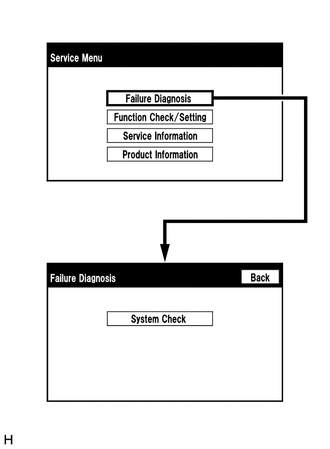
The "Failure Diagnosis" screen will be displayed by pressing the "Failure Diagnosis" switch on the "Service Menu" screen.
SYSTEM CHECK
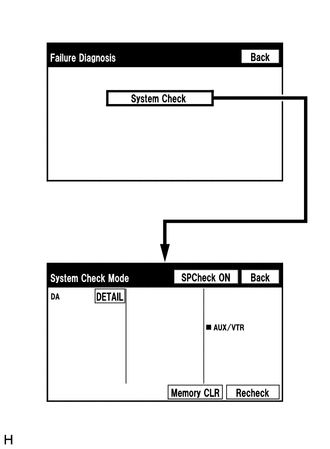
The "System Check Mode" screen will be displayed by pressing the "System Check" switch on the "Failure Diagnosis" screen.
CHECK DTC (CHECK USING SYSTEM CHECK MODE SCREEN)
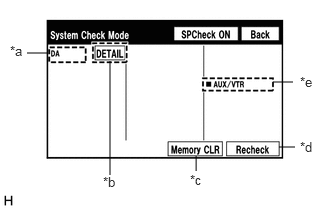
System check mode screen description
| Display | Content |
|---|---|
| *a: Device Name List No. 1 | ·
Device Name List No. 1 displays some of the devices that make up the audio and visual system. ·
The names of the components from Device Name List No. 1 are shown in the following table. |
| *b: Check Result | Result codes for all devices are displayed. |
| *c: Memory Clear | ·
Present and history DTCs and registered connected device names are cleared. ·
Press the "Memory CLR" switch for 3 seconds. |
| *d: Recheck | ·
A system check will be performed again after the memory is cleared. ·
The "Recheck" switch will dim during a system check. |
| *e: Device Name List No. 2 | ·
Device Name List No. 2 displays some of the devices that make up the audio and visual system. ·
The names of the components from Device Name List No. 2 are shown in the following table. |
| Name | Component | Connection Method |
|---|---|---|
| DA | Radio and display receiver assembly | - |
| Result | Meaning | Action |
|---|---|---|
| DETAIL | The device responds with a DTC. | Look up the DTC in "Unit Check Mode". |
| Name | Component | Connection Method |
|---|---|---|
| AUX/VTR | No. 1 stereo jack adapter assembly | Vehicle wire harness |
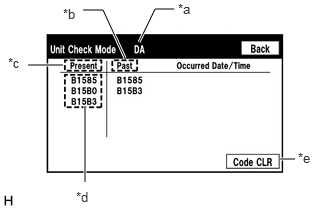
Unit check mode screen description
| Display | Content |
|---|---|
| *a: Device name | Target device |
| *b: History DTC | Diagnostic memory results and stored DTCs are displayed. |
| *c: Current DTC | DTCs output in the service check are displayed. |
| *d: DTC | DTC (Diagnostic Trouble Code) |
| *e: Diagnosis clear switch | Pushing this switch for 3 seconds clears the diagnostic memory data of the target device (Both response to diagnostic system check result and the displayed data are cleared.). |
- HINT:
- ·
This screen is updated once per second.
·A maximum of 6 DTCs can be displayed for history and present DTCs.
Read the system check result.
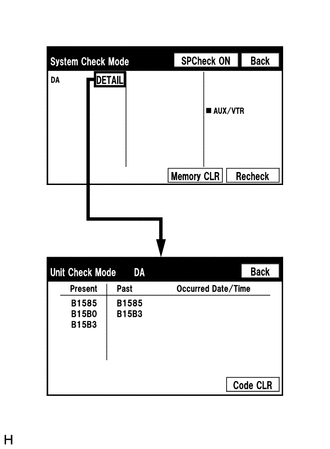
If the check result is "DETAIL", touch the displayed check result to view the results on the "Unit Check Mode" screen and record them.
- NOTICE:
-
A maximum of 6 DTCs can be displayed for history and present DTCs on the "Unit check mode" screen. Therefore, when 6 DTCs are displayed, troubleshoot those DTCs first and then check the "Unit check mode" screen again to see if any other DTCs are displayed.
- HINT:
- ·
When all results are "OK", this means that no DTCs are present.
·When proceeding to view the results of another device, press the "Back" switch to return to the "System Check Mode" screen. Repeat the step above to view the results of other devices.
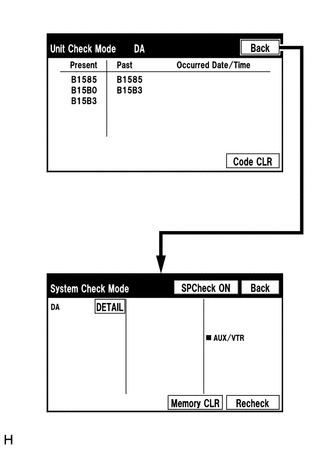
Check the details of the DTC(s) (See page Audio / Visual / Telematics>AUDIO / VIDEO>AUDIO AND VISUAL SYSTEM>DIAGNOSTIC TROUBLE CODE CHART).
DTC CLEAR/RECHECK (CLEAR USING SYSTEM CHECK MODE SCREEN)
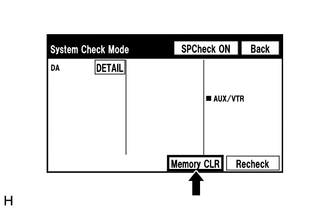
Clear DTCs
Press the "Memory CLR" switch for 3 seconds.
Confirm that the check results are cleared.
- HINT:
- ·
To clear the DTCs for a specific device, clear the DTCs using the "Unit Check Mode" screen.
·When clearing the DTCs using the "Unit Check Mode" screen, press the "Code CLR" switch for 3 seconds.
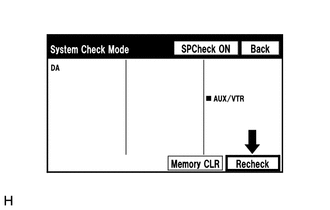
Recheck
Press the "Recheck" switch.
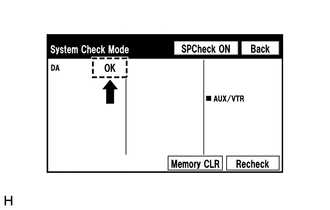
Confirm that all diagnostic codes are "OK" when the check results are displayed. If a code other than "OK" is displayed, troubleshoot again.
- HINT:
-
When DTCs are cleared using the "Unit Check Mode" screen, press the "Back" switch to return to the "System Check Mode" screen and perform this operation.
FINISH DIAGNOSTIC MODE
Turn the ignition switch off.