RM1440E
_56
Audio / Visual / Telematics
_056151
PARK ASSIST / MONITORING
_0274042
REAR VIEW MONITOR SYSTEM
D
PARK ASSIST / MONITORING REAR VIEW MONITOR SYSTEM OPERATION CHECK
CHECK INNER REAR VIEW MIRROR
a.
Turn the ignition switch to ON.
b.
Move the shift lever to R.
c.
0.625,1.698 0.625,0.76
0.625,0.76 0.792,0.76
false
0.625,1.698 0.625,0.76
0.625,0.76 0.792,0.76
true
1.542,2.25 1.542,2.531
1.542,2.531 1.448,2.531
true
1.802,2.24 1.948,2.979
1.948,2.979 1.844,2.979
true
0.844,0.688 1.021,0.865
0.177,0.177
10
false
*a
1.229,2.438 1.385,2.594
0.156,0.156
10
false
*b
1.625,2.896 1.813,3.042
0.188,0.146
10
false
*c
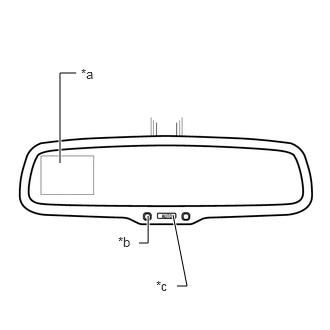
Check that the rear camera display in the inner rear view mirror assembly displays the rear view monitor image.
- HINT:
-
If the amber LED light is illuminated on the inner rear view mirror assembly with the ignition switch ON and the shift lever in R, this indicates that the monitor image has been canceled manually. Check if the image is displayed by pressing the display on/off button.
| *a | Rear Camera Display |
| *b | LED Indicator |
| *c | Display On/Off Button |