RM1440E
_58
Vehicle Interior
_056164
POWER OUTLETS (INT)
_0274154
REAR POWER OUTLET SOCKET
A
POWER OUTLETS (INT) REAR POWER OUTLET SOCKET REMOVAL
PROCEDURE

 85536
1.REMOVE POWER OUTLET SOCKET BEZEL
a.
2.823,1.063 2.156,1.063
false
2.875,1 3.042,1.156
0.167,0.156
10
false
*1
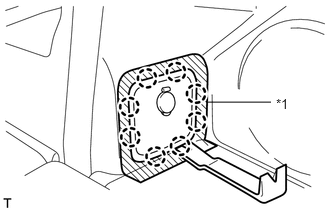
Put protective tape around the power outlet socket bezel.
b.
Using a moulding remover, detach the 8 claws and remove the bezel.
| *1 | Protective Tape |
c.
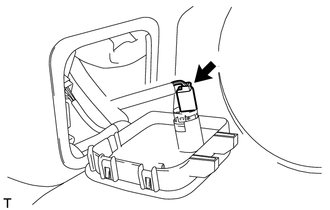
Disconnect the connector.
85530B
2.REMOVE REAR POWER POINT SOCKET ASSEMBLY
a.
1.301,0.917 0.539,0.917
false
0.315,0.815 0.503,0.985
0.187,0.170
10
*1
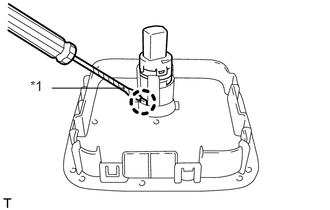
Using a screwdriver, detach the claw and remove the power point socket.
| *1 | Protective Tape |
- HINT:
-
Tape the screwdriver tip before use.
85535F
3.REMOVE REAR POWER POINT SOCKET COVER
a.
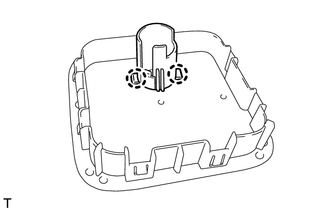
Detach the 2 claws and remove the socket cover.