Turn the ignition switch off.
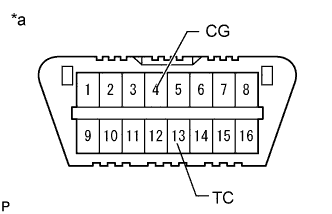 |
Using SST, connect terminals 13 (TC) and 4 (CG) of the DLC3.
- SST
- 09843-18040
| *a | Front view of DLC3 |
Turn the ignition switch to ON.
Read and record any DTCs from the tire pressure warning light in the combination meter.
- HINT:
- When only 1 DTC is stored, the light outputs the same code after an interval of 4.5 seconds. Example: When DTC 21 is stored, the light blinks twice, turns off for 1.5 seconds, blinks once, turns off for 4.5 seconds, and then repeats this output pattern.
- When 2 or more DTCs are stored, the light outputs the codes with an interval of 2.5 seconds between each different code and the output of all codes repeats after an interval of 4.5 seconds.
- If the tire pressure warning light does not output any DTCs or the tire pressure warning light turns on and goes off repeatedly at 0.25 second intervals, inspect the tire pressure warning light circuit or TC and CG terminal circuit.
Trouble Area See page Tire pressure warning light circuit Click here TC and CG terminal circuit Click here - If 2 or more malfunctions are indicated at the same time, the lowest numbered DTC is output first.
Refer to the Diagnostic Trouble Code Chart (Click here) for DTC information.
After completing the check, turn the ignition switch off and remove SST from the DLC3.
- SST
- 09843-18040