Grip the No. 2 instrument cluster finish panel garnish and pull it diagonally upward toward the rear to detach the 5 clips and remove the No. 2 instrument cluster finish panel garnish.
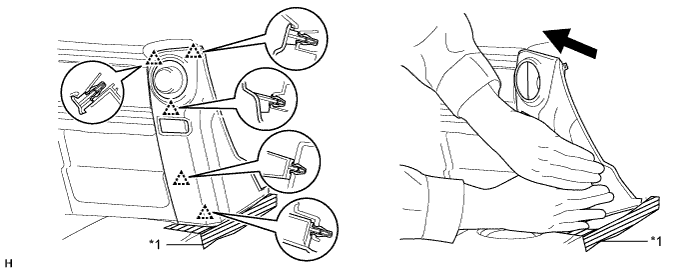
| *1 | Protective Tape | - | - |
DCM(TELEMATICS TRANSCEIVER) > REMOVAL |
| 1. DISCONNECT CABLE FROM NEGATIVE BATTERY TERMINAL |
| 2. REMOVE DOOR SCUFF PLATE ASSEMBLY RH |
| 3. REMOVE COWL SIDE TRIM BOARD RH |
| 4. REMOVE NO. 2 INSTRUMENT CLUSTER FINISH PANEL GARNISH |
Open the instrument cluster finish panel lid.
Put protective tape around the No. 2 instrument cluster finish panel garnish.
Grip the No. 2 instrument cluster finish panel garnish and pull it diagonally upward toward the rear to detach the 5 clips and remove the No. 2 instrument cluster finish panel garnish.
| *1 | Protective Tape | - | - |
| 5. REMOVE NO. 2 INSTRUMENT PANEL UNDER COVER SUB-ASSEMBLY |
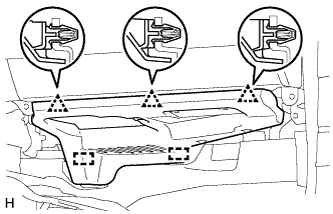 |
Detach the 3 clips and 2 guides to remove the No. 2 instrument panel under cover sub-assembly.
| 6. REMOVE LOWER INSTRUMENT COVER LH |
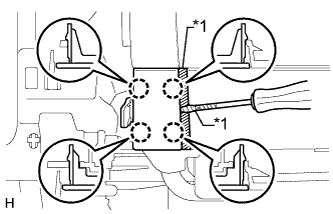 |
Put protective tape around the lower instrument cover LH.
Using a screwdriver, detach the 4 claws to remove the lower instrument cover LH.
| *1 | Protective Tape |
| 7. REMOVE LOWER NO. 2 INSTRUMENT PANEL AIRBAG ASSEMBLY |
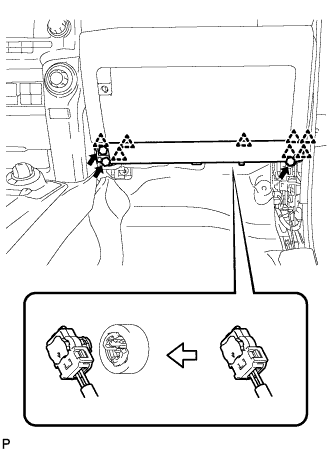 |
Remove the 3 bolts.
Detach the 8 claws and remove the instrument panel airbag.
Disconnect the connector.
| 8. REMOVE INSTRUMENT PANEL BOX DOOR COVER |
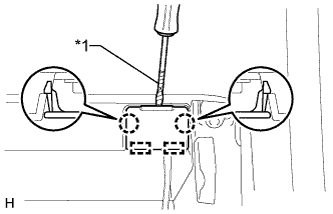 |
Using a screwdriver, detach the 2 claws and 2 guides to remove the instrument panel box door cover.
| *1 | Protective Tape |
| 9. REMOVE LOWER INSTRUMENT PANEL SUB-ASSEMBLY |
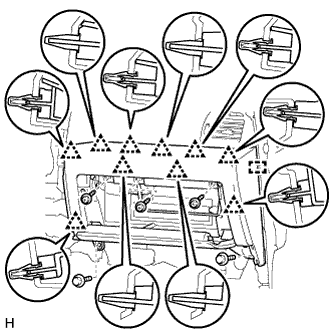 |
Remove the 3 screws <B> and 2 bolts <C>.
Detach the 10 clips and guide.
Disconnect each connector and remove the lower instrument panel sub-assembly.
| 10. REMOVE DCM (TELEMATICS TRANSCEIVER) |
Disconnect the connectors.
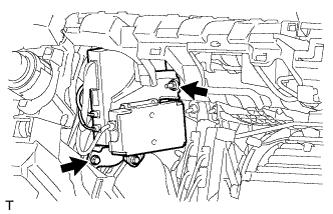 |
Remove the bolt, nut and DCM (telematics transceiver) with bracket from the vehicle.
| 11. REMOVE MAYDAY BATTERY WITH BRACKET |
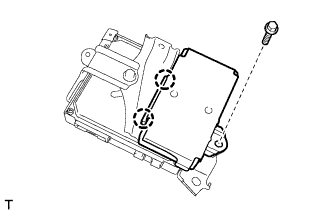 |
Remove the bolt.
Detach the 2 claws and remove the mayday battery with bracket.
| 12. REMOVE NO. 1 TELEPHONE BRACKET |
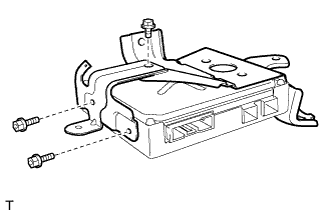 |
Disconnect the 2 connectors.
Remove the 3 bolts and No. 1 telephone bracket.
| 13. REMOVE NO. 2 TELEPHONE BRACKET |
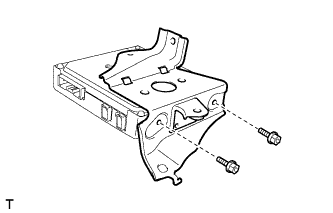 |
Remove the 2 bolts and No. 2 telephone bracket.