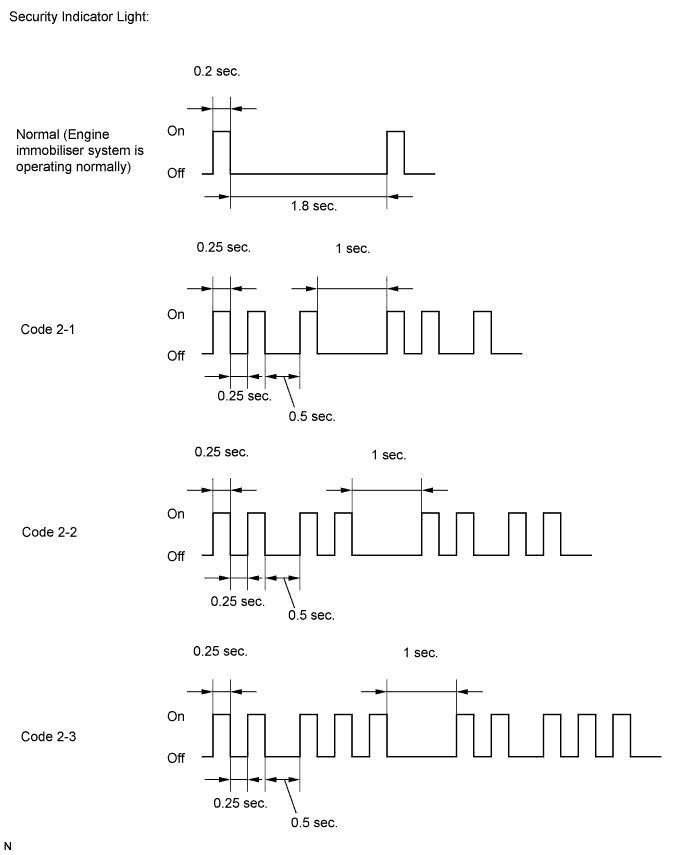
ENGINE IMMOBILISER SYSTEM (w/o Smart Key System) > REGISTRATION |
| 1. DESCRIPTION OF CODE REGISTRATION |
| 2. KEY REGISTRATION PROCEDURES WHEN ADDING OR REPLACING KEY OR WHEN KEY IS LOST |
| Customer Request/Condition | Registration Procedure Condition | Procedure | Refer to |
| Registering additional key | Customer must bring at least 1 master key | 1. Register additional keys as necessary (additional key ID registration) | PROCEDURE "B" |
| Customer must bring at least 1 master key | 1. Using remaining key, clear all registered keys except one (key ID erasure) | PROCEDURE "C" |
| 2. Register additional keys as necessary (additional key ID registration) | PROCEDURE "B" | ||
| All keys are lost | - | 1. Reset all keys (all keys ID erasure (key code reset)) | PROCEDURE "D" |
| 2. Register all keys (new key ID registration) | PROCEDURE "A" |
| 3. PART REPLACEMENT AND KEY REGISTRATION PROCEDURES |
The following table shows ECU replacement and key registration procedures in case the malfunctioning ECU has been specified after troubleshooting the engine immobiliser system.
| Malfunctioning ECU | Procedure | Refer to |
| Transponder key ECU | 1. Replace transponder key ECU | - |
| 2. Reregister all keys | PROCEDURE "A" | |
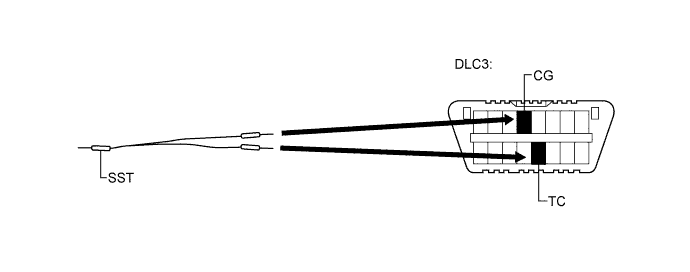
| 3. Using SST (09843-018040), connect terminals TC and CG of DLC3 | PROCEDURE "E" | |
| 4. Turn ignition switch to ON and leave it as is for 30 minutes | ||
| ECM | 1. Replace ECM | - |
| 2. Check that engine starts and stays on for more than 3 seconds | PROCEDURE "E" | |
| Transponder key ECU and ECM | 1. Replace transponder key ECU | - |
| 2. Replace ECM | - | |
| 3. Reregister all keys | PROCEDURE "A" | |
| 4. Check that engine starts and stays on for more than 3 seconds | PROCEDURE "E" |
| 4. KEY REGISTRATION PROCEDURES |
PROCEDURE "A"
New key code registration
| Procedure | Security Indicator Light Condition |
| 1. Start registration | Security indicator light is blinking |
| 2. Insert one of master keys into ignition key cylinder | Security indicator light turns on |
| 3. Enter the following menus: (1) Body Electrical (2) Immobiliser (3) Utility (4) Key Registration
| Security indicator light turns off for 1 sec. and then turns on |
| 4. Remove key | Security indicator light turns on
|
| 5. Register another key? YES: Go to step 6 NO: Go to step 7
| |
| 6. Insert another key into ignition key cylinder. Then go to step 4. | Security indicator light turns off for 1 sec. and then turns on |
| 7. End of registration | |
End new key code registration mode (when not using the Techstream)
End new key code registration mode (when using the Techstream)

PROCEDURE "B"
Additional key code registration
| Procedure | Security Indicator Light Condition | Time (Completion of Operation) |
| 1. Start registration | Security indicator light is blinking | - |
| 2. Insert an already registered master key into the ignition key cylinder, turn the ignition switch to ON, and turn the Techstream on | Security indicator light turns off | - |
| 3. Enter the following menus: (1) Body Electrical (2) Immobiliser (3) Utility (4) Key Registration
| Security indicator light turns on | |
| 4. Perform following operation: (1) Remove master key from ignition key cylinder (2) Insert master key back into ignition key cylinder (3) Turn ignition switch to ON (4) Push Next on the Techstream | Security indicator light turns on | Within 120 sec. of instruction on the Techstream |
| 5. Remove master key, and then push Next on the Techstream | Security indicator light turns on | Within 20 sec. of instruction on the Techstream |
| 6. Insert unregistered key into ignition key cylinder, and then push Next on the Techstream | Security indicator light is blinking
| Within 10 sec. |
7. After 60 sec., key is registered
| Security indicator light turns off | - |
| 8. Screen displays number of registered keys | ||
| 9. Register another key? YES: Go to step 2 NO: Go to step 10 | ||
| 10. End of registration | ||
PROCEDURE "C"
Clear all key codes except master key
| Procedure | Security Indicator Light Condition | Time (Completion of Operation) |
| 1. Start of erasure | Security indicator light is blinking | - |
| 2. Enter the following menus: (1) Body Electrical (2) Immobiliser (3) Utility (4) Transponder Code Erasure
| Security indicator light turns on for 1 sec. then turns off | - |
| 3. Perform following operation: (1) Insert registered master key into ignition key cylinder (2) Turn ignition switch to ON (3) Push Next on the Techstream | Security indicator light turns off | Within 120 sec. of instruction on the Techstream |
4. Remove master key
| Security indicator light turns on | Within 10 sec. of instruction on the Techstream |
| 5. End of erasure | ||
PROCEDURE "D"
Erasure of all key codes
| Procedure | Security Indicator Light Condition | Time (Completion of Operation) |
| 1. Using TIS, confirm that user and vehicle match | Security indicator light is blinking | - |
| 2. Start of erasure | Security indicator light is blinking | - |
| 3. Insert previously registered master key or unregistered key into ignition key cylinder and turn ignition switch to ON | Security indicator light turns off | Within 120 sec. |
| 4. Enter the following menus: (1) Body Electrical (2) Immobiliser (3) Utility (4) Immobiliser Code Reset | Security indicator light turns on for 1 sec. then turns off | Within 15 min. |
| 5. Completion of erasure of all key codes is displayed | Security indicator light turns on | - |
| 6. End of erasure | ||
PROCEDURE "E"
ECU - ECM communication ID registration
After replacing the transponder key ECU

| Procedure | Security Indicator Light Condition |
1. Insert previously registered key into ignition key cylinder and turn ignition switch to ON
| Security indicator light turns off |
| 2. Leave vehicle as is for 30 min. | |
| 3. Turn ignition switch off and disconnect terminals 13 (TC) and 4 (CG) | |
| 4. Start engine | |
| 5. Check that engine starts and stays on for more than 3 sec. Registration is complete |
After replacing the ECM
| Procedure | Security Indicator Light Condition |
| 1. Insert previously registered key into ignition key cylinder | Security indicator light turns off. |
| 2. Start engine | |
| 3. Check that engine starts and stays on for more than 3 sec. Registration is complete |
After replacing the transponder key ECU and ECM
| Procedure | Security Indicator Light Condition |
| 1. Insert previously registered key into ignition key cylinder | Security indicator light turns off |
| 2. Start engine | |
| 3. Check that engine starts and stays on for more than 3 sec. Registration is complete |