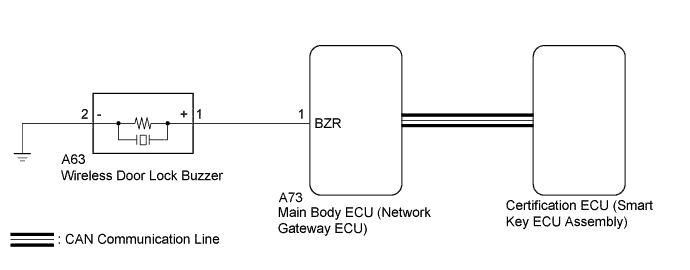
ENTRY AND START SYSTEM (for Entry Function) > Wireless Door Lock Buzzer Does not Sound |
| 1.PERFORM ACTIVE TEST USING GTS (WIRELESS BUZZER) |
Connect the GTS to the DLC3.
Turn the engine switch on (IG).
Turn the GTS on.
Enter the following menus: Body Electrical / Main Body / Active Test.
According to the display on the GTS, perform the Active Test.
| Tester Display | Test Part | Control Range | Diagnostic Note |
| Wireless Buzzer | Wireless door lock buzzer | OFF/ON | - |
|
| ||||
| OK | ||
 | ||
| ||
| 2.CHECK HARNESS AND CONNECTOR (MAIN BODY ECU - WIRELESS DOOR LOCK BUZZER AND BODY GROUND) |
Disconnect the A63 wireless door lock buzzer connector.
Disconnect the A73 main body ECU (network gateway ECU) connector.
Measure the resistance according to the value(s) in the table below.
| Tester Connection | Condition | Specified Condition |
| A63-1 (+) - A73-1 (BZR) | Always | Below 1 Ω |
| A63-2 (-) - Body ground | Always | Below 1 Ω |
| A63-1 (+) - Body ground | Always | 10 kΩ or higher |
|
| ||||
| OK | |
 |
| 3.REPLACE WIRELESS DOOR LOCK BUZZER |
Temporarily replace the wireless door lock buzzer with a new or normally functioning one (Click here).
| NEXT | |
|
| 4.PERFORM ACTIVE TEST USING GTS |
Connect the GTS to the DLC3.
Turn the engine switch on (IG).
Turn the GTS on.
Enter the following menus: Body Electrical / Main Body / Active Test.
According to the display on the GTS, perform the Active Test.
| Tester Display | Test Part | Control Range | Diagnostic Note |
| Wireless Buzzer | Wireless door lock buzzer | OFF/ON | - |
|
| ||||
| OK | ||
| ||
| ||

