 |
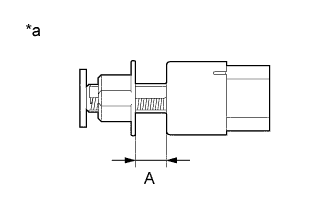
Measure dimension A in the illustration when the vehicle is brought in.
- NOTICE:
- Perform the measurement before removing the stop light switch assembly.
| *a | Stop light switch assembly installed (When vehicle is brought in.) |
STOP LIGHT SWITCH > ADJUSTMENT |
| 1. CHECK THE DATA LIST FOR STOP LIGHT SWITCH ASSEMBLY |
Turn the ignition switch off.
Connect the GTS to the DLC3.
Turn the ignition switch to ON.
Enter the following menus: Chassis / ABS/VSC/TRC / Data List / Stop Light SW and Master Cylinder Pressure Sensor 1 (Click here).
Without the brake pedal depressed, check that the Data List "Stop Light SW" is "OFF."
Depress the brake pedal slowly, and check that the Data List "Master Cylinder Pressure Sensor 1" is within the standard value when the Data List "Stop Light SW" is turned "ON".
Check for DTCs.
| 2. CHECK THE STOP LIGHT SWITCH ASSEMBLY INSTALLATION POSITION |
|
Measure dimension A in the illustration when the vehicle is brought in.
| *a | Stop light switch assembly installed (When vehicle is brought in.) |
| 3. ADJUST STOP LIGHT SWITCH ASSEMBLY |
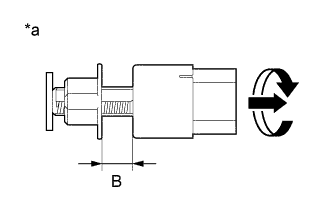 |
Measure dimension B after installing the stop light switch assembly, and make adjustment so that it is larger than dimension A.
| *a | Stop light switch assembly installed (After Adjustment) |
After adjusting, check the value for the "Master Cylinder Pressure Sensor 1" on the Data List. If the value is outside the standard value, perform procedure (a) again.