METER / GAUGE / DISPLAY METER / GAUGE SYSTEM GENERAL/CONTROL/DETAILS DETAILS
FUNCTION
Except Models with TFT LCD Type Multi-information Display
Buzzer Function
The table below shows the warning and reminder functions of the buzzer in the combination meter assembly.
| Priority | Item |
|---|---|
| 1 | Speed Limiter Warning*1 |
| 2 | Front Seat Belt Warning |
| 3 | EPS Warning |
| 4 | Key Reminder |
| 5 | Hill Start Assist Control Warning |
| 6 | Engine Immobiliser Matching Completion Report |
| 7 | Shift Operation Reject Warning*2 |
| 8 | Rev/Red Zone Warning*3 |
| 9 | Light Reminder |
- HINT:
-
*1: Models for G.C.C. countries
-
*2: Models with A/T
-
*3: Models with rev indicator/red zone indicator
Multi-information Display Function
| Display | Display Item | Outline |
|---|---|---|
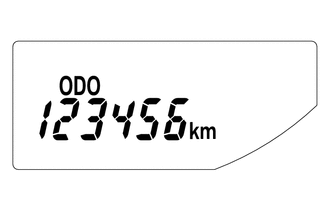
|
Odometer Display | Displays the odometer. |
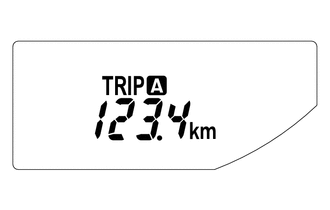
|
Trip Meter A Display | Displays the trip meter A. |
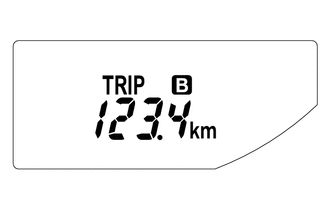
|
Trip Meter B Display | Displays the trip meter B. |
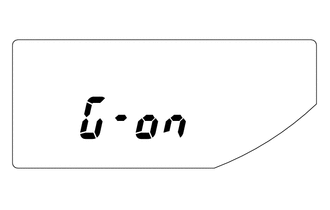
|
M/T Shift and Shift-up Indicator Customize Display*1
(While IG OFF) |
·
Displays whether M/T shift and shift-up indicator display control is off or on. ·
When the ignition is off and the trip meter B is being displayed, pressing the ODO/TRIP switch quickly changes the display mode to M/T shift and shift-up indicator customize. Holding the ODO/TRIP switch down can toggle it between off and on. ·
Initial setup is off. |
|
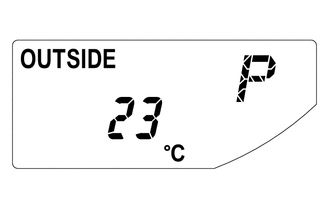
Outside Temperature Display | Displays the temperature outside.*2 |
|
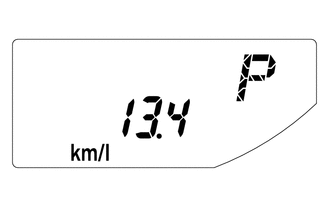
Instant Fuel Consumption Display | ·
Displays the value that has been calculated by the combination meter assembly, which is based on the distance driven and the fuel consumption volume. ·
The display updates constantly. |
|
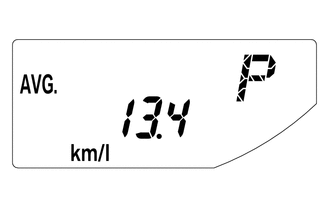
Average Fuel Consumption After Refueling Display | ·
Displays the value that has been calculated by the combination meter assembly, which is based on the distance driven after reset and the fuel consumption. ·
Holding down the DISP switch will reset the fuel consumption meter. ·
The display updates every 10 seconds. |
|
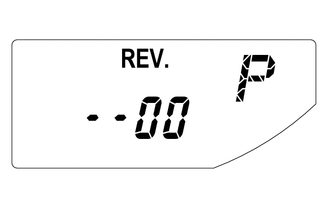
Rev Indicator/Red Zone Indicator Customize Display*3
(While a Vehicle Stop) |
·
Displays the starting engine revolution count for rev indicator light-up. ·
While rev indicator/red zone indicator customize is indicated, holding down the DISP switch changes it to setup mode. The starting engine revolution count for rev indicator light-up (2000 to 7400 revolutions) and rev/red zone buzzer on/off can be set. ·
When setting the rev indicator, the rev indicator will light up and the tachometer will display the set engine revolution count for 1 second with the ignition on. ·
The initial setup is the function off state. |
- HINT:
-
*1: Models with M/T shift and shift-up indicator customize display function for M/T
-
*2: The indication of the outside temperature is influenced by vehicle speed, and the indication during a stop (low vehicle speed) is not updated, but is not abnormal.
-
*3: Models with rev indicator/red zone indicator
Models with TFT LCD Type Multi-information Display
Buzzer Function
The table below shows the warning and reminder functions of the buzzer in the combination meter assembly.
| Priority | Item |
|---|---|
| 1 | Speed Limiter Warning*1 |
| 2 | Front Seat Belt Warning |
| 3 | EPS Warning |
| 4 | Entry and Start System Warning |
| 5 | Hill Start Assist Control Warning |
| 6 | Multi-information Display Warning |
| 7 | Engine Immobiliser Matching Completion Report |
| 8 | Shift Operation Reject Warning*2 |
| 9 | Rev/Red Zone Warning |
| 10 | Light Reminder |
- HINT:
-
*1: Models for G.C.C. countries
-
*2: Models with A/T
Setting Function
The items displayed on the multi-information display can be customized.
The items can be selected on the information setting screen.
| Item | Available Setting |
|---|---|
| Initial Performance | The videos display on the multi-information display can be switched:
·
ON (Default) ·
OFF
|
| REV Indicator | ·
The rev indicator setting on the multi-information display can be adjusted:
·
The rev zone warning buzzer can be switched: -
ON -
OFF (Default) |
| GSI Customize* | The GSI (Gear Shift Indicator) customize setting on the multi-information display can be switched: |
| Language | The language used on the multi-information display can be selected:
·
English ·
French ·
Spanish ·
German ·
Italian ·
Russian ·
Chinese ( - 2017/10) ·
Turkish ·
Arabic (2017/10 - )
|
| Unit | The unit displayed on the multi-information display can be selected:
·
miles (MPG (US)) ·
miles (MPG (Imperial)) ·
km (L/100 km) ·
km (km/L)
|
| Initialization | The setting items on the multi-information display can be in initialized. |
- HINT:
-
*: Shown or hidden according to the destination.
Warning Mode Function
When a warning is necessary, the warning display interrupts the display in the multi-information display.
The master warning light may illuminate or blink and the buzzer in the combination meter assembly may sound depending on the item displayed on the multi-information display.
| Priority | Display | Master Warning light | Buzzer |
|---|---|---|---|
| 1 | Brake Malfunction | Illuminates | Sounds |
| 2 | Door Open (While Driving) | Blinks | - |
| 3 | Door Open | - | - |
| 4 | Auto Power Off to Conserve Battery | - | - |
| 5 | Shift to P position when parked | Blinks | Sounds |
| 6 | Check Power Steering System | Illuminates | Sounds |
| 7 | Key not detected | Blinks | Sounds |
| 8 | Check SRS Airbag System | Illuminates | Sounds |
| 9 | Check ABS | - | Sounds |
| 10 | Engine Coolant High Temperature | Illuminates | Sounds |
| 11 | Check Access System with Elec. Key | Blinks | Sounds |
| 12 | Transmission Fluid High Temperature | Illuminates | Sounds |
| 13 | Turn Power Off | Blinks | Sounds |
| 14 | Key detected in vehicle | Blinks | Sounds |
| 15 | Turn Light Off | Blinks | Sounds |
| 16 | Depress brake pedal, touch engine switch with key | Blinks | Sounds |
| 17 | Depress clutch pedal, touch engine switch with key | Blinks | Sounds |
| 18 | Depress brake pedal and push engine switch to start | Blinks | Sounds |
| 19 | Depress clutch pedal and push engine switch to start | Blinks | Sounds |
| 20 | Shift to P position to Start | Blinks | Sounds |
| 21 | Steering Lock active | Blinks | Sounds |
| 22 | Key Battery Low | Illuminates | Sounds |
| 23 | Fuel Low | - | - |
| 24 | Roads may be icy | - | - |
| 25 | No Messages | - | - |
OPERATION
Except Models with TFT LCD Type Multi-information Display
Switching the Multi-information Display
The multi-information display changes in the order shown below by pressing the ODO/TRIP switch or DISP switch.
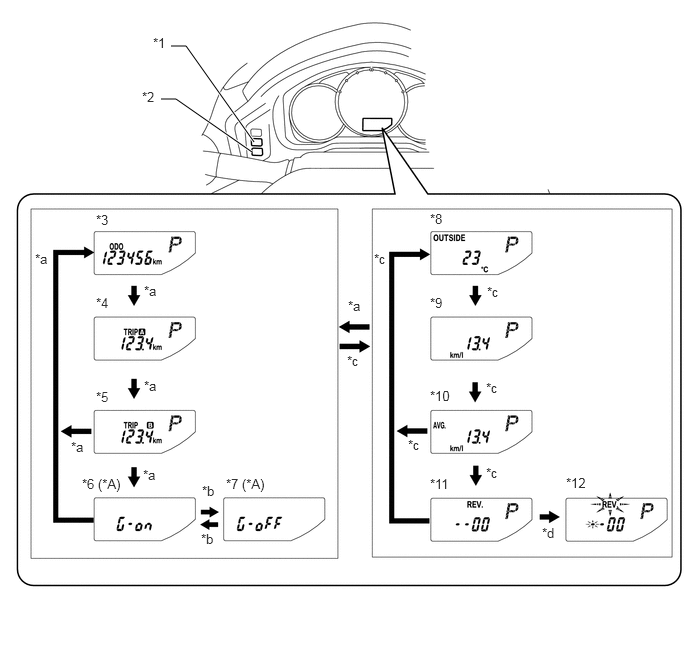
| *A | Models with M/T Shift and Shift-up Indicator Customize Display Function for M/T | - | - |
| *1 | ODO/TRIP Switch | *2 | DISP Switch |
| *3 | Odometer Display | *4 | Trip Meter A Display |
| *5 | Trip Meter B Display | *6 | M/T Shift and Shift-up Indicator Customize Display: G-On (While IG OFF) |
| *7 | M/T Shift and Shift-up Indicator Customize Display: G-Off (While IG OFF) | *8 | Outside Temperature Display |
| *9 | Instant Fuel Consumption Display | *10 | Average Fuel Consumption After Refueling Display |
| *11 | Rev Indicator/Red Zone Indicator Customize Display (Models with Rev Indicator/Red Zone Indicator) (While a Vehicle Stop) | *12 | Rev Indicator/Red Zone Indicator Customize Display Setup Mode (Models with Rev Indicator/Red Zone Indicator) (While a Vehicle Stop) |
| *a | ODO/TRIP switch short press | *b | ODO/TRIP switch long press |
| *c | DISP switch short press | *d | DISP switch long press |
Rev Indicator/Red Zone Indicator Customize Setup Mode Display
The starting engine revolution count for rev indicator light-up (2000 to 7400 revolutions) and rev/red zone buzzer on/off can be set.
When average fuel consumption is indicated while the vehicle is stopped, pressing the DISP switch quickly displays the rev indicator/red zone indicator customize mode. Holding down the DISP switch changes it to setup mode.
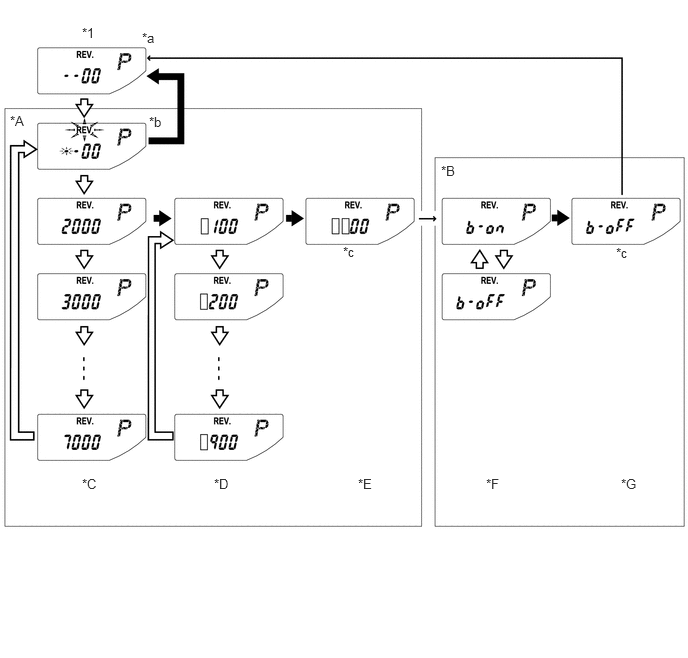
| *A | Rev Indicator Revolution Count Setup Mode | *B | Rev/Red Zone Buzzer On/Off Setup Mode |
| *C | Thousands-Digit Setup Screen | *D | Hundreds-Digit Setup Screen |
| *E | Revolution Count Confirmation Screen | *F | Buzzer On/Off Setup Screen |
| *G | Buzzer Setup Confirmation Screen | - | - |
| *1 | Rev Indicator/Red Zone Indicator Customize Display | - | - |
| *a | Initial display. Displays previous revolution setting if a previous setting value exists. | *b | "REV." and setable area blink during setup mode. |
| *c | Switch input invalid (1 second indication) | - | - |

|
DISP switch short press | 
|
DISP switch long press |
| → | Automatic transition | [] | Setting value |
Models with TFT LCD Type Multi-information Display
Switching the Multi-information Display
Display Function Flow
The multi-information display flow can be switched as shown in the flow chart below:
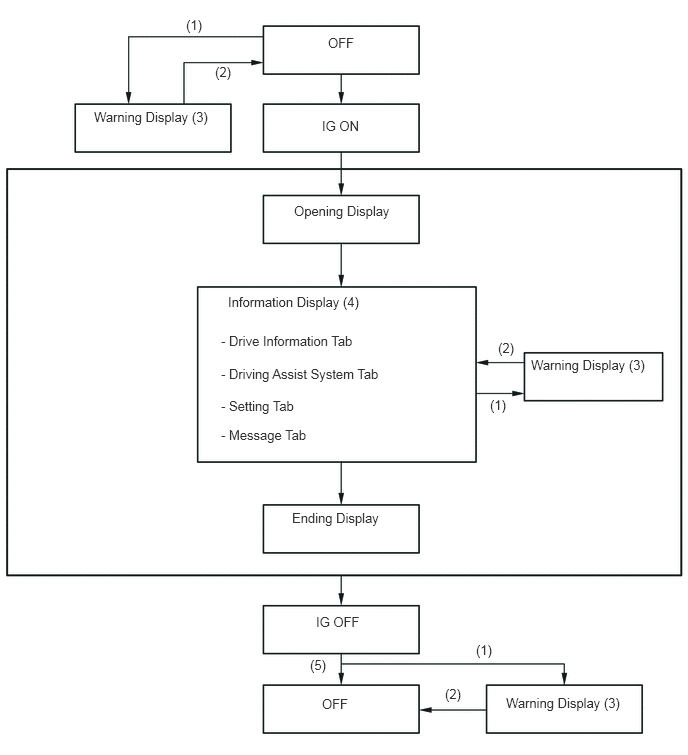
| Item | Display Change Condition |
|---|---|
| (1) | Conditions are met. |
| (2) | Conditions are not met. |
| (3) | If there are multiple display requests, items will be displayed in sequence. |
| (4) | Item or display is selected by operating the steering pad switch assembly switch. |
| (5) | ODO and remaining fuel display is displayed for a certain period of time after the ignition switch is turned off and the ODO/TRIP switch is pressed. |
Display Tab Operation
The information currently displayed can be switched using the RIGHT/LEFT switch on the steering pad switch assembly.
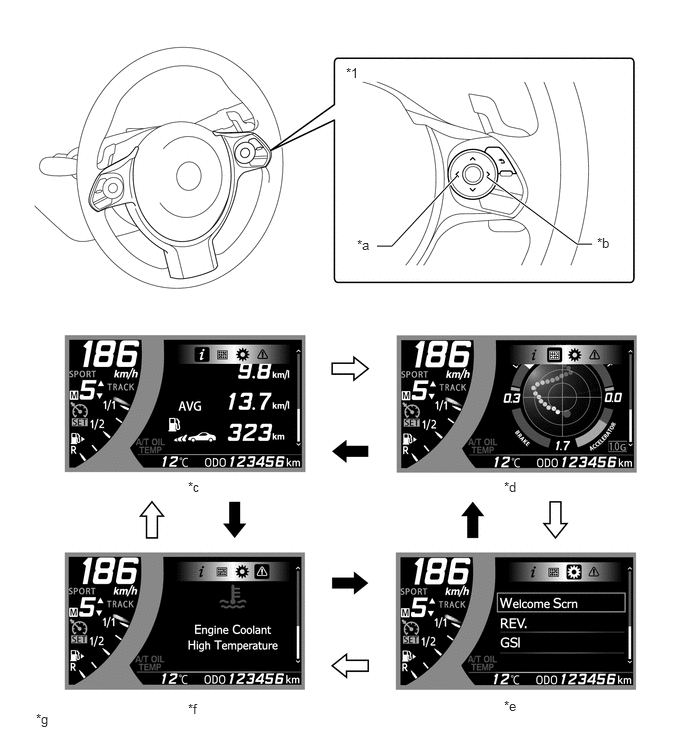
| *1 | Steering Pad Switch Assembly | - | - |
| *a | LEFT Switch | *b | RIGHT Switch |
| *c | Drive Information | *d | Driving Assist System Information |
| *e | Setting | *f | Message |
| *g | The illustrations shown are examples only. | - | - |
|
|
Pressing the LEFT switch |
|
Pressing the RIGHT switch |
The information currently displayed can be switched using the UP/DOWN switch and BACK switch on the steering pad switch assembly.
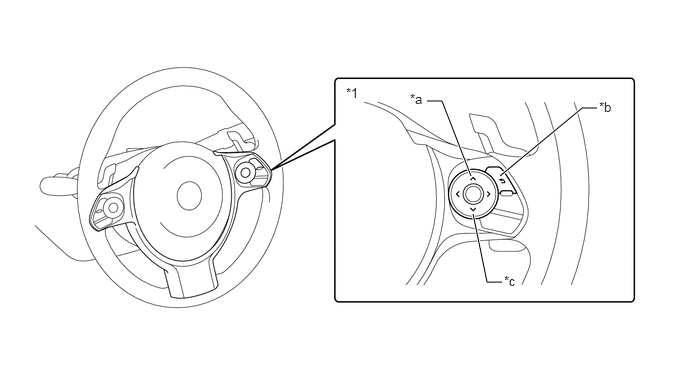
| *1 | Steering Pad Switch Assembly | - | - |
| *a | UP Switch | *b | BACK Switch |
| *c | DOWN Switch | - | - |
| Tab | Display |
|---|---|
| Drive information | Drive information 1
·
Instantaneous fuel consumption ·
Average fuel consumption ·
Cruising distance |
| Drive information 2
·
Average vehicle speed ·
Continuous operation time ·
Continuous operation distance |
|
| Drive information 3
·
Coolant temperature gauge ·
Oil temperature gauge ·
Voltage gauge |
|
| Driving Assist System Information | G meter
·
G ball (past 20 items)* ·
Steering angle gauge ·
Brake pedal force ·
Accelerator position |
| G meter and peak hold
·
G ball (with peak hold)* ·
Steering angle gauge ·
Brake pedal force ·
Accelerator position |
|
| Torque curve
·
Torque curve ·
Power curve |
|
| Stop watch (Lap timer) |
- HINT:
-
*: This display is intended for use as a guideline. Depending on factors such as the road surface condition, temperature and vehicle speed, the display may not show the actual condition of the vehicle.