PARK ASSIST / MONITORING MONITOR SYSTEM GENERAL/CONTROL/DETAILS DETAILS
FUNCTION OF MAIN COMPONENTS
The rear view monitor system consists of the following parts:
| Component | Function | |
|---|---|---|
| Inner Rear View Mirror Assembly | Display | Displays the images of the area to the rear of the vehicle from the rear television camera assembly. |
| Rear Television Camera Assembly | The rear television camera assembly combines a parking guide line with a video of the area behind the vehicle and transmits this video signal to the inner rear view mirror assembly. | |
| Back-up Light Switch Assembly*1 | Sends an R shift position signal to the inner rear view mirror assembly. | |
| Park/Neutral Position Switch Assembly*2 | ||
- HINT:
-
*1: Models with M/T
-
*2: Models with A/T
SYSTEM CONTROL
This system operates when both the following conditions have been met:
Ignition switch is ON
Shift lever is in R.
FUNCTION
Area Displayed on Screen
On the display, objects on the right of the vehicle appear on the right side of the display panel, and objects on the left of the vehicle appear on the left side of the display panel.
The rear television camera assembly uses a wide-angle lens. The perceived distance from images that appear on the screen differs from the actual distance.
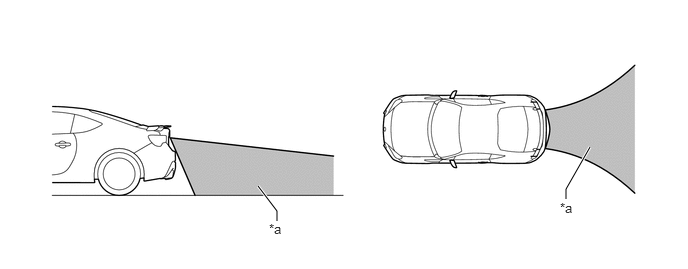
| *a | Area Displayed on Screen | - | - |
- NOTICE:
-
Area displayed on screen may vary according to vehicle status or road conditions. The area covered by the rear television camera assembly is limited. The rear television camera assembly dose not show objects close to either corner of the bumper or under bumper.
Warning Message
A warning message appears at the bottom of the screen under the following conditions.
| Warning Message | Condition |
|---|---|
| Check Surroundings Before Backing Up | This message always appears during system operation. |
CONSTRUCTION
Rear Television Camera Assembly
The rear television camera assembly consists of a wide-angle lens and a Complementary Metal Oxide Semiconductor (CMOS).
An image captured by the rear television camera assembly lens is converted into electrical signals according to the light intensity by using the CMOS image element, and the signals are then output to the inner rear view mirror assembly.
An image captured by the rear television camera assembly is converted into electrical signals according to the light intensity by a CMOS image element, a parking guide line signal is added, and then the signals are output to the inner rear view mirror assembly.
The image output from the rear television camera assembly is reversed to much the rear view seen from the inner rear view mirror assembly. Therefore, the rear view actually seen is displayed on the screen in the horizontal reverse.
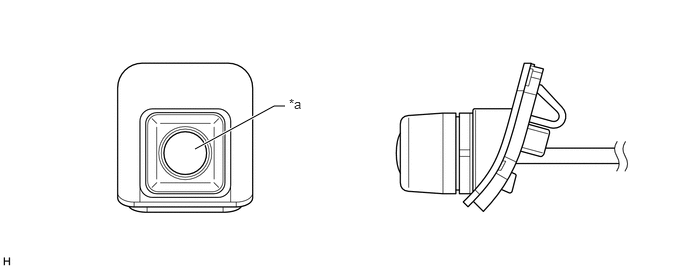
| *a | Wide-angle Lens | - | - |
Inner Rear View Mirror Assembly (Rear View Monitor Display)
A 3.3 inch display is built into the inner rear view mirror assembly.
When reverse (R) is selected, the display shows the image from the rear television camera assembly.
When the video is being displayed on the inner rear view mirror assembly, the guide lines for park assist are also displayed.
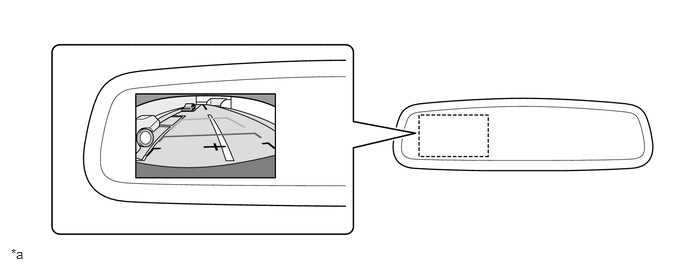
| *a | The illustration shown is an example only. The illustration may differ from the actual vehicle screen. | - | - |
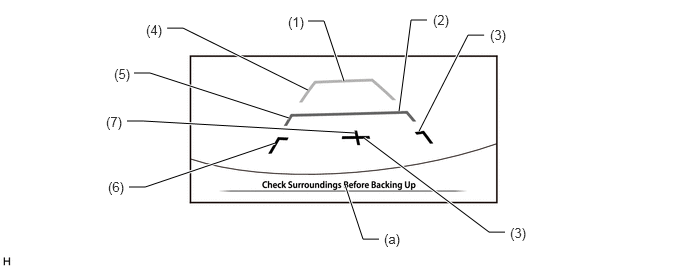
A description of the parking guide line mode display is provided in the following diagram.
| Item | Description | |
|---|---|---|
| (1) | Distance Guide Line (Green) | Indicates a position on the ground about 3.0 m (9.8 ft.) behind the rear bumper. |
| (2) | Distance Guide Line (Yellow) | Indicates a position on the ground about 1.0 m (3.3 ft.) behind the rear bumper. |
| (3) | Distance Guide Line (Red) | Indicates a position on the ground about 0.5 m (1.6 ft.) behind the rear bumper. |
| (4) | Vehicle Width Extension Guide Lines (Green) | Indicate the estimated vehicle width. |
| (5) | Vehicle Width Extension Guide Lines (Yellow) | |
| (6) | Vehicle Width Extension Guide Lines (Red) | |
| (7) | Vehicle Center Guide Line (Red) | Indicates the estimated position on the ground of the center of the vehicle. |
| (a) | Warning Message Display Area | Area where a warning message is displayed. |
- CAUTION:
- ·
Do not rely entirely on the rear view monitor system. Use caution, just as you would when backing up any vehicle.
·Never back up while looking only at the screen. The image on the screen may differ from actual conditions. If you back up while looking only at the screen, you may hit an object or have an accident. When backing up, be sure to check by looking behind and all around the vehicle, both directly and using the mirrors, before reversing.