RM19Y0E
_56
Audio / Visual / Telematics
_003000
AUDIO / VIDEO
_0015167
RADIO RECEIVER
A
AUDIO / VIDEO RADIO RECEIVER REMOVAL
PROCEDURE

 55412D
1.REMOVE CENTER INSTRUMENT CLUSTER FINISH PANEL SUB-ASSEMBLY
86180
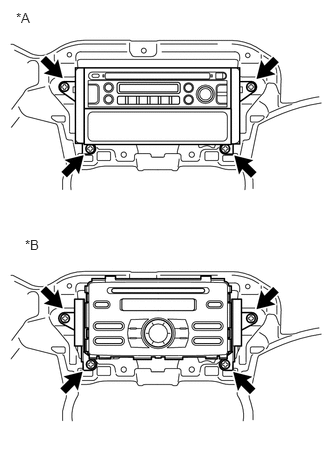
2.REMOVE STEREO COMPONENT TUNER ASSEMBLY WITH BRACKET
0.167,0.104 0.479,0.26
0.313,0.156
10
false
*A
0.26,2.469 0.573,2.625
0.313,0.156
10
false
*B
| *A | w/o USB Audio System |
| *B | w/ USB Audio System |
a.
Remove the 4 screws and the stereo component tuner assembly with bracket.
b.
Disconnect the antenna plug and each connector.
86212
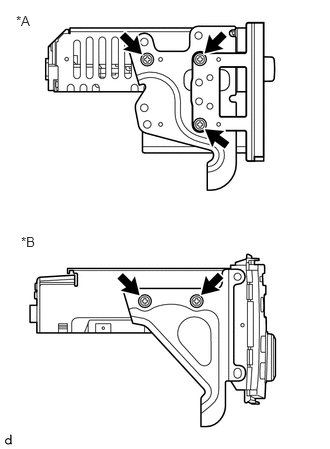
3.REMOVE NO. 2 RADIO BRACKET
0.167,0.135 0.479,0.292
0.313,0.156
10
false
*A
0.219,2.438 0.531,2.594
0.313,0.156
10
false
*B
| *A | w/o USB Audio System |
| *B | w/ USB Audio System |
a.
w/o USB Audio System:
i.
Remove the 3 screws.
ii.
Remove the No. 2 radio bracket and radio receiver panel.
b.
w/ USB Audio System:
i.
Remove the 2 screws and the No. 2 radio bracket.
86211
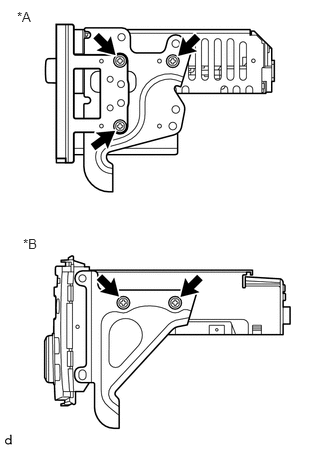
4.REMOVE NO. 1 RADIO BRACKET
0.177,0.094 0.49,0.25
0.313,0.156
10
false
*A
0.24,2.458 0.552,2.615
0.313,0.156
10
false
*B
| *A | w/o USB Audio System |
| *B | w/ USB Audio System |
a.
w/o USB Audio System:
i.
Remove the 3 screws.
ii.
Remove the No. 1 radio bracket, radio receiver panel and radio tuner opening cover.
b.
w/ USB Audio System:
i.
Remove the 2 screws and the No. 1 radio bracket.