M20A-FXS BATTERY / CHARGING BATTERY CURRENT SENSOR REMOVAL
CAUTION / NOTICE / HINT
The necessary procedures (adjustment, calibration, initialization or registration) that must be performed after parts are removed and installed, or replaced during battery state sensor removal/installation are shown below.
| Replaced Part or Performed Procedure | Necessary Procedure | Effect/Inoperative Function when Necessary Procedure not Performed | Link |
|---|---|---|---|
|
*1: When performing learning using the GTS. Click here( |
|||
| Auxiliary battery terminal is disconnected/reconnected | Perform steering sensor zero point calibration | Lane departure alert system (w/ Steering Control) | ( ) |
| Toyota parking assist-sensor system*1 | |||
| Parking support brake system*1 | |||
| Simple intelligent parking assist system*1 | |||
| Pre-collision system | |||
| Initialize back door lock | Power door lock control system | ()
|
|
- NOTICE:
- ·
After the power switch is turned off, the radio and display receiver assembly records various types of memory and settings. As a result, after turning the power switch off, make sure to wait at least 120 seconds before disconnecting the cable from the negative (-) auxiliary battery terminal (for Audio and Visual System).
·After the power switch is turned off, the radio and display receiver assembly records various types of memory and settings. As a result, after turning the power switch off, make sure to wait at least 120 seconds before disconnecting the cable from the negative (-) auxiliary battery terminal (for Navigation System (for Radio and Display Type)).
PROCEDURE

 58410B
1.REMOVE DECK BOARD ASSEMBLY
28850C
2.REMOVE BATTERY STATE SENSOR ASSEMBLY
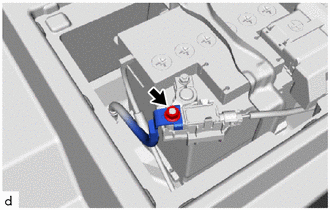
Remove the nut and disconnect the No. 2 frame wire from the battery state sensor assembly.
- NOTICE:
-
When disconnecting the wire harness, some systems need to be initialized after the wire harness is reconnected.
-
Click hereGeneral>INTRODUCTION>REPAIR INSTRUCTION>INITIALIZATION
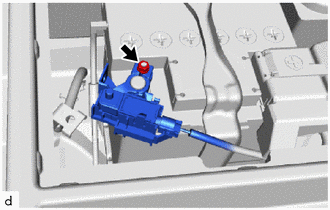
Loosen the nut and remove the battery state sensor assembly from the auxiliary battery.
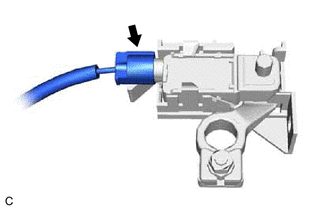
Disconnect the battery state sensor assembly connector.
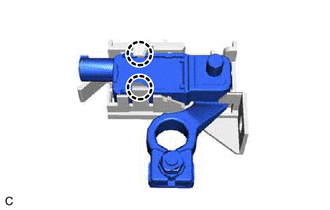
Disengage the 2 claws to remove the battery state sensor assembly from the battery current sensor holder.