NAVIGATION / MULTI INFO DISPLAY NAVIGATION ANTENNA REMOVAL
PROCEDURE

 63311C
1.REMOVE ROOF HEADLINING (for Radio and Display Type with Dual Knob Type)
86300J
2.REMOVE ROOF ANTENNA ASSEMBLY (for Radio and Display Type with Dual Knob Type)
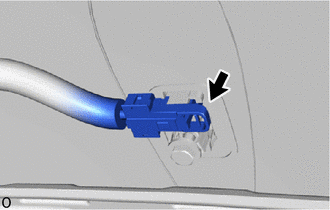
Disconnect the connector.
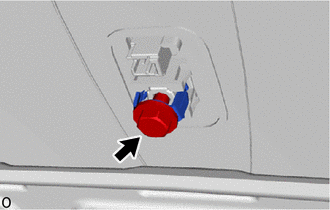
Remove the bolt and holder.
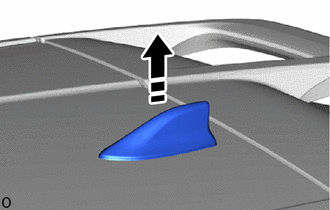

|
Remove in this Direction |
Remove the roof antenna assembly with antenna outer cover as shown in the illustration.
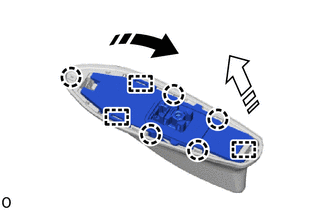
|
|
Remove in this Direction (1) |

|
Remove in this Direction (2) |
Disengage the claws and guides to remove the roof antenna assembly as shown in the illustration.
When reusing the roof antenna assembly:
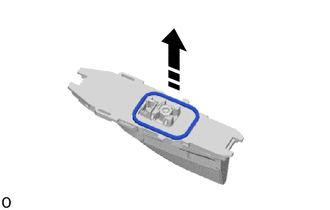
|
|
Remove in this Direction |
Remove the seal as shown in the illustration.
55401E
3.REMOVE INSTRUMENT PANEL SAFETY PAD SUB-ASSEMBLY (for Radio and Display Type with Single Knob Type)
55950G
4.REMOVE DEFROSTER NOZZLE ASSEMBLY (for Radio and Display Type with Single Knob Type)
5.REMOVE NAVIGATION ANTENNA ASSEMBLY WITH BRACKET (for Radio and Display Type with Single Knob Type)
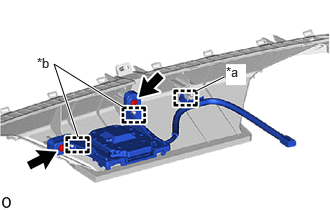
| *a | Clamp |
| *b | Guide |
Remove the 2 screws.
Disengage the guides and clamp to remove the navigation antenna assembly with bracket.
86101M
6.REMOVE ANTENNA CORD SUB-ASSEMBLY (for Radio and Display Type with Single Knob Type)
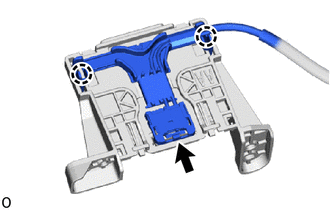
Disconnect the connector.
Disengage the claws to remove the antenna cord sub-assembly.
86860
7.REMOVE NAVIGATION ANTENNA ASSEMBLY (for Radio and Display Type with Single Knob Type)
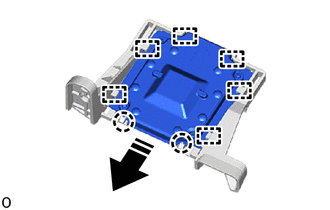
|
|
Remove in this Direction |
Disengage the claws and guides to remove the navigation antenna assembly from the navigation antenna bracket as shown in the illustration.