TELEMATICS MAYDAY BATTERY REMOVAL
CAUTION / NOTICE / HINT
The necessary procedures (adjustment, calibration, initialization, or registration) that must be performed after parts are removed, installed, or replaced during the mobilephone battery removal/installation are shown below.
| Replacement Part or Procedure | Necessary Procedure | Effect/Inoperative when not Performed | Link |
|---|---|---|---|
| Telematics transceiver | Register vehicle information | ·
Telematics System ·
Emergency call service |
for eCall with Single Knob Type Radio and Display:
(  ) for eCall with Dual Knob Type Radio and Display: ( )
|
| Mobilephone battery | Reset mobilephone battery condition |
PROCEDURE

 86740
1.REMOVE TELEMATICS TRANSCEIVER (for eCall with Dual Knob Type Radio and Display)
86740
2.REMOVE TELEPHONE TRANSCEIVER ASSEMBLY (for eCall with Single Knob Type Radio and Display)
86742
3.REMOVE TRANSCEIVER COVER
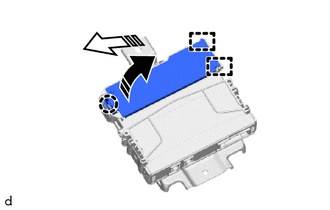

|
Remove in this Direction (1) |

|
Remove in this Direction (2) |
for eCall with dual knob type radio and display:
Disengage the claw and guides to remove the transceiver cover as shown in the illustration.
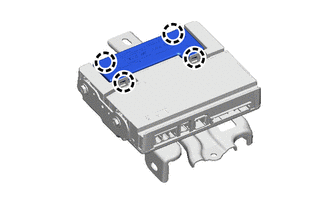
for eCall with single knob type radio and display:
Disengage the 4 claws to remove the cover.
86725
4.REMOVE MOBILEPHONE BATTERY
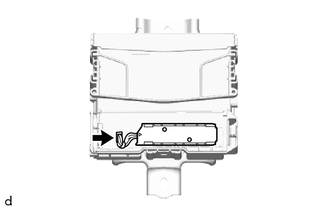
for eCall with dual knob type radio and display:
Disconnect the connector.
Remove the mobilephone battery.
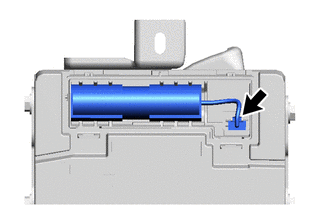
for eCall with single knob type radio and display:
Disconnect the connector.
Remove the mobilephone battery.