Removal / installation · Vehicles built Oct 2006 – May 2009
Versions by build date: Oct 2006 – May 2009from Jun 2009
1.
REMOVE FRONT WHEEL RH
2.
REMOVE FRONT FENDER APRON SEAL RH
3.
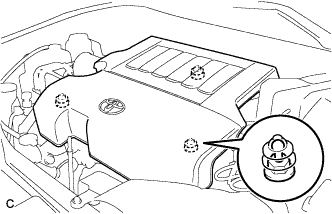
REMOVE V-BANK COVER SUB-ASSEMBLY
Hold the front of the V-bank cover and raise it to disengage the 2 clips on the front of the cover. Continue to raise the cover to disengage the clip on the rear of the cover and remove the cover.
NOTICE:
Attempting to disengage both front and rear clips at the same time may cause the cover to break.
4.
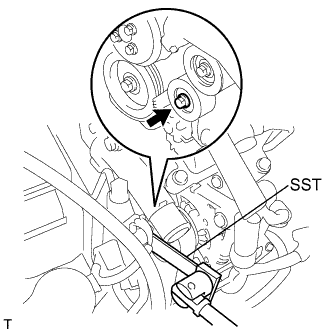
REMOVE V-RIBBED BELT
Using SST, release the belt tension by turning the belt tensioner counterclockwise, and remove the V-ribbed belt from the belt tensioner.
SST
09249-63010
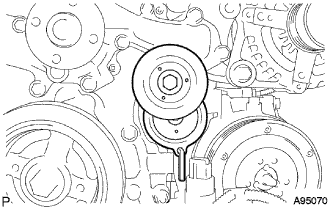
While turning the belt tensioner counterclockwise, align with its holes, and then insert a 5 mm bi-hexagon wrench into the holes to fix the V-ribbed belt tensioner.
5.
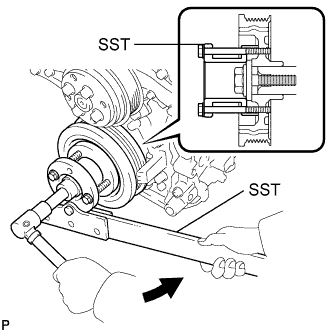
REMOVE CRANKSHAFT PULLEY
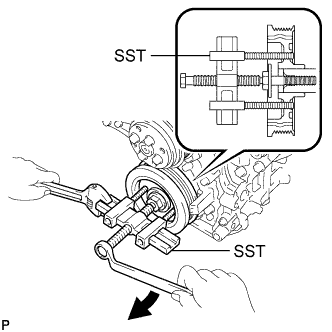
Using SST, loosen the crankshaft pulley bolt.
SST
09213-70011
(09213-70020)
09330-00021
Using SST, remove the crankshaft pulley bolt and crankshaft pulley.