INSTALLATION
Removal / installation · Vehicles built from Jun 2009
| 1. INSTALL REAR TELEVISION CAMERA ASSEMBLY (w/o Smart Entry and Start System) |

Install the rear television camera assembly with the 2 screws.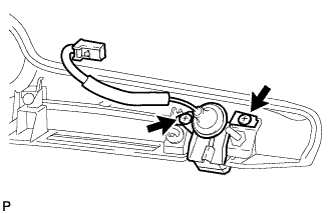

- Torque:
- 1.0 N*m{ 10 kgf*cm , 8.9 in.*lbf }
| 2. INSTALL REAR TELEVISION CAMERA ASSEMBLY (w/ Smart Entry and Start System) |
Install the rear television camera assembly with the 2 screws.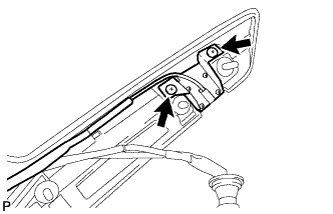
- Torque:
- 1.0 N*m{ 10 kgf*cm , 8.9 in.*lbf }
Connect the connector.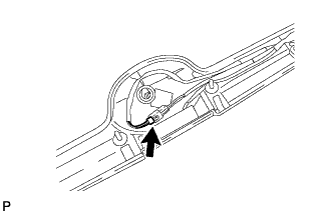
- NOTICE:
- Check that the connector is securely connected.
Install the cushion tape.
Engage the clamp and wire harness.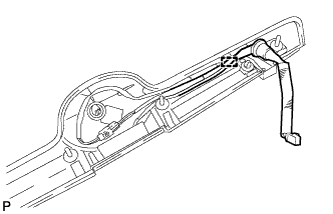
Engage the 3 clamps, 3 guides and wire harness.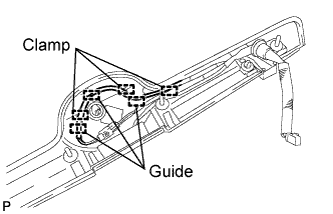
| 3. INSTALL LUGGAGE COMPARTMENT DOOR OUTSIDE GARNISH ASSEMBLY |
Engage the 2 clips and install the luggage compartment door outside garnish assembly.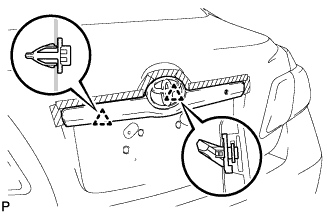
Install the 3 nuts.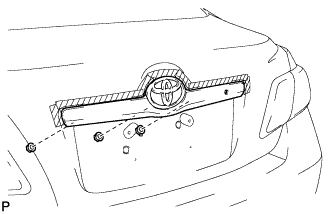
| 4. INSTALL LUGGAGE COMPARTMENT DOOR LOCK CYLINDER ASSEMBLY |
Install the luggage compartment door lock cylinder with the 2 nuts.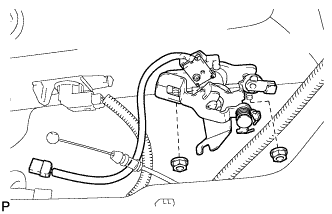
Connect the cable and connector.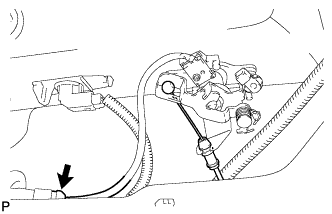
| 5. INSTALL LUGGAGE COMPARTMENT DOOR COVER |
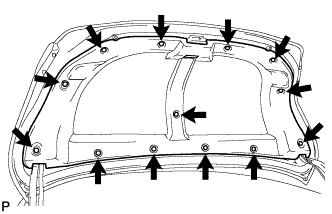
Install the luggage compartment door cover with the 13 clips.