P0011 Camshaft Position "A" - Timing Over-Advanced or System Performance (Bank 1)
Diagnostic trouble codes · Vehicles built from Jun 2009
Also covers:
- P0012 Camshaft Position "A" - Timing Over-Retarded (Bank 1)
- P0021 Camshaft Position "A" - Timing Over-Advanced or System Performance (Bank 2)
- P0022 Camshaft Position "A" - Timing Over-Retarded (Bank 2)
Versions by build date: Oct 2006 – May 2009 from Jun 2009
DESCRIPTION
The Variable Valve Timing (VVT) system includes the ECM, Oil Control Valve (OCV) and VVT controller. The ECM sends a target duty-cycle control signal to the OCV. This control signal regulates the oil pressure supplied to the VVT controller. Camshaft timing control is performed according to engine operating conditions such as intake air volume, throttle valve position and engine coolant temperature. The ECM controls the OCV, based on the signals transmitted from several sensors. The VVT controller regulates the intake camshaft angle using oil pressure through the OCV. As a result, the relative positions of the camshaft and crankshaft are optimized, the engine torque and fuel economy improve, and the exhaust emissions decrease under overall driving conditions. The ECM detects the actual intake valve timing using signals from the camshaft and crankshaft position sensors, and performs feedback control. This is how the target intake valve timing is verified by the ECM.| DTC No. |
DTC Detection Condition |
Trouble Area |
| P0011 P0021 |
Valve timing is not adjusted in valve timing advance range (1 trip detection logic) |
|
| P0012 P0022 |
Valve timing is not adjusted in valve timing retard range (2 trip detection logic) |
|
WIRING DIAGRAM
Refer to DTC P0010 (Click here).INSPECTION PROCEDURE
- HINT:
Abnormal bank
Advanced timing over
(Valve timing is out of specified range)
Retarded timing over
(Valve timing is out of specified range)
Bank 1
P0011
P0012
Bank 2
P0021
P0022
- If DTC P0011 or P0012 is displayed, check the right bank VVT system for intake camshaft circuit (bank 1).
- Bank 1 refers to the bank that includes cylinder No. 1.
- If DTC P0021 or P0022 is displayed, check the intake camshaft circuit for the left bank VVT system (bank 2).
- Bank 2 refers to the bank that does not include cylinder No. 1.
- Read freeze frame data using an intelligent tester. The ECM records vehicle and driving condition information as freeze frame data the moment a DTC is stored. When troubleshooting, freeze frame data can be helpful in determining whether the vehicle was running or stopped, whether the engine was warmed up or not, whether the air-fuel ratio was lean or rich, as well as other data recorded at the time of a malfunction (Click here).
- If DTC P0011 or P0012 is displayed, check the right bank VVT system for intake camshaft circuit (bank 1).
| 1. CHECK ANY OTHER DTCS OUTPUT (IN ADDITION TO DTC P0011, P0012, P0021 OR P0022) |

Connect the intelligent tester to the DLC3.
Turn the ignition switch on (IG) and turn the tester on.
Enter the following menus: Powertrain / Engine / DTC.
Read the DTCs.
- Result:
Display (DTC Output)
Proceed to
P0011, P0012, P0021 or P0022
A
P0011, P0012, P0021 or P0022 and other DTCs
B
- HINT:
- If any DTCs other than P0011, P0012, P0021 or P0022 are output, troubleshoot those DTCs first.
|
|
||||

| A | |
 |
| 2. PERFORM ACTIVE TEST USING INTELLIGENT TESTER (OPERATE OCV) |
Connect the intelligent tester to the DLC3.
Start the engine and turn the tester on.
Enter the following menus: Powertrain / Engine / Active Test / Control the VVT System (Bank 1) or Control the VVT System (Bank 2).
Check the engine speed while operating the Oil Control Valve (OCV) using the tester.
- OK:
Tester Operation
Specified Condition
OCV OFF
Normal engine speed
OCV ON
Engine idles roughly or stalls (soon after OCV switched from OFF to ON)
|
|
||||

| OK | |
|
| 3. CHECK WHETHER DTC OUTPUT RECURS (DTC P0011, P0012, P0021 OR P0022) |
Connect the intelligent tester to the DLC3.
Turn the ignition switch on (IG) and turn the tester on.
Clear the DTCs.
Drive the vehicle for more than 10 minutes.
Enter the following menus: Powertrain / Engine / DTC / Pending.
Read the DTCs using the tester.
- OK:
- No DTC output.
|
|
||||
| OK | ||
 |
||
| ||
| 4. CHECK VALVE TIMING (CHECK FOR LOOSE AND JUMPED TEETH ON TIMING CHAIN) |
Remove the cylinder head covers RH and LH.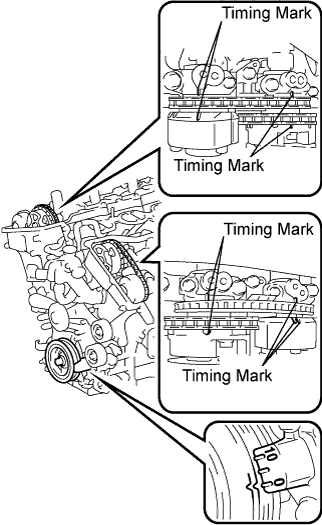

Turn the crankshaft pulley, and align its groove with the timing mark "0" of the timing chain cover.
Check that the timing marks of the camshaft timing gears are aligned with the timing marks of the bearing cap as shown in the illustration.If not, turn the crankshaft 1 revolution (360°), then align the marks as above.
- OK:
- Timing marks on the camshaft timing gears are aligned as shown in the illustration.
Reinstall the cylinder head covers.
|
|
||||
| OK | |
|
| 5. INSPECT CAMSHAFT TIMING OIL CONTROL VALVE ASSEMBLY (OCV) |
Remove the OCV.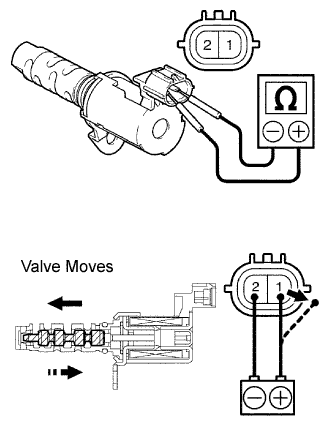
Measure the resistance between the terminals of the OCV.
- Standard resistance:
Tester Connection
Condition
Specified Condition
1 - 2
20°C (68°F)
6.9 to 7.9 Ω
Apply positive battery voltage to terminal 1 and negative battery voltage to terminal 2. Check the valve operation.
- OK:
- Valve moves quickly.
Reinstall the OCV.
|
|
||||
| OK | |
|
| 6. INSPECT OIL CONTROL VALVE FILTER AND PIPE |
Remove the oil pipe No. 1 or No. 2.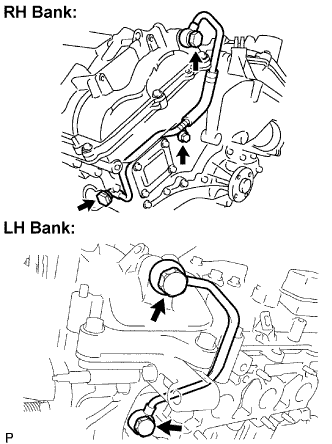
Remove the oil control valve filter.
Check that the filter and pipe are not clogged.
- OK:
- The filter and pipe are not clogged.
|
|
||||
| OK | |
|
| 7. REPLACE CAMSHAFT TIMING GEAR ASSEMBLY |
| NEXT | |
|
| 8. CHECK WHETHER DTC OUTPUT RECURS |
Connect the intelligent tester to the DLC3.
Turn the ignition switch on (IG) and turn the tester on.
Clear the DTCs.
Start the engine and warm it up.
Drive the vehicle for more than 10 minutes.
Enter the following menus: Powertrain / Engine / DTC / Pending.
Read the output DTCs using the intelligent tester.
- OK:
- No DTC output.
- HINT:
- DTC P0011, P0012, P0021 or P0022 is output when foreign objects in engine oil are caught in some parts of the system. These codes will stay output even if the system returns to normal after a short time. These foreign objects are then captured by the oil filter, thus eliminating the source of the problem.
|
|
||||
| NG | ||
|
||
| ||