| B |  |
| GO TO DTC CHART (Click here) |
DTC P0011 Camshaft Position "A" - Timing Over-Advanced or System Performance (Bank 1) |
DTC P0012 Camshaft Position "A" - Timing Over-Retarded (Bank 1) |
| DTC No. | DTC Detection Condition | Trouble Area |
| P0011 | Valve timing is not adjusted in valve timing advance range (1 trip detection logic) |
|
| P0012 | Valve timing is not adjusted in valve timing retard range (2 trip detection logic) |
|
| 1.CHECK ANY OTHER DTCS OUTPUT (IN ADDITION TO DTC P0011 OR P0012) |
Connect the intelligent tester to the DLC3.
Turn the ignition switch to ON.
Turn the tester on.
Enter the following menus: Powertrain / Engine and ECT / DTC.
Read the DTCs.
| Result | Proceed to |
| DTC P0011 or P0012 is output | A |
| DTC P0011 or P0012 and other DTCs are output | B |
|
| ||||
| A | |
 |
| 2.PERFORM ACTIVE TEST USING INTELLIGENT TESTER (OPERATE OIL CONTROL VALVE) |
Connect the intelligent tester to the DLC3.
Start the engine.
Turn the tester on.
Enter the following menus: Powertrain / Engine and ECT / Active Test / Control the VVT Linear (Bank 1).
Check the engine speed while operating the camshaft timing oil control valve assembly using the tester.
| Tester Operation | Specified Condition |
| 0% | Normal engine speed |
| 100% | Engine idles roughly or stalls |
|
| ||||
| OK | |
|
| 3.CHECK WHETHER DTC OUTPUT RECURS (DTC P0011 OR P0012) |
Connect the intelligent tester to the DLC3.
Turn the ignition switch to ON.
Turn the tester on.
Clear the DTCs (Click here).
Start the engine and warm it up.
Drive the vehicle at approximately 60 km/h (37 mph) for 10 minutes or more.
Idle the engine for 3 minutes or more.
Enter the following menus: Powertrain / Engine and ECT / DTC.
Read the pending DTCs.
Repeat the pattern of accelerating the vehicle from rest to approximately 60 km/h (37 mph) and then decelerating the vehicle 10 to 15 times.
Idle the engine for 3 minutes or more.
Enter the following menus: Powertrain / Engine and ECT / DTC.
Read the pending DTCs.
| Result | Proceed to |
| DTC is not output | A |
| DTC P0011 or P0012 is output | B |
|
| ||||
| A | ||
 | ||
| ||
| 4.INSPECT CAMSHAFT TIMING OIL CONTROL VALVE ASSEMBLY |
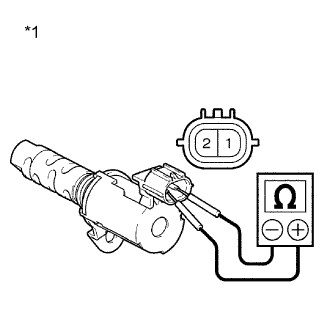 |
Remove the camshaft timing oil control valve assembly.
Measure the resistance according to the value(s) in the table below.
| Tester Connection | Condition | Specified Condition |
| 1 - 2 | 20°C (68°F) | 6.9 to 7.9 Ω |
| *1 | Component without harness connected (Camshaft Timing Oil Control Valve Assembly) |
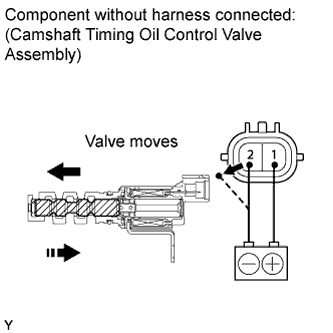 |
Connect the positive (+) battery terminal to terminal 1 and connect the negative (-) battery terminal to terminal 2. Check the valve operation.
Reinstall the camshaft timing oil control valve assembly.
|
| ||||
| OK | |
|
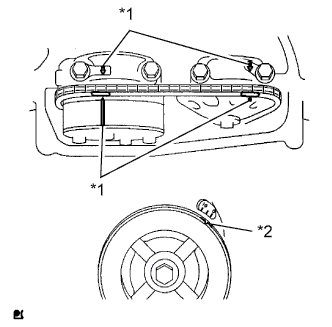
| 5.CHECK VALVE TIMING |
 |
Remove the cylinder head cover.
Turn the crankshaft pulley, then align its groove with the timing mark "0" on the timing chain cover.
Check that the point marks on the camshaft timing gears are aligned with the timing chain cover surface as shown in the illustration.
If not, turn the crankshaft 1 revolution (360°), then align the marks as above.
| *1 | Alignment Marks |
| *2 | Groove |
Reinstall the cylinder head cover.
|
| ||||
| OK | |
|
| 6.INSPECT OIL CONTROL VALVE FILTER |
Remove the oil control valve filter .
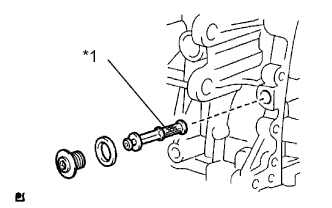 |
Check that the oil control valve filter is not clogged.
| *1 | Oil Control Valve Filter |
Reinstall the oil control valve filter .
|
| ||||
| OK | |
|
| 7.INSPECT CAMSHAFT TIMING GEAR ASSEMBLY |
Inspect the camshaft timing gear assembly .
|
| ||||
| OK | |
|
| 8.CHECK WHETHER DTC OUTPUT RECURS (DTC P0011 OR P0012) |
Connect the intelligent tester to the DLC3.
Turn the ignition switch to ON.
Turn the tester on.
Clear the DTCs (Click here).
Start the engine and warm it up.
Drive the vehicle at approximately 60 km/h (37 mph) for 10 minutes or more.
Idle the engine for 3 minutes or more.
Enter the following menus: Powertrain / Engine and ECT / DTC.
Read the pending DTCs.
Repeat the pattern of accelerating the vehicle from rest to approximately 60 km/h (37 mph) and then decelerating the vehicle 10 to 15 times.
Idle the engine for 3 minutes or more.
Enter the following menus: Powertrain / Engine and ECT / DTC.
Read the pending DTCs.
| Result | Proceed to |
| DTC is not output | A |
| DTC P0011 or P0012 is output | B |
|
| ||||
| A | ||
| ||
| ||
