POWER OUTLETS (INT) REAR POWER OUTLET SOCKET REMOVAL
PROCEDURE

 53922B
1.REMOVE FRONT PANEL GARNISH LH
53921B
2.REMOVE FRONT PANEL GARNISH RH
33504F
3.REMOVE SHIFT LEVER KNOB SUB-ASSEMBLY
58805C
4.REMOVE REAR CONSOLE UPPER PANEL SUB-ASSEMBLY
58801E
5.REMOVE UPPER CONSOLE BOX SUB-ASSEMBLY
85530E
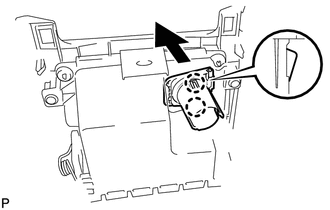
6.REMOVE NO. 3 POWER OUTLET SOCKET ASSEMBLY
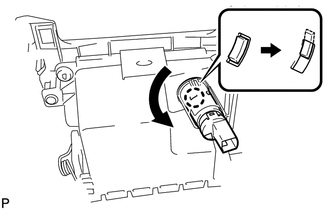
Turn the No. 3 power outlet socket assembly in the direction shown in the illustration to disengage the claw.
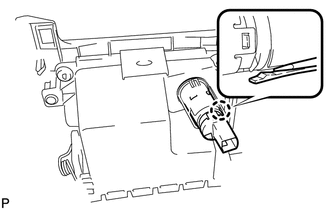
Using a screwdriver, disengage the claw, and then push in the No. 3 power outlet socket assembly until the protrusion of the No. 3 power outlet socket assembly comes into contact with the No. 2 power outlet socket cover.
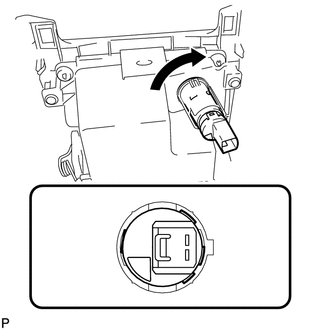
As shown in the illustration, align the protrusion of the No. 3 power outlet socket assembly and the notch of the No. 2 power outlet socket cover.
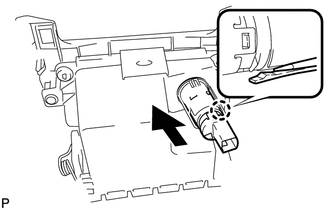
Using a screwdriver, disengage the claw and remove the No. 3 power outlet socket assembly from the No. 2 power outlet socket cover.
85535E
7.REMOVE NO. 2 POWER OUTLET SOCKET COVER
Disengage the 2 claws and remove the No. 2 power outlet socket cover.