PARK ASSIST / MONITORING TELEVISION CAMERA(for Rear) REMOVAL
CAUTION / NOTICE / HINT
The necessary procedures (adjustment, calibration, initialization, or registration) that must be performed after parts are removed and installed, or replaced during rear television camera assembly removal/installation are shown below.
| Replaced Part or Performed Procedure | Necessary Procedure | Effect/Inoperative Function When Necessary Procedures are not Performed | Link |
|---|---|---|---|
| Rear television camera assembly (w/ Parking assist monitor system) | ·
Parking assist monitor system initialization ·
Rear television camera assembly optical axis (Back camera position setting) |
Parking assist monitor system | ( ) |
| Rear television camera assembly (w/ Panoramic view monitor system) | ·
Rear television camera view adjustment ·
Rear television camera assembly optical axis (Back camera position setting) |
Panoramic view monitor system | ()
|
PROCEDURE

 76801A
1.REMOVE LUGGAGE COMPARTMENT DOOR OUTSIDE GARNISH SUB-ASSEMBLY
2.REMOVE REAR TELEVISION CAMERA ASSEMBLY WITH WIRE
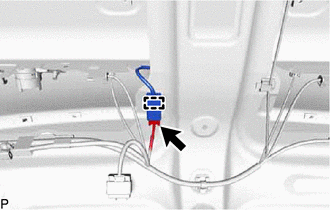
Disconnect the connector.
Disengage the clamp.
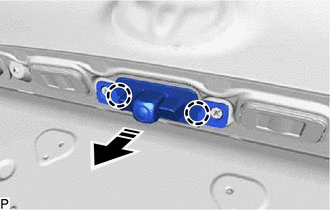

|
Remove in this Direction |
Disengage the 2 claws to remove the rear television camera assembly with wire as shown in the illustration.
86799
3.REMOVE TELEVISION CAMERA WIRE
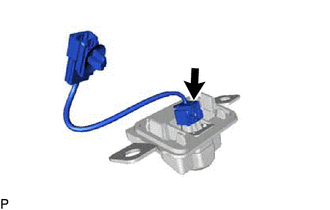
Disconnect the connector to remove the television camera wire.
86790D
4.REMOVE REAR TELEVISION CAMERA ASSEMBLY