RM33A0E
_56
Audio / Visual / Telematics
_072211
TELEMATICS
_0351486
MAYDAY BATTERY
A
TELEMATICS MAYDAY BATTERY INSTALLATION
PROCEDURE

 86725
1.INSTALL MOBILE PHONE BATTERY
a.
Connect the connector and install a new battery with the "TOP" mark facing upward as shown in the illustration.
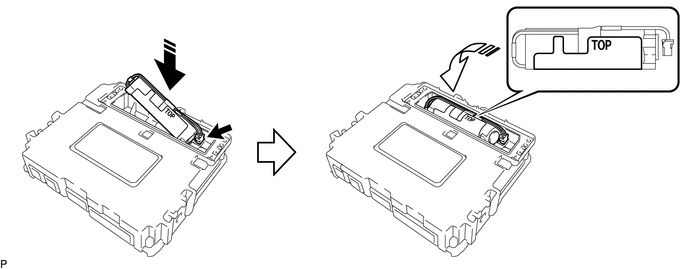
0,0 0,0
false

|
Install in this Direction (1) | 
|
Install in this Direction (2) |
- NOTICE:
-
Make sure that the connector is connected securely.
b.
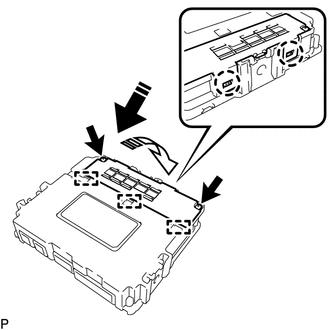
0,0 0,0
false
|
|
Install in this Direction (1) |
|
|
Install in this Direction (2) |
Engage the 3 guides and 2 claws as shown in the illustration.
c.
Install a new battery cover sub-assembly with the 2 screws.
- NOTICE:
-
Make sure that the battery cover sub-assembly is securely installed.
86740
2.INSTALL TELEMATICS TRANSCEIVER
3.PERFORM REGISTRATION