RM2850E
_57
Power Source / Network
_073263
CAN COMMUNICATION
_0356859
NETWORK GATEWAY ECU
A
CAN COMMUNICATION NETWORK GATEWAY ECU INSTALLATION
CAUTION / NOTICE / HINT
- HINT:
- ·
A bolt without a torque specification is shown in the standard bolt chart.
Click hereGeneral>SPECIFICATIONS>STANDARD BOLT>SPECIFIED TORQUE FOR STANDARD BOLTS
·Use the same procedure for LHD and RHD vehicles.
·The procedure listed below is for LHD vehicles.
PROCEDURE

 89111
1.INSTALL NETWORK GATEWAY ECU
a.
1.833,0.531 1.833,0.146
1.833,0.146 2.01,0.146
true
2.083,0.063 2.438,0.344
0.354,0.281
10
false
*a
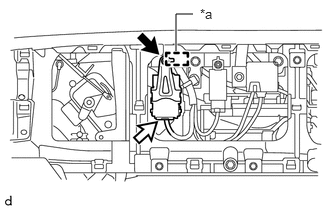
Connect the connector.
b.
Attach the guide to temporarily install the network gateway ECU.
| *a | Guide |
c.
Install the network gateway ECU with the bolt.
55433B
2.INSTALL LOWER NO. 2 INSTRUMENT PANEL FINISH PANEL