AUDIO / VIDEO AUDIO AND VISUAL SYSTEM CD cannot be Inserted / Played or CD is Ejected Right After Insertion
PROCEDURE
Make sure that the CD is an audio CD or a CD with an MP3 or WMA file, and that it is not deformed, flawed, stained, burred, or otherwise defective.
- OK:
Normal CD
- HINT:
- ·
Copy-protected CDs cannot be played.
·CD-Rs and CD-RWs may not be played depending on the recording conditions or characteristics of the discs, or due to damage, dirt, or deterioration caused by leaving the discs in the cabin for a long time.
·Unfinalized CD-Rs and CD-RWs cannot be played.
·Keep the discs away from dirt. Be careful not to damage the discs or leave your fingerprints on them.
·Hold discs by the outer edge and center hole with the label side up.
·Leaving the disc exposed halfway out of the slot for a long time after pressing the disc eject button may cause deformation of the disc, making the disc unusable.
·If discs have adhesive tape, stickers, CD labels, or any traces of such labels attached, the discs may not be ejected or player malfunctions may result.
·Keep the discs away from direct sunlight. (Exposure to direct sunlight may cause deformation of the disc, making the disc unusable.)
·Do not use odd-shaped CDs because these may cause player malfunctions.
·Do not use discs whose recording portion is transparent or translucent because they may not be inserted, ejected, or played normally.
·For details on playable CDs, refer to the Owner's Manual.
- Result:
Proceed to OK NG
OK
NG
Check whether or not the CD is inserted upside down.
- OK:
CD is properly inserted.
- Result:
Proceed to OK NG
OK
NG
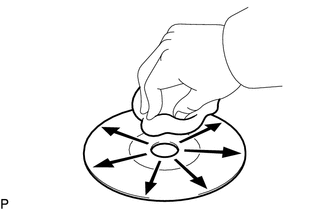
Clean the disc by wiping it with a soft cloth from the inside to the outside in a radial direction.
- OK:
Malfunction disappears.
- NOTICE:
-
Do not use a conventional record cleaner or anti-static preservative.
- Result:
Proceed to OK NG
OK
NG
Replace the CD with a normal one and check that the malfunction disappears.
- OK:
Malfunction disappears.
- Result:
Proceed to OK NG
OK
NG